

On my X850 CF card, I am using 1.62 Vgpu for 650 clks on core.
Mem does 600-620 with default VDD.
On stock cooling/no vmods the X850 CF I have does 599.
Water cooled/Vmodded
Water cooled/no mods


On my X850 CF card, I am using 1.62 Vgpu for 650 clks on core.
Mem does 600-620 with default VDD.
On stock cooling/no vmods the X850 CF I have does 599.
Water cooled/Vmodded
Water cooled/no mods
Last edited by Dynasty; 12-02-2005 at 10:50 AM.

Thank you very muchOriginally Posted by G H Z
This certainly looks more like it. Stock air.


damn what a sweet 01 score. I just beat 31k with my x1800xt and I was happy but not anymore!
Silverstone Temjin TJ-09BW w/ Silverstone DA750
Asus P8P67
2600K w/ Thermalright Venomous X Black w/ Sanyo Denki San Ace 109R1212H1011
8GB G.Skill DDR-1600 7-8-7-24
Gigabyte GTX 460 1G
Modded Creative X-Fi Fatal1ty w/ Klipsch Promedia 2.1
1 X 120GB OCZ Vertex
1 X 300GB WD Velociraptor HLFS
1 X Hitachi 7K1000 1TB
Pioneer DVR-216L DVD-RW
Windows 7 Ultimate 64

Nice
Whats cooling your Opty?
Stock Mach II with ricky tweak, about -5 @ load in mbm5
You ran ATI Tool for voltage and Overclocker for card clocks(2D or 3D)? I can't get my XT anywhere near the clocks in '01 that it can do in '05.
Yes, ATItool for volts and OC tool 2D for clocks. Win 2000 dx8.1.
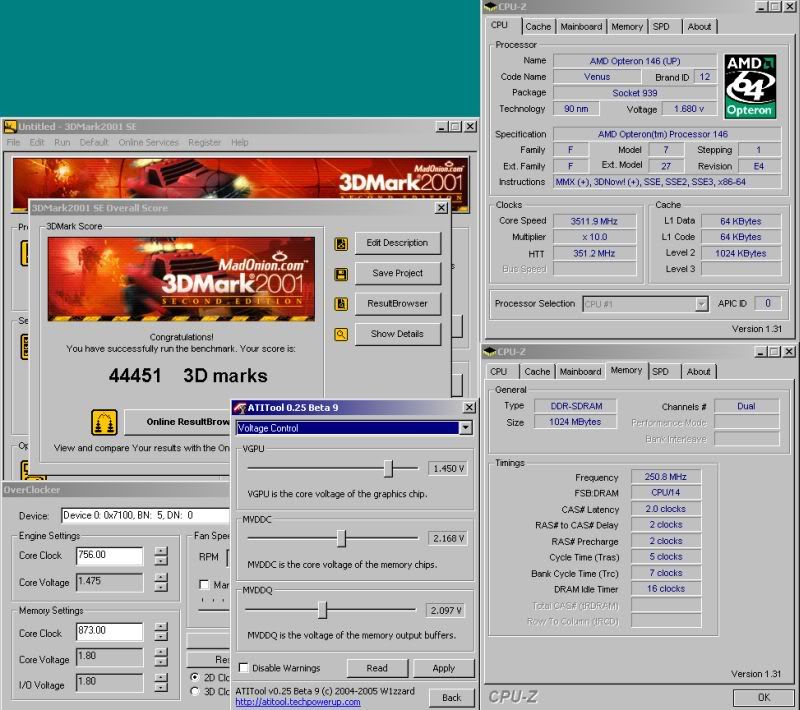
nice score
The whole world's hip and thats not cool !
Rip Van Hippy
Doesn't expecting the unexpected make the unexpected the expected ?
Light travels faster than sound. This is why some people appear bright until you hear them speak
-------------------------
ty, here you go.
http://service.futuremark.com/compare?2k1=8811962
oh come on, i dunno about that. Air is perfectly fine, especially at stock speeds, i wouldn't say water extends the life of a card, modern video cards are designed to run hot, if the stock heatsinks were not adequate, they wouldn't use them.
Kentsfield Q6600@ 3100Mhz
Asus P5B-E Plus
2GB GSkill DDRII PC6400GBHZ
Albatron Geforce 8800GTX
Silverstone Temjin TJ-09
Thermalright Ultra 120
Corsair 620W HX
74GB Raptor/ X-Fi Platinum
19" CRT NEC 930 SB
Windows XP Pro SP2


I am going to have to remove two of my 4 sticks of ram on a cold night and hit 3GHz on my Sandy and see what I can do then. I have a baby going to be here tomorrow...they are inducing labor in the morning at 8am so I will have to put everything on hold until then. I have a lot of cold nights left to beat eva2000s score in 3DMark05 though.
Take care everyone and happy overclocking
27" iMac
3.06GHz Core 2 Duo
8GB DDR3
1TB HDD + 2TB Ext + 1TB Ext
ATI HD 4670 256MB
20" iMac
2.4GHz Core 2 Duo
2GB+1GB G.Skill DDR2
320GB HDD
ATI HD 2600 Pro 256MB
16GB iPhone 3GS
GamerTag: ugp
GamerTag: SadisticPuppets
Designed to run hot is an understatement lol! Just curious what is the rated max for the X1800 core?
Silverstone Temjin TJ-09BW w/ Silverstone DA750
Asus P8P67
2600K w/ Thermalright Venomous X Black w/ Sanyo Denki San Ace 109R1212H1011
8GB G.Skill DDR-1600 7-8-7-24
Gigabyte GTX 460 1G
Modded Creative X-Fi Fatal1ty w/ Klipsch Promedia 2.1
1 X 120GB OCZ Vertex
1 X 300GB WD Velociraptor HLFS
1 X Hitachi 7K1000 1TB
Pioneer DVR-216L DVD-RW
Windows 7 Ultimate 64
I have noticed this with both my XL and XT x1800 card. 01 for whatever reason is much harder on the card than any of the other 2 3dmarks, aquamark or even games for that matter. I can play games for hours, loop 3dmark03 and 05 for hours without issue however 01 will crash to desktop before too long if I really start to push it. I found on my XL if I just gave an ever so slight bump in volts 01 too would loop for hours on end without issue. Heat is a big issue for me on my XT card which it hitting into the 80's c without much work so raising volts is not an option. I was raising clocks through the overdrive tab in CCC and set them to 690/800 (max) and that would run through any 3dmarks, aquamark and games np but 01 would crash to desktop. The only way to get 01 to loop for hours on end was to lower the core down to about 680 (675 actual). I did this today and was finally able to loop 01 over and over with no title screens between tests for a good 4+ hours. I wish the card didn't get so hot as I would really like to start pushing it more. 675/800(792) is not bad though and nets me nearly 9.6k in 05. I finally beat FEAR on this card today and the ending never played so smooth.
Silverstone Temjin TJ-09BW w/ Silverstone DA750
Asus P8P67
2600K w/ Thermalright Venomous X Black w/ Sanyo Denki San Ace 109R1212H1011
8GB G.Skill DDR-1600 7-8-7-24
Gigabyte GTX 460 1G
Modded Creative X-Fi Fatal1ty w/ Klipsch Promedia 2.1
1 X 120GB OCZ Vertex
1 X 300GB WD Velociraptor HLFS
1 X Hitachi 7K1000 1TB
Pioneer DVR-216L DVD-RW
Windows 7 Ultimate 64
I am using v5.11s
I tried getting my Sandy to do 3GHz and it was a no go...temps are fine but I don't think it has what it takes to do it with only 1.65 Volts to it...and I don't want to push it any further than that.
I am going to give reflashing my BIOS on motherboard a try and see if I can get some stable 24/7 clocks. I am very CPU limited here.
Unless someone has a nice Opty they would like to give me
Last edited by ugp; 12-02-2005 at 08:35 PM.
27" iMac
3.06GHz Core 2 Duo
8GB DDR3
1TB HDD + 2TB Ext + 1TB Ext
ATI HD 4670 256MB
20" iMac
2.4GHz Core 2 Duo
2GB+1GB G.Skill DDR2
320GB HDD
ATI HD 2600 Pro 256MB
16GB iPhone 3GS
GamerTag: ugp
GamerTag: SadisticPuppets
you might need more GPU and mem voltage for 3d2k1
---
try this... run ATI Tool and show 3D window and let it run for say 15-30mins with your overclock GPU/mem settings and see if ATI Tool 3d window's behaviour is closer to 3d2k1 or 3d2k05
---
this is standard behavior of all new cores from ati!!
I have same problem with x1300, 3dmark05 and 03 are less demanding that 3dmark01!!
PS. nice clocks
RiG1: Ryzen 7 1700 @4.0GHz 1.39V, Asus X370 Prime, G.Skill RipJaws 2x8GB 3200MHz CL14 Samsung B-die, TuL Vega 56 Stock, Samsung SS805 100GB SLC SDD (OS Drive) + 512GB Evo 850 SSD (2nd OS Drive) + 3TB Seagate + 1TB Seagate, BeQuiet PowerZone 1000W
RiG2: HTPC AMD A10-7850K APU, 2x8GB Kingstone HyperX 2400C12, AsRock FM2A88M Extreme4+, 128GB SSD + 640GB Samsung 7200, LG Blu-ray Recorder, Thermaltake BACH, Hiper 4M880 880W PSU
SmartPhone Samsung Galaxy S7 EDGE
XBONE paired with 55''Samsung LED 3D TV
Thanks Lightman. I am running a very poohy cpu right now too. Still running my Winchester that can only 2.48ghz max and with only 225mhz on the FSB before the memory controller craps out. If you guys think you are cpu limited check me out! I really need a new cpu and quick. At least 2.6ghz with a 1M cache.
Eva, I am going to try the show 3D view in ATI Tool now to see what happens after 30 minutes. If it is still runnign strong that is a good sign, it will also show me temps as I know this gets the card quite hot. Upon running it I immediately get a yellow border of blocks surrounding the 3D image that never gets any better or worse. I hope this is a bug in the program as I had the same thing on my weak XL. I would like to think of my XT as working strong and as should. Anyone else getting yellow boxed border around the the 3D image when running it?
Silverstone Temjin TJ-09BW w/ Silverstone DA750
Asus P8P67
2600K w/ Thermalright Venomous X Black w/ Sanyo Denki San Ace 109R1212H1011
8GB G.Skill DDR-1600 7-8-7-24
Gigabyte GTX 460 1G
Modded Creative X-Fi Fatal1ty w/ Klipsch Promedia 2.1
1 X 120GB OCZ Vertex
1 X 300GB WD Velociraptor HLFS
1 X Hitachi 7K1000 1TB
Pioneer DVR-216L DVD-RW
Windows 7 Ultimate 64
for show 3d for X1800XT
- use ATI Tool beta 10
- set to use old artifacting test method in settings panel
---
yea I found out about the old testing method from my XL which got rid of those yellow boxes. I thought beta 10 had fixed that but I guess not. I take it this is a known problem and without checking off old testing method you too get those yellow boxes?
The weird thing is this. I can run scan for artifacts WITHOUT checking off old compatibility method however show 3D view shows those boxes.
Just to let you know as well I ran show 3D view for about 45 mins and it was still running before I stopped it. I take it all is gravy?
Silverstone Temjin TJ-09BW w/ Silverstone DA750
Asus P8P67
2600K w/ Thermalright Venomous X Black w/ Sanyo Denki San Ace 109R1212H1011
8GB G.Skill DDR-1600 7-8-7-24
Gigabyte GTX 460 1G
Modded Creative X-Fi Fatal1ty w/ Klipsch Promedia 2.1
1 X 120GB OCZ Vertex
1 X 300GB WD Velociraptor HLFS
1 X Hitachi 7K1000 1TB
Pioneer DVR-216L DVD-RW
Windows 7 Ultimate 64
Well with a CPU at 2.75 and ATI @ 750/900 I scored 10,500 in 3DMark05 so I am very CPU limited here. That is the max I think I will hit. I think that is the max I can get on the core and even at that I get artifacts. I shall wait for ATITool to be fixed and then I shall find my stable 24/7 clock.
What do you guys think of the Zalman cooler for these cards? Or would the ATI Silencer be the way to go...? ATI Silencers are the way I always went in the past anyway.
27" iMac
3.06GHz Core 2 Duo
8GB DDR3
1TB HDD + 2TB Ext + 1TB Ext
ATI HD 4670 256MB
20" iMac
2.4GHz Core 2 Duo
2GB+1GB G.Skill DDR2
320GB HDD
ATI HD 2600 Pro 256MB
16GB iPhone 3GS
GamerTag: ugp
GamerTag: SadisticPuppets
I am unsure if the ATI Silencer will be able to beat the stock ATI cooler as it is already quite beefy and under a similar design. IF so that would be great as I always went the ATI Silencer route in the past as well and loved the cooler temps and MUCH quieter noise.
The Zalman is great on the XL but I don't think it will fare to well on the XT, it just can't handle the load the XT pushes with the much higher clocks and much lower volts. It dropped temps a good 10c on my XL though.
Silverstone Temjin TJ-09BW w/ Silverstone DA750
Asus P8P67
2600K w/ Thermalright Venomous X Black w/ Sanyo Denki San Ace 109R1212H1011
8GB G.Skill DDR-1600 7-8-7-24
Gigabyte GTX 460 1G
Modded Creative X-Fi Fatal1ty w/ Klipsch Promedia 2.1
1 X 120GB OCZ Vertex
1 X 300GB WD Velociraptor HLFS
1 X Hitachi 7K1000 1TB
Pioneer DVR-216L DVD-RW
Windows 7 Ultimate 64
Culd someone tel me this picture, http://www.bjorn3d.com/read.php?cID=852&pageID=1853 why have x1800xt 1 milion transitor more off xl
pretty dam good that UGP!!
I get 10,100 at 729/865 at 2608mhz on my 4400+, so seems about right.
Kentsfield Q6600@ 3100Mhz
Asus P5B-E Plus
2GB GSkill DDRII PC6400GBHZ
Albatron Geforce 8800GTX
Silverstone Temjin TJ-09
Thermalright Ultra 120
Corsair 620W HX
74GB Raptor/ X-Fi Platinum
19" CRT NEC 930 SB
Windows XP Pro SP2
so i see 5.11 drivers are pretty optimised for dual core cpus too ?
Here's my first run using Farcry v1.33 with HardwareOC's Farycry Benchmark v1.4.2 http://i4memory.com/showthread.php?t=1870
System
Opteron 146 CAB2E 0540FPMW @3000mhz
DFI NF4 Ultra-D 704-2BTA
2x512MB XMS3500C2v1.1 BH-5 @250mhz 2-2-2-5
74GB Raptor OS
160GB Seagate 7200.7 NCQ
510W PC Powercooling SLI PSU
512MB HIS X1800XT @621/747 stock speeds
Cat 5.11 drivers
Settings:
- Max Quality
- 4xAA/16xAF
- Demo run = 5 runs
- Shader Model 3.0
Demo:
HardwareOC Steam results
HardwareOC Archive resultsResolution: 640×480
Maximum quality option, Direct3D renderer
Level: Steam, demo: hocsteam.tmd
Pixel shader: model 3.0
Antialising: 4×
Anisotrophic filtering: 16×
HDR: disabled
Geometry Instancing: disabled
Normal-maps compression: disabled
Score = 97.04 FPS (Run 1)
Score = 100.37 FPS (Run 2)
Score = 96.89 FPS (Run 3)
Score = 98.39 FPS (Run 4)
Score = 100.27 FPS (Run 5)
Average score = 98.59 FPS
Resolution: 800×600
Maximum quality option, Direct3D renderer
Level: Steam, demo: hocsteam.tmd
Pixel shader: model 3.0
Antialising: 4×
Anisotrophic filtering: 16×
HDR: disabled
Geometry Instancing: disabled
Normal-maps compression: disabled
Score = 96.89 FPS (Run 1)
Score = 99.46 FPS (Run 2)
Score = 100.08 FPS (Run 3)
Score = 97.91 FPS (Run 4)
Score = 101.74 FPS (Run 5)
Average score = 99.21 FPS
Resolution: 1024×768
Maximum quality option, Direct3D renderer
Level: Steam, demo: hocsteam.tmd
Pixel shader: model 3.0
Antialising: 4×
Anisotrophic filtering: 16×
HDR: disabled
Geometry Instancing: disabled
Normal-maps compression: disabled
Score = 96.52 FPS (Run 1)
Score = 96.79 FPS (Run 2)
Score = 97.75 FPS (Run 3)
Score = 103.11 FPS (Run 4)
Score = 103.04 FPS (Run 5)
Average score = 99.44 FPS
Resolution: 1280×1024
Maximum quality option, Direct3D renderer
Level: Steam, demo: hocsteam.tmd
Pixel shader: model 3.0
Antialising: 4×
Anisotrophic filtering: 16×
HDR: disabled
Geometry Instancing: disabled
Normal-maps compression: disabled
Score = 87.84 FPS (Run 1)
Score = 92.77 FPS (Run 2)
Score = 94.50 FPS (Run 3)
Score = 94.75 FPS (Run 4)
Score = 95.16 FPS (Run 5)
Average score = 93.00 FPS
Resolution: 1600×1200
Maximum quality option, Direct3D renderer
Level: Steam, demo: hocsteam.tmd
Pixel shader: model 3.0
Antialising: 4×
Anisotrophic filtering: 16×
HDR: disabled
Geometry Instancing: disabled
Normal-maps compression: disabled
Score = 70.83 FPS (Run 1)
Score = 75.19 FPS (Run 2)
Score = 75.37 FPS (Run 3)
Score = 75.27 FPS (Run 4)
Score = 75.94 FPS (Run 5)
Average score = 74.52 FPS
Seems always the first run is lower ?Resolution: 640×480
Maximum quality option, Direct3D renderer
Level: Archive, demo: Archive1.tmd
Pixel shader: model 3.0
Antialising: 4×
Anisotrophic filtering: 16×
HDR: disabled
Geometry Instancing: disabled
Normal-maps compression: disabled
Score = 169.79 FPS (Run 1)
Score = 180.26 FPS (Run 2)
Score = 181.61 FPS (Run 3)
Score = 181.01 FPS (Run 4)
Score = 180.31 FPS (Run 5)
Average score = 178.59 FPS
Resolution: 800×600
Maximum quality option, Direct3D renderer
Level: Archive, demo: Archive1.tmd
Pixel shader: model 3.0
Antialising: 4×
Anisotrophic filtering: 16×
HDR: disabled
Geometry Instancing: disabled
Normal-maps compression: disabled
Score = 163.41 FPS (Run 1)
Score = 176.79 FPS (Run 2)
Score = 183.65 FPS (Run 3)
Score = 193.87 FPS (Run 4)
Score = 193.84 FPS (Run 5)
Average score = 182.31 FPS
Resolution: 1024×768
Maximum quality option, Direct3D renderer
Level: Archive, demo: Archive1.tmd
Pixel shader: model 3.0
Antialising: 4×
Anisotrophic filtering: 16×
HDR: disabled
Geometry Instancing: disabled
Normal-maps compression: disabled
Score = 149.34 FPS (Run 1)
Score = 157.89 FPS (Run 2)
Score = 156.37 FPS (Run 3)
Score = 155.14 FPS (Run 4)
Score = 156.67 FPS (Run 5)
Average score = 155.08 FPS
Resolution: 1280×1024
Maximum quality option, Direct3D renderer
Level: Archive, demo: Archive1.tmd
Pixel shader: model 3.0
Antialising: 4×
Anisotrophic filtering: 16×
HDR: disabled
Geometry Instancing: disabled
Normal-maps compression: disabled
Score = 110.17 FPS (Run 1)
Score = 121.16 FPS (Run 2)
Score = 121.20 FPS (Run 3)
Score = 120.88 FPS (Run 4)
Score = 120.97 FPS (Run 5)
Average score = 118.87 FPS
Resolution: 1600×1200
Maximum quality option, Direct3D renderer
Level: Archive, demo: Archive1.tmd
Pixel shader: model 3.0
Antialising: 4×
Anisotrophic filtering: 16×
HDR: disabled
Geometry Instancing: disabled
Normal-maps compression: disabled
Score = 78.58 FPS (Run 1)
Score = 81.96 FPS (Run 2)
Score = 81.89 FPS (Run 3)
Score = 81.71 FPS (Run 4)
Score = 81.80 FPS (Run 5)
Average score = 81.18 FPS
---
 Posting Permissions


 Reply With Quote
 and make sure you disable in options the tray BS. Then check your AI setting and put it to Advanced, make sure everything else is disabled, including Mipmap. Stock XT should be good for around 380+ Fps in Nature.


Bookmarks