
MMM
Results 1 to 17 of 17

Thread: Article: 7800GT OCing peculiarities and unlocking

  1. #1
    Xtreme X.I.P.
    Join Date
    Apr 2005
    Posts
    4,475

    Article: 7800GT OCing peculiarities and unlocking

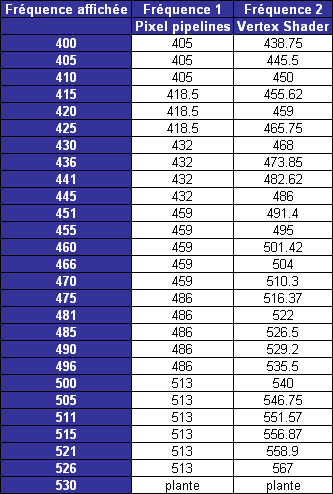
    As it was reported earlier the G70 core has two frequencies - the ROPs frequency is higher than core`s for 30 MHz. But how will it scale during OCing ? Guys from Hardware.fr have made some investigation. And this is what they got :


    The first column shows the core speed as you can see it in any hardware utility like RivaTuner. the second is the Pixel pipelines frequency. And the third - vertex processor units frequency. As you see the numbers differs. This leads to some sort of usefull OCing steps which can be ilustrated by this graph (for GTX version)


    Unlocking the missing quad of pipelines is another story. Overclockers.ru reports that HKEPC (and IMO other lucky guys) could unlock their`s GTs cos it was engeneering samples, which won`t come to market. So only the actual owners of 7800GT will proove (or dispel) this.
  2. #2
    Xtreme Enthusiast
    Join Date
    Jan 2003
    Location
    Gurnee, Illinois
    Posts
    518
    The two frequencies part doesn't seem much different than the 7800GTX.

    If they cards DO unlock, then they'll be the where everyone goes.
    Currently building my i7 920 rig
    i7 920 - Gigabyte x58-UD3R - 6GB Corsair DDR 1600
    GTX285 - Intel X25-M + 1.2TB - Watercooled


  3. #3
    Xtreme X.I.P.
    Join Date
    Apr 2005
    Posts
    4,475
    Quote Originally Posted by DriveEuro
    The two frequencies part doesn't seem much different than the 7800GTX.
    It`s common for all G70 cards

  4. #4
    Xtreme Addict
    Join Date
    Jan 2005
    Location
    Oxford, UK
    Posts
    1,620
    what's an average overclock on air then?

    I'll be getting one of these cards, just waiting for a slight price drop.
    Conroe E6300 ES
    2x1gb Ballistix PC8000
    Asus P5W DH Deluxe (1705)
    Manli Geforce 7950GT 512mb
    Hiper Type-R 480w
    Samsung SP250

    "What did the quantam duck say?" "Quark Quark"

  5. #5
    Xtreme Addict
    Join Date
    Apr 2004
    Posts
    1,640
    Really is fairly confusing. Can't wait til the new version of RivaTuner comes out with support for the additional clocks.
    DFI LANParty DK 790FX-B
    Phenom II X4 955 BE (1003GPMW) @ 3.8GHz (19x200) w/1.36v
    -cooling: Scythe Mugen 2 + AC MX-2
    XFX ATI Radeon HD 5870 1024MB
    8GB PC2-6400 G.Skill @ 800MHz (1:2) 5-5-5-15 w/1.8v
    Seagate 1TB 7200.11 Barracuda
    Corsair HX620W


    Support PC gaming. Don't pirate games.

  6. #6
    Xtreme Member
    Join Date
    Sep 2003
    Location
    Loughborough, UK
    Posts
    263
    There are actually more than two clocks inside G70 - there are many clocks and at least three clock derivatives, and you will not be able to unlock these cards AFAIK.

    G70 is much the same as NV43 A4 revision and NV41 silicon - there's some sort of protection (either in the drivers, or in the silicon) that cannot be bypassed by NVStrap or a BIOS modification.
    Tim Smalley @ bit-tech

  7. #7
    Xtreme Member
    Join Date
    Jan 2005
    Posts
    458
    Quote Originally Posted by bigZ
    There are actually more than two clocks inside G70 - there are many clocks and at least three clock derivatives, and you will not be able to unlock these cards AFAIK.

    G70 is much the same as NV43 A4 revision and NV41 silicon - there's some sort of protection (either in the drivers, or in the silicon) that cannot be bypassed by NVStrap or a BIOS modification.
    Interesting... has anyone looked into it specifically to figure out what the actual cause of the protection might be?

    The pipes don't seem to matter very much, just the clocks. There are some articles with engineering sample cards that were unlocked and producing similar numbers. Only clocking to GTX speeds seems to have a dramatic effect.
    DFI nF4 Ultra-D
    1 GB of OCZ PC3700EL Platinum TCCD
    AMD 3500+ Clawhammer (XP-120)
    eVGA 6200 -> 6600 softmod

  8. #8
    Xtreme Member
    Join Date
    Jan 2005
    Posts
    466
    Tried unlocking with the current RivaTuner, altough it said 24x1,8x1 under the NVStrap, it seems like it didn't apply it. Maybe later version will be able to do it.
    Main: i7 2700k @ 5.0Ghz, ASUS Maximus V Formula Z77
    16GB Corsair Vengeance 1600, ASUS GeForce GTX680
    2x240GB SanDisk Extreme RAID0, Seasonic Platinum 1000, Corsair H100
    Server: i7 2700k, ASROCK Z68 Extreme7 Gen3
    16GB Patriot 1600, 120GB SanDisk Extreme
    5TB JBOD, Corsair 850TX, Corsair H100
    Media: Phenom II X4 940BE, Biostar TA790GX XE
    4GB Corsair XMS2 1066, VisionTek HD4850 512MB
    60GB OCZ Agility 3, SilverStone ST400

  9. #9
    Xtreme Addict
    Join Date
    Jan 2005
    Location
    Oxford, UK
    Posts
    1,620
    unwinder (the rivatuner maker) said that it doesn't apear unlockable, as yet.
    Conroe E6300 ES
    2x1gb Ballistix PC8000
    Asus P5W DH Deluxe (1705)
    Manli Geforce 7950GT 512mb
    Hiper Type-R 480w
    Samsung SP250

    "What did the quantam duck say?" "Quark Quark"

  10. #10
    Xtreme Member
    Join Date
    Jan 2005
    Posts
    458
    Quote Originally Posted by koei
    Tried unlocking with the current RivaTuner, altough it said 24x1,8x1 under the NVStrap, it seems like it didn't apply it. Maybe later version will be able to do it.
    What do you mean it seems like it didn't apply? I didn't think that anyone else could even get it to work under the NVStrap.
    DFI nF4 Ultra-D
    1 GB of OCZ PC3700EL Platinum TCCD
    AMD 3500+ Clawhammer (XP-120)
    eVGA 6200 -> 6600 softmod

  11. #11
    Xtreme Member
    Join Date
    Jan 2005
    Posts
    466
    I mean I installed NVStrap, goto the pixel/vertex units configuration and select custom, then change the disabled units to enable. After that's done, it showed under NVStrap that I selected the 24x1 and 8x1 configuration, but after reboot, it still shows 20x1 7x1 under main menu of RivaTuner and benchmark shows the same performance results.
    Main: i7 2700k @ 5.0Ghz, ASUS Maximus V Formula Z77
    16GB Corsair Vengeance 1600, ASUS GeForce GTX680
    2x240GB SanDisk Extreme RAID0, Seasonic Platinum 1000, Corsair H100
    Server: i7 2700k, ASROCK Z68 Extreme7 Gen3
    16GB Patriot 1600, 120GB SanDisk Extreme
    5TB JBOD, Corsair 850TX, Corsair H100
    Media: Phenom II X4 940BE, Biostar TA790GX XE
    4GB Corsair XMS2 1066, VisionTek HD4850 512MB
    60GB OCZ Agility 3, SilverStone ST400

  12. #12
    Xtreme Member
    Join Date
    Jan 2005
    Posts
    458
    Quote Originally Posted by koei
    I mean I installed NVStrap, goto the pixel/vertex units configuration and select custom, then change the disabled units to enable. After that's done, it showed under NVStrap that I selected the 24x1 and 8x1 configuration, but after reboot, it still shows 20x1 7x1 under main menu of RivaTuner and benchmark shows the same performance results.
    Ahh... that's the same as what others say. Do you have to reboot to get it to work?
    DFI nF4 Ultra-D
    1 GB of OCZ PC3700EL Platinum TCCD
    AMD 3500+ Clawhammer (XP-120)
    eVGA 6200 -> 6600 softmod

  13. #13
    Xtreme Member
    Join Date
    Jan 2005
    Posts
    466
    Yes, it asks you to reboot after making the change to the masks.
    Main: i7 2700k @ 5.0Ghz, ASUS Maximus V Formula Z77
    16GB Corsair Vengeance 1600, ASUS GeForce GTX680
    2x240GB SanDisk Extreme RAID0, Seasonic Platinum 1000, Corsair H100
    Server: i7 2700k, ASROCK Z68 Extreme7 Gen3
    16GB Patriot 1600, 120GB SanDisk Extreme
    5TB JBOD, Corsair 850TX, Corsair H100
    Media: Phenom II X4 940BE, Biostar TA790GX XE
    4GB Corsair XMS2 1066, VisionTek HD4850 512MB
    60GB OCZ Agility 3, SilverStone ST400

  14. #14
    Xtreme Member
    Join Date
    Sep 2002
    Location
    Austin, Texas. USA
    Posts
    393
    Thanks for the great info Cooper.

    I have a new PNY 7800GT that clocked fine on standard volts from 400 to 504 at the core (so I'm guessing the other pixel clock speeds were much higher as your chart indicates.)

    I'm very pleased with a 104Mhz overclock, but my temp probe shows that highest GPU temps are only 111F/43.8C.

    This leads me to believe I've plenty of headroom for overclocking yet, and just need to get more volts to the GPU.

    Anyone here know of a volt mod for the 7800GT GPU? I've asked this on a couple other threads, no answers yet....
    Latest: Asus K8n4-e Delux, Mobile 3400 with 1 Mg cache, 754 PCI-E goodness, 7800GT. Four other AMD rigs and a Dell notebook.

  15. #15
    Xtreme X.I.P.
    Join Date
    Apr 2005
    Posts
    4,475
    zippyc maybe you could overvolt the core with nibitor - softvoltmod ?
    I`m trying to overvolt mine 6800 for 0.1 V. It`s actually very easy. Just remeber to save your curent BIOS if something goes wrong.

  16. #16
    Xtreme Member
    Join Date
    Jan 2005
    Posts
    458
    Quote Originally Posted by zippyc
    Thanks for the great info Cooper.

    I have a new PNY 7800GT that clocked fine on standard volts from 400 to 504 at the core (so I'm guessing the other pixel clock speeds were much higher as your chart indicates.)

    I'm very pleased with a 104Mhz overclock, but my temp probe shows that highest GPU temps are only 111F/43.8C.

    This leads me to believe I've plenty of headroom for overclocking yet, and just need to get more volts to the GPU.

    Anyone here know of a volt mod for the 7800GT GPU? I've asked this on a couple other threads, no answers yet....
    Holy... that's a really nice overclock for a 7800GT! I can only get to ~475/1200. I noticed that the memory bandwidth is really key though. I think I was lucky to get a card that does both pretty well and not just one or the other. NiBiTor will not work, the voltage tables are already maxed out on there cards (7800GT/GTX).
    DFI nF4 Ultra-D
    1 GB of OCZ PC3700EL Platinum TCCD
    AMD 3500+ Clawhammer (XP-120)
    eVGA 6200 -> 6600 softmod

  17. #17
    Xtreme X.I.P.
    Join Date
    Apr 2005
    Posts
    4,475
    Acbar. Well i think you just have to encrese the voltages yourself by tweaking the VGA `s BIOS. Or just to try real voltmod.

Bookmarks

Bookmarks

Posting Permissions

  • You may not post new threads
  • You may not post replies
  • You may not post attachments
  • You may not edit your posts
  •
