MMM
Page 23 of 23 FirstFirst ... 1320212223
Results 551 to 574 of 574

Thread: **[OFFICIAL]** GIGABYTE Z77X Owners Club/Discussion/Info (All Model's Welcome)

  1. #551
    Xtreme Member
    Join Date
    Mar 2003
    Location
    AZ, USA
    Posts
    127
    @ Mickey Padge: the UD5H's dual bios selector switch is located near the edge of the board, opposite side of where the CPU is located.
    With power disconnected, slide the switch to select the alternate bios, then do the update flash. I recommend using bios version F15o, because later bioses F15p & F15q have lost use of the F11 alternate boot device key. F15q also has problems with the USB mouse function while in the bios setup.
    Note: only F15k and later include the updated Intel RST firmware. Version F15t is also not recommended.
    Last edited by vailr; 02-27-2013 at 02:07 PM.
    System 1: Intel 3570K, Gigabyte Z77X-UD5H (blue capacitors), dual bioses F15o/F15r, Samsung 2x 4 Gb 30nm ULV DDR3, Sony-Optiarc BD-R, dual-boot: Windows 8 Pro 64-bit, Windows XP SP3 32-bit.
    System 2: Intel E8400; Gigabyte EP45-UD3R, bios F12, 2x 2 Gb G.Skill PC8800, Seagate SATA HD, nVidia 9500GT; Samsung SATA DVD-RW, dual-boot: OSX Lion, Windows 7 64-bit.

  2. #552
    Xtreme Member
    Join Date
    Sep 2003
    Location
    London
    Posts
    340
    Quote Originally Posted by vailr View Post
    @ Mickey Padge: the UD5H's dual bios selector switch is located near the edge of the board, opposite side of where the CPU is located.
    With power disconnected, slide the switch to select the alternate bios, then do the update flash. I recommend using bios version F15o, because later bioses F15p & F15q have lost use of the F11 alternated boot device key. F15q also has problems with the USB mouse function while in the bios setup.
    Note: only F15k and later include the updated Intel RST firmware. Version F15t is also not recommended.
    Thanks for the info on the dual BIOS, found the switch

    The F15o BIOS was not good for me, had to plug the keyboard directly into the mobo instead of my hub to get the del or F12 keys etc to work, same for the mouse, plus random boot fails and general instabilities, so far by comparison F14 has been solid as a rock
    "I love her muffins more than life itself" Dexter's Laboratory

  3. #553
    Xtreme Member
    Join Date
    Sep 2003
    Location
    London
    Posts
    340
    Delided my 3770K, it survived, just, and with the help of a carefully applied liquid pro thermal paste (paste?! Crazy stuff lol), temps have dropped by between 15-20c give or take, that's just nuts! 80c ish to around 60c ish!

    Slight nick on the CPU's green PCB, where the corner of the heat cover dug when popped off, had me very nervous, it revealed metal, but it was to the outer edges and didn't hurt anything, phew
    "I love her muffins more than life itself" Dexter's Laboratory

  4. #554
    Registered User
    Join Date
    Feb 2013
    Posts
    2
    Hi, had a bit of a nerve wracking weekend, so these forums showed up in my desperate google searches so thought i'd give it a shot!

    In summary, this weekend i tried to overclock my pc. It didnt go well. So first things first, here's what i've got!

    Gigabyte Z77X-D3H - Rev 1.0 (Intel Ivy Bridge Core i5-3570K CPU @ 3.40GHz)
    Motherboard firmware - f15
    enermax ETS-T40 cooler
    Microsoft Windows 7 Home Premium 64-bit SP1
    12.0 GB Dual-Channel DDR3 @ 667MHz (9-9-9-24) (Corsair Vengeance CMZ16GX3M4A1600C9)
    NVIDIA GeForce GTX 660
    Hard Drives
    119GB SAMSUNG SSD 830 Series (SSD)
    932GB Seagate ST1000DM005 HD103SJ (SATA)

    OCZ ZS Series 550W '80 Plus Bronze

    I put this system together in september, and its been running great since. Knowing that it was stable, i thought it was finally time to bite the bullet and do my first overclock.

    1) Installed a cooler, ran a few stress tests, temps were great (before: 69 degress under load, after: 44 degress). Onto step 2!
    2) Using 3d bios set the CPU multiplier to 43 (4.3ghz overclock)
    My understanding was that the bios would automatically adjust everything else. Idiot proof! Temps were fine, about 55 degress...
    3)...then my pc just completely shut down.
    4) Dialled back the overclocks, 4.2ghz, 4.1, 4.0...all would crash within a short period of time.
    5) decided to use the Easy tune 6 app helpfully provided by gigabyte themselves. This was a bad idea.
    6) Machine restarted to apply changes, then failed to boot at all. Totally nuked. Turning on power results in power led flashing for half a second and then everything shutting down.
    7) Cry a little
    8) Unplug EVERYTHING, reset CMOS with screwdriver, load optimised defaults, decide to call it a day and forget about overclocking.
    9) next day, machine fails to boot again. Unplug, power down, reset cmos, load optimised defaults. It works! Problem solved
    10) today switched on, AGAIN failed to power up. Open case, reset cmos, load optimised defaults, log onto forums here.

    HELP! Dont really know what i've done wrong. I've not used any 3rd party tools or software, and now things are a lot worse than before.

    Initial thoughts were the overclock and graphics card were draining too much power, but now that i've reverted to factory settings, that cant be the case.

    Upgrading the firmware also isnt an option, as i tried f16 and f17 before, and computer would post but not boot into windows.

    So if anyone has any thoughts or suggestions i'd be very appreciative. Feels like i've shot myself in the foot here!

    Thanks and apologies if this is all overwhelmingly NOOBish
    Last edited by junkville; 02-24-2013 at 11:44 AM. Reason: edit for clarity

  5. #555
    Xtreme Addict
    Join Date
    May 2007
    Location
    Hampshire, UK
    Posts
    1,656
    @ Junkville I would flash the BIOS again in the hope that it has become corrupted & a re-flash would at least get you back to where you were.

    Welcome to the forum


    Home / Play Rig Asrock Z87 OC Formula/AC, i7 4770K L310B487, 8GB Corsair Dominator Platinum 2666 CL10, BeQuiet Dark Power Pro P8 1200W PSU, 120GB Corsair Force GT SSD, 2 x 1TB WD Sata Drives Mirrored, Palit 680GTX JetStream, Antec Kuhler 920, Windows 10 Pro, Logitech LX700 Deskset, AOC 27" Monitor.

    Work 24/7 Rig Gigabyte GA-Z97X-SOC Force, i7 4790K L418C133 ,8GB Team Xtreem LV 2600, PC Power & Cooling 850WPSU, 120GB OCZ Vertex 3 SSD, 2 x 500GB Hitachi Sata Drives Mirrored, Antec Kuhler 620, Windows 10 Pro 64 Bit, Logitech LX700 Deskset, Benq 27" Monitor.

    Home NAS DFI P35 T2RL Motherboard, Intel E6850 CPU, 8GB Nanya DDR2 6400, 2X 2TB Toshiba DT01ACA200 SATA Drives, ZFS RAID Mirror On Intel ICH9 AHCI, Artic Blue 850W PSU, Marvell Yukon 88E8053 Gigabit Ethernet, FreeNAS 9.2.1.5 RC, 64-Bit On 4GB USB2 SanDisk Cruizer Blade Thumb Drive.

  6. #556
    Registered User
    Join Date
    Feb 2013
    Posts
    2
    Quote Originally Posted by C-N View Post
    @ Junkville I would flash the BIOS again in the hope that it has become corrupted & a re-flash would at least get you back to where you were.

    Welcome to the forum
    Thanks for the reply, and thanks for the welcome! I wouldnt have thought to try reflashing the bios, but thats now TOP of my to-do list for the week

  7. #557
    Xtreme Mentor stasio's Avatar
    Join Date
    Jan 2008
    Location
    Malaysia
    Posts
    3,036
    New BIOS is out.
    Need a Gigabyte latest BIOS?
    Z370 AORUS Gaming 7,
    GA-Z97X-SOC Force ,Core i7-4790K @ 4.9 GHz
    GA-Z87X-UD3H ,Core i7-4770K @ 4.65 GHz
    G.Skill F3-2933C12D-8GTXDG @ 3100 (12-15-14-35-CR1) @1.66V
    2xSSD Corsair Force GS 128 (RAID 0), WD Caviar Black SATA3 1TB HDD,
    Evga GTS 450 SC, Gigabyte Superb 720W
    XSPC RayStorm D5 EX240 (Liquid Ultra)
    NZXT Phantom 630 Ultra Tower
    Win 7 SP1 x64;Win 10 x64

  8. #558
    Xtreme Addict
    Join Date
    May 2007
    Location
    Hampshire, UK
    Posts
    1,656
    Quote Originally Posted by stasio View Post
    New BIOS is out.
    Thanks mate, I'm on F15r right now for the UD5H

    Few points I've noticed so far if anyone is interested

    BIOS dated 19/2/13
    Raid ROM 11.6.0.1702
    Few new features in "BIOS Features" like fast boot & ultra fast boot etc.

    With fast boot selected the board fails to report BIOS version, adjusted multiplier, voltages etc.... just shows default.

    Something has happened with the SATA channels... Just like some other BIOS's my SSD & DVD wont play together on the same channel whilst my RAID mirror drives are on the Intel white ports. I now have the SSD on the top grey port & the DVD on the lone port at the bottom of the board & all are reported ok!!! Previously on F14 Mod SSD & DVD on marvel grey ports & mirror on either black or white Intel ports.

    Update ###

    BIOS don't look bad... I have not killed it yet, its not got confused & Its booting & performing perfectly

    Looks like you now have to Enable Intel Turbo Boost Technology & set the desired multiplier / Turbo Ratio to get what you want

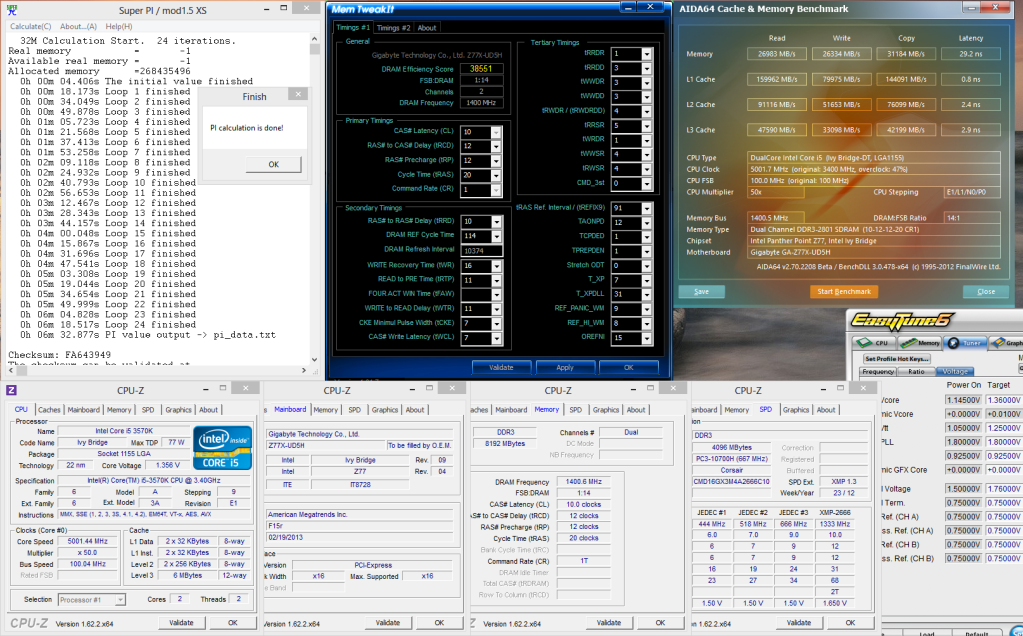
    BIOS F15R has also run 3 hours of prime @ my 24/7 4.5G 2666 tight just fine & I have run 6 or so 32M runs @ 5G 2800 in Windows 8 just fine

    Nearly SPD timings on the RAM & Slews Auto
    Last edited by C-N; 02-27-2013 at 03:32 PM. Reason: Update


    Home / Play Rig Asrock Z87 OC Formula/AC, i7 4770K L310B487, 8GB Corsair Dominator Platinum 2666 CL10, BeQuiet Dark Power Pro P8 1200W PSU, 120GB Corsair Force GT SSD, 2 x 1TB WD Sata Drives Mirrored, Palit 680GTX JetStream, Antec Kuhler 920, Windows 10 Pro, Logitech LX700 Deskset, AOC 27" Monitor.

    Work 24/7 Rig Gigabyte GA-Z97X-SOC Force, i7 4790K L418C133 ,8GB Team Xtreem LV 2600, PC Power & Cooling 850WPSU, 120GB OCZ Vertex 3 SSD, 2 x 500GB Hitachi Sata Drives Mirrored, Antec Kuhler 620, Windows 10 Pro 64 Bit, Logitech LX700 Deskset, Benq 27" Monitor.

    Home NAS DFI P35 T2RL Motherboard, Intel E6850 CPU, 8GB Nanya DDR2 6400, 2X 2TB Toshiba DT01ACA200 SATA Drives, ZFS RAID Mirror On Intel ICH9 AHCI, Artic Blue 850W PSU, Marvell Yukon 88E8053 Gigabit Ethernet, FreeNAS 9.2.1.5 RC, 64-Bit On 4GB USB2 SanDisk Cruizer Blade Thumb Drive.

  9. #559
    Xtreme Mentor
    Join Date
    Mar 2006
    Location
    Evje, Norway
    Posts
    3,419
    After many years with AMD ive (finally?) switched to Intel. Got myself a Z77X-UD4H and a 3570k (Batch 3236B873). Im also just on aircooling for now with a Hyper 212+ evo. For ram im using my "old" vengeance ram with hynix BFR.
    Since my HD6950 is in for RMA im just using igpu atm.
    I havent OCed it much yet, just upped the turbo to 43x and a very minor voltage offset(probably dont even need it, figure that out later) and igpu to 1500mhz. Ive been mostly playing with the ram. 2400 10.12.11.30 1T, 1.635v wasnt quite stable. It passed 1 memtest loop, but i got a couple bsods and fails in game and such so i need to tweak more, or just tweak around 2200mhz instead wich i run atm.

    When im going to oc the cpu i would like to keep power saving options and stuff enabled. Should i just disable turbo and up the multi and it will clock down when idling? or should i use turbo and voltage offset? I dont need 5ghz+ but i do want to find a sweetspot between ghz and voltage. Im not excactly new to OC, but i havent played that much with Intel before, and never with turbo.
    Quote Originally Posted by iddqd View Post
    Not to be outdone by rival ATi, nVidia's going to offer its own drivers on EA Download Manager.
    X2 555 @ B55 @ 4050 1.4v, NB @ 2700 1.35v Fuzion V1
    Gigabyte 890gpa-ud3h v2.1
    HD6950 2GB swiftech MCW60 @ 1000mhz, 1.168v 1515mhz memory
    Corsair Vengeance 2x4GB 1866 cas 9 @ 1800 8.9.8.27.41 1T 110ns 1.605v
    C300 64GB, 2X Seagate barracuda green LP 2TB, Essence STX, Zalman ZM750-HP
    DDC 3.2/petras, PA120.3 ek-res400, Stackers STC-01,
    Dell U2412m, G110, G9x, Razer Scarab

  10. #560
    Xtreme Member
    Join Date
    Apr 2012
    Location
    Melb, AU
    Posts
    236
    guys, got a chip here that's supposed to do 1511 mem frequency (websmile's chip Link Link)
    running it on UD3H and UP5, and cant use the 2933 divider with my 2600C10 trident at as much as 1.95v, am i missing a bios setting or something somewhere?
    have set PLL overvoltage enabled, 1.15-1.2 VTT, 1.1-1.15IMC, and running 11-13-13-38 2T with all other settings auto.

    i7 4770K [L315B347]
    Gigabyte Z97 SOC Force
    F3-2600C10D-8GTXD | F3-2666C11Q-16GTXD
    GTX780 Epower2
    Corsair AX1200i
    TRUE Copper| Custom Water | Kingpin Venom 6.66 | Kingpin Tek-9 Fat


    i7 4770K [L312B515] | Asus Max VI Impact | 2x8GB Kingston 1600c10
    600GB WD Velociraptor
    GTX580 Classified
    Silverstone M600W Strider
    Coolermaster Elite 130


    i3 3225 | Asrock B75M Pro3 | 2x4gb Kingston 1333c9
    Intel 520 60GB | LSI 9211-8i | 6x Seagate 4TB
    Silverstone M600W Strider
    Silverstone GD08

  11. #561
    Xtreme Member
    Join Date
    Apr 2012
    Location
    Melb, AU
    Posts
    236
    Nevermind
    F13a bios + correct samsung slews = success

    i7 4770K [L315B347]
    Gigabyte Z97 SOC Force
    F3-2600C10D-8GTXD | F3-2666C11Q-16GTXD
    GTX780 Epower2
    Corsair AX1200i
    TRUE Copper| Custom Water | Kingpin Venom 6.66 | Kingpin Tek-9 Fat


    i7 4770K [L312B515] | Asus Max VI Impact | 2x8GB Kingston 1600c10
    600GB WD Velociraptor
    GTX580 Classified
    Silverstone M600W Strider
    Coolermaster Elite 130


    i3 3225 | Asrock B75M Pro3 | 2x4gb Kingston 1333c9
    Intel 520 60GB | LSI 9211-8i | 6x Seagate 4TB
    Silverstone M600W Strider
    Silverstone GD08

  12. #562
    Xtreme Mentor
    Join Date
    Mar 2006
    Location
    Evje, Norway
    Posts
    3,419
    This thread is dead it seemes...
    Quote Originally Posted by iddqd View Post
    Not to be outdone by rival ATi, nVidia's going to offer its own drivers on EA Download Manager.
    X2 555 @ B55 @ 4050 1.4v, NB @ 2700 1.35v Fuzion V1
    Gigabyte 890gpa-ud3h v2.1
    HD6950 2GB swiftech MCW60 @ 1000mhz, 1.168v 1515mhz memory
    Corsair Vengeance 2x4GB 1866 cas 9 @ 1800 8.9.8.27.41 1T 110ns 1.605v
    C300 64GB, 2X Seagate barracuda green LP 2TB, Essence STX, Zalman ZM750-HP
    DDC 3.2/petras, PA120.3 ek-res400, Stackers STC-01,
    Dell U2412m, G110, G9x, Razer Scarab

  13. #563
    Registered User
    Join Date
    Feb 2006
    Posts
    60
    Yes... I guess its time for 1150.

    Anyway, my UD3H is stable and all but its has been almost a year and we still don?t have a final BIOS that enables 4X Samsungs 35nm to run above 1866MHz...
    New: R7 1700 @3.8?? | Asus Prime X370-PRO | 2x8GB G.Skill Trident Z @3200MHz CL14 1T | PowerColor 290X 4GB OC | Crucial MX100 256GB | Corsair 700D+AX760 Platinum
    Old: i5-3570K @4.2 | Gigabyte GA-Z77X-UD3H | 4x4GB Samsung 30nm @1866MHz CL9 1T| MSI 7950 TwinFrozr 3GB | Crucial C300 128GB | HyperX 3K 240GB | Corsair 700D+AX750

  14. #564
    Xtreme Member
    Join Date
    Mar 2012
    Location
    Brisbane,Australia
    Posts
    182
    hey guys, what board would you say is the best for memory testing a raw CPU clocks? UD3H or UP4/5 or another one? (Up7 is out as it is too much currently)
    Work/Gaming: i7-950|GB X58A-UD7|12GB Trident BBSE/XMS3|460GTX|WD 1TB BLK|Pioneer DVDRW|CM HAF-X|Win 7 Pro 64 bit|U2711|HX850|G500|G510
    Quote Originally Posted by hiwa View Post
    I protect my gskills like how i protect my balls
    Heatware: jimba86
    Bench:Custom Giga-bench|Win 7/XP SP3|WD 36GB Raptor|Dell 22|AX1200|MS intellimouse
    Bench 1:i7 930|water 2.0 performer|Gigabyte X58A-OC | 4GB corsair 1866 CL7|GTX 295 Quad SLI
    Bench 2:E8500|NHD14|P45-UD3P(2nd PCIEx16 slot broken.. )|2GB Corsair 8888 Cl4|GTX 260 SOC
    (Bench 3: In Progress) 4770K|F1EE|Gigabyte Z97X-SOC Force| 4GB GTX1 /8GB Gskill TridentX 2666CL11 ney pro|5870 x3 on KPC tek9 slim 5.0/7.0
    Bench 4 E8600|NHD14|REX|2GB Corsair 1800 Cl7|Asus GTX 280
    Bench 5 (TBC): FX?|990FX-UD7|Gskill Flare 2000 Cl7|6970
    Server/renderbox: G3258|TT Water 2.0|Gigabyte Z87 Sniper M5|8GB Gskill Sniper 2133|gigabyte 5750|FD NODE 804

  15. #565
    Xtreme Memory Hoarder
    Join Date
    Mar 2010
    Posts
    2,661
    Quote Originally Posted by jimba86 View Post
    hey guys, what board would you say is the best for memory testing a raw CPU clocks? UD3H or UP4/5 or another one? (Up7 is out as it is too much currently)
    None of the boards listed in this thread

    I kid I kid, I saw pretty nice results from the UD4H in terms of the newer ic kits (2666/2800) this last weekend, and Bullant has incredible results on the UP5 so maybe start there as you should be able to find the above for a good deal with Haswell around the corner.
    Quote Originally Posted by Hondacity View Post
    gskillllin it!

  16. #566
    Xtreme Member
    Join Date
    Mar 2012
    Location
    Brisbane,Australia
    Posts
    182
    Quote Originally Posted by l0ud_sil3nc3 View Post
    None of the boards listed in this thread

    I kid I kid, I saw pretty nice results from the UD4H in terms of the newer ic kits (2666/2800) this last weekend, and Bullant has incredible results on the UP5 so maybe start there as you should be able to find the above for a good deal with Haswell around the corner.
    The UD4H seems to not be available here (unless the UP4TH is the same board?) the UP5 looks like the goods,ill keep any eye on it and see if I can pickup a bargain when haswell drops.. currently the price of 349 is bit rich of my blood especially with haswell around the corner..

    thanks for info loud!
    Work/Gaming: i7-950|GB X58A-UD7|12GB Trident BBSE/XMS3|460GTX|WD 1TB BLK|Pioneer DVDRW|CM HAF-X|Win 7 Pro 64 bit|U2711|HX850|G500|G510
    Quote Originally Posted by hiwa View Post
    I protect my gskills like how i protect my balls
    Heatware: jimba86
    Bench:Custom Giga-bench|Win 7/XP SP3|WD 36GB Raptor|Dell 22|AX1200|MS intellimouse
    Bench 1:i7 930|water 2.0 performer|Gigabyte X58A-OC | 4GB corsair 1866 CL7|GTX 295 Quad SLI
    Bench 2:E8500|NHD14|P45-UD3P(2nd PCIEx16 slot broken.. )|2GB Corsair 8888 Cl4|GTX 260 SOC
    (Bench 3: In Progress) 4770K|F1EE|Gigabyte Z97X-SOC Force| 4GB GTX1 /8GB Gskill TridentX 2666CL11 ney pro|5870 x3 on KPC tek9 slim 5.0/7.0
    Bench 4 E8600|NHD14|REX|2GB Corsair 1800 Cl7|Asus GTX 280
    Bench 5 (TBC): FX?|990FX-UD7|Gskill Flare 2000 Cl7|6970
    Server/renderbox: G3258|TT Water 2.0|Gigabyte Z87 Sniper M5|8GB Gskill Sniper 2133|gigabyte 5750|FD NODE 804

  17. #567
    Xtreme Addict
    Join Date
    May 2007
    Location
    Hampshire, UK
    Posts
    1,656
    Hey Jimba from what I've seen on here in the HWBot team thread & 5G 32M thread the UD3H, UD5H & UP5 are all fine boards & have pulled big mem & cpu speeds. I've not seen much done with the UD4H so cant comment.

    I have a UD5H & the only limit is the rest of the hardware I put with it & my skills. Don't know about AU but there are plenty of UD5H's left here in the UK & Europe priced about the 150GBP mark.


    Home / Play Rig Asrock Z87 OC Formula/AC, i7 4770K L310B487, 8GB Corsair Dominator Platinum 2666 CL10, BeQuiet Dark Power Pro P8 1200W PSU, 120GB Corsair Force GT SSD, 2 x 1TB WD Sata Drives Mirrored, Palit 680GTX JetStream, Antec Kuhler 920, Windows 10 Pro, Logitech LX700 Deskset, AOC 27" Monitor.

    Work 24/7 Rig Gigabyte GA-Z97X-SOC Force, i7 4790K L418C133 ,8GB Team Xtreem LV 2600, PC Power & Cooling 850WPSU, 120GB OCZ Vertex 3 SSD, 2 x 500GB Hitachi Sata Drives Mirrored, Antec Kuhler 620, Windows 10 Pro 64 Bit, Logitech LX700 Deskset, Benq 27" Monitor.

    Home NAS DFI P35 T2RL Motherboard, Intel E6850 CPU, 8GB Nanya DDR2 6400, 2X 2TB Toshiba DT01ACA200 SATA Drives, ZFS RAID Mirror On Intel ICH9 AHCI, Artic Blue 850W PSU, Marvell Yukon 88E8053 Gigabit Ethernet, FreeNAS 9.2.1.5 RC, 64-Bit On 4GB USB2 SanDisk Cruizer Blade Thumb Drive.

  18. #568
    Xtreme Member
    Join Date
    Mar 2012
    Location
    Brisbane,Australia
    Posts
    182
    Quote Originally Posted by C-N View Post
    Hey Jimba from what I've seen on here in the HWBot team thread & 5G 32M thread the UD3H, UD5H & UP5 are all fine boards & have pulled big mem & cpu speeds. I've not seen much done with the UD4H so cant comment.

    I have a UD5H & the only limit is the rest of the hardware I put with it & my skills. Don't know about AU but there are plenty of UD5H's left here in the UK & Europe priced about the 150GBP mark.
    Yeah I can get a UD3H for about 170AUD which I am strongly considering or if its better to watch the price of the UP5 and get one when they hit $250 (I can get a OC formula for that much as well) I kinda went nuts getting memory but not a board to test them in..
    Work/Gaming: i7-950|GB X58A-UD7|12GB Trident BBSE/XMS3|460GTX|WD 1TB BLK|Pioneer DVDRW|CM HAF-X|Win 7 Pro 64 bit|U2711|HX850|G500|G510
    Quote Originally Posted by hiwa View Post
    I protect my gskills like how i protect my balls
    Heatware: jimba86
    Bench:Custom Giga-bench|Win 7/XP SP3|WD 36GB Raptor|Dell 22|AX1200|MS intellimouse
    Bench 1:i7 930|water 2.0 performer|Gigabyte X58A-OC | 4GB corsair 1866 CL7|GTX 295 Quad SLI
    Bench 2:E8500|NHD14|P45-UD3P(2nd PCIEx16 slot broken.. )|2GB Corsair 8888 Cl4|GTX 260 SOC
    (Bench 3: In Progress) 4770K|F1EE|Gigabyte Z97X-SOC Force| 4GB GTX1 /8GB Gskill TridentX 2666CL11 ney pro|5870 x3 on KPC tek9 slim 5.0/7.0
    Bench 4 E8600|NHD14|REX|2GB Corsair 1800 Cl7|Asus GTX 280
    Bench 5 (TBC): FX?|990FX-UD7|Gskill Flare 2000 Cl7|6970
    Server/renderbox: G3258|TT Water 2.0|Gigabyte Z87 Sniper M5|8GB Gskill Sniper 2133|gigabyte 5750|FD NODE 804

  19. #569
    Registered User
    Join Date
    Aug 2006
    Posts
    45
    Quote Originally Posted by C-N View Post
    ...I now have the SSD on the top grey port & the DVD on the lone port at the bottom of the board & all are reported ok!!! Previously on F14 Mod SSD & DVD on marvel grey ports & mirror on either black or white Intel ports...
    Keep in mind Marvell performance is bad when compared to Intel. You are not going to lost too much (if any) if you move those mechanical disks to the Intel 3GB port. But you are going to see a HUGE improvement if you connect your SSD to 6GB port of Intel chipset. And probably some more gain if you install Intel RST.

  20. #570
    Xtreme Addict
    Join Date
    May 2007
    Location
    Hampshire, UK
    Posts
    1,656
    Quote Originally Posted by psy4fun View Post
    Keep in mind Marvell performance is bad when compared to Intel. You are not going to lost too much (if any) if you move those mechanical disks to the Intel 3GB port. But you are going to see a HUGE improvement if you connect your SSD to 6GB port of Intel chipset. And probably some more gain if you install Intel RST.
    Thanks for the reply.

    I'm not so bothered about all out performance just want it all to work. In real life I cannot tell the difference its not such a hit to notice on an SSD. I want my RAID mirror on Intel & they are SATA2 drives anyway so no need to be on the SATA3 port anyway. I do use RST my SSD uses AHCI as does my DVD which dont play well on the same controller as my mirror so dont see how I can have it any other way. The marvel ports are SATA 3 anyway btw.


    Home / Play Rig Asrock Z87 OC Formula/AC, i7 4770K L310B487, 8GB Corsair Dominator Platinum 2666 CL10, BeQuiet Dark Power Pro P8 1200W PSU, 120GB Corsair Force GT SSD, 2 x 1TB WD Sata Drives Mirrored, Palit 680GTX JetStream, Antec Kuhler 920, Windows 10 Pro, Logitech LX700 Deskset, AOC 27" Monitor.

    Work 24/7 Rig Gigabyte GA-Z97X-SOC Force, i7 4790K L418C133 ,8GB Team Xtreem LV 2600, PC Power & Cooling 850WPSU, 120GB OCZ Vertex 3 SSD, 2 x 500GB Hitachi Sata Drives Mirrored, Antec Kuhler 620, Windows 10 Pro 64 Bit, Logitech LX700 Deskset, Benq 27" Monitor.

    Home NAS DFI P35 T2RL Motherboard, Intel E6850 CPU, 8GB Nanya DDR2 6400, 2X 2TB Toshiba DT01ACA200 SATA Drives, ZFS RAID Mirror On Intel ICH9 AHCI, Artic Blue 850W PSU, Marvell Yukon 88E8053 Gigabit Ethernet, FreeNAS 9.2.1.5 RC, 64-Bit On 4GB USB2 SanDisk Cruizer Blade Thumb Drive.

  21. #571
    Xtreme Enthusiast
    Join Date
    Jan 2003
    Location
    Littleton, Colorado
    Posts
    740
    Quote Originally Posted by eXa View Post
    This thread is dead it seemes...
    Never. Just built my UD5-based machine a few days ago.

    Also, where is everyone getting these F15r (etc) BIOS? The Gigabyte site only has up to 'q'.
    Heatware

    Main
    intel i5 3570k @ 4+ GHz | Gigabyte Z77X-UD5H Rev 1.1 |Crucial Ballistix Tactical VLP 2x8GB DDR3-1600
    intel 335 240GB SSD | WD Black 640GB HDD
    Sapphire AMD 7870XT 2GB w-Boost (Tahiti LE)
    Creative X-Fi Titanium PCI-e

    HTPC
    AMD FX 6300 Vishera | ASRock 970 Extreme 3 | Kingston HyperX Black 2x4GB DDR3-1600
    intel 320 120GB SSD | Seagate Barracuda 640GB HDD
    AMD Visiontek HD7850 2GB
    Dlink DWA-556 Wireless N Adapter

    Tablet
    Lenovo IdeaTab A2109 - Running rooted J-Bean & ADW

  22. #572
    Xtreme Mentor stasio's Avatar
    Join Date
    Jan 2008
    Location
    Malaysia
    Posts
    3,036
    Need a Gigabyte latest BIOS?
    Z370 AORUS Gaming 7,
    GA-Z97X-SOC Force ,Core i7-4790K @ 4.9 GHz
    GA-Z87X-UD3H ,Core i7-4770K @ 4.65 GHz
    G.Skill F3-2933C12D-8GTXDG @ 3100 (12-15-14-35-CR1) @1.66V
    2xSSD Corsair Force GS 128 (RAID 0), WD Caviar Black SATA3 1TB HDD,
    Evga GTS 450 SC, Gigabyte Superb 720W
    XSPC RayStorm D5 EX240 (Liquid Ultra)
    NZXT Phantom 630 Ultra Tower
    Win 7 SP1 x64;Win 10 x64

  23. #573
    Xtreme Enthusiast
    Join Date
    Jan 2003
    Location
    Littleton, Colorado
    Posts
    740
    Thank you!
    Heatware

    Main
    intel i5 3570k @ 4+ GHz | Gigabyte Z77X-UD5H Rev 1.1 |Crucial Ballistix Tactical VLP 2x8GB DDR3-1600
    intel 335 240GB SSD | WD Black 640GB HDD
    Sapphire AMD 7870XT 2GB w-Boost (Tahiti LE)
    Creative X-Fi Titanium PCI-e

    HTPC
    AMD FX 6300 Vishera | ASRock 970 Extreme 3 | Kingston HyperX Black 2x4GB DDR3-1600
    intel 320 120GB SSD | Seagate Barracuda 640GB HDD
    AMD Visiontek HD7850 2GB
    Dlink DWA-556 Wireless N Adapter

    Tablet
    Lenovo IdeaTab A2109 - Running rooted J-Bean & ADW

  24. #574
    Registered User
    Join Date
    Mar 2009
    Posts
    1
    never mind
    I bought the HyperX Beast 8GB (2 x 4GB) DDR3 2400 (PC3 19200) Desktop Memory Model KHX24C11T3K2/8X
    Last edited by reb; 04-18-2014 at 12:40 PM.

Page 23 of 23 FirstFirst ... 1320212223

Bookmarks

Bookmarks

Posting Permissions

  • You may not post new threads
  • You may not post replies
  • You may not post attachments
  • You may not edit your posts
  •