

Nice news......seems that sammy ulv nightmare is over.Originally Posted by sin0822





Nice news......seems that sammy ulv nightmare is over.
Need a Gigabyte latest BIOS?
Z370 AORUS Gaming 7,
GA-Z97X-SOC Force ,Core i7-4790K @ 4.9 GHz
GA-Z87X-UD3H ,Core i7-4770K @ 4.65 GHz
G.Skill F3-2933C12D-8GTXDG @ 3100 (12-15-14-35-CR1) @1.66V
2xSSD Corsair Force GS 128 (RAID 0), WD Caviar Black SATA3 1TB HDD,
Evga GTS 450 SC, Gigabyte Superb 720W
XSPC RayStorm D5 EX240 (Liquid Ultra)
NZXT Phantom 630 Ultra Tower
Win 7 SP1 x64;Win 10 x64
Yup, and now let's show some stuff instead of talk!
First off the Z77X-UD5H running 2x4GB Samsung Green ULV@ 2600 Cas 10 T1
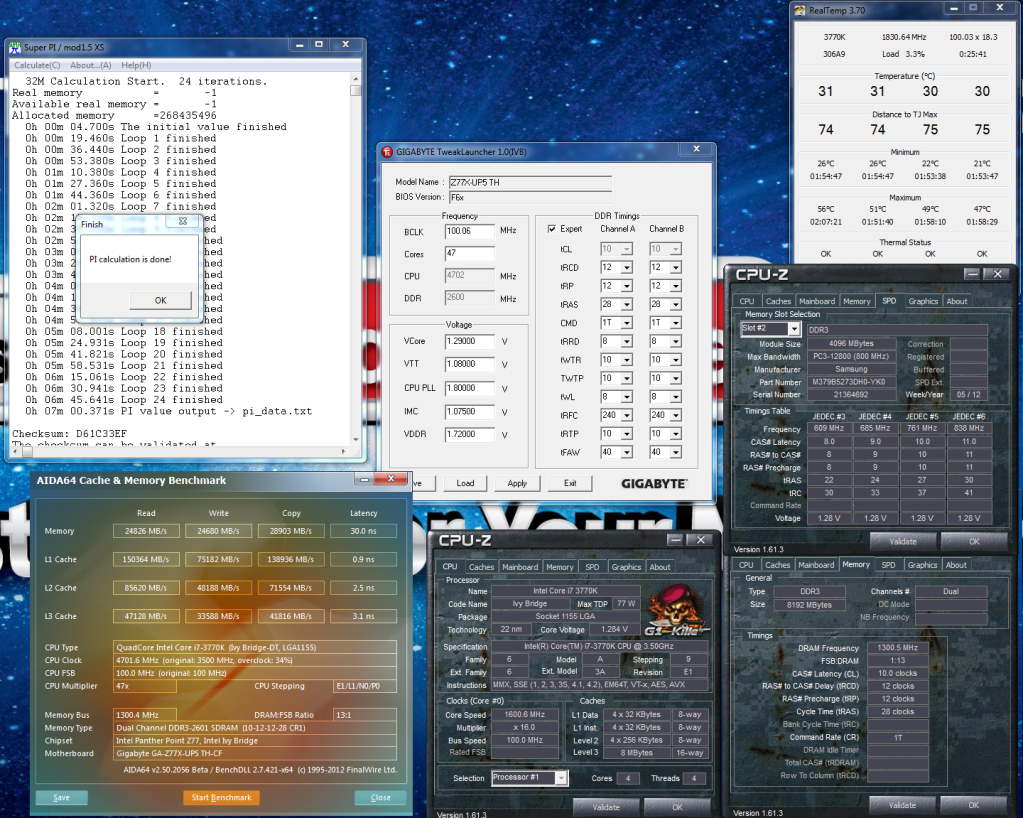
Second we have the beautiful Z77X-UP5 TH-CF running 2x4GB Samsung Green ULV@ 2600 Cas 10 T1

Wow,sammy flying now........
Need a Gigabyte latest BIOS?
Z370 AORUS Gaming 7,
GA-Z97X-SOC Force ,Core i7-4790K @ 4.9 GHz
GA-Z87X-UD3H ,Core i7-4770K @ 4.65 GHz
G.Skill F3-2933C12D-8GTXDG @ 3100 (12-15-14-35-CR1) @1.66V
2xSSD Corsair Force GS 128 (RAID 0), WD Caviar Black SATA3 1TB HDD,
Evga GTS 450 SC, Gigabyte Superb 720W
XSPC RayStorm D5 EX240 (Liquid Ultra)
NZXT Phantom 630 Ultra Tower
Win 7 SP1 x64;Win 10 x64
Very nice Sin
Main Rig
Gigabyte z78x-OC Bios F5n
i7-4770k batch L310B492 Malay @ 4.5ghz with HT 1.2v
Samsung Green 8GB 2x4GB MV-3V4G3D/US DDR3 1.3v 30nn
HiS ATI HD 6950
Corsair Force GT 120 GB Sata3 SSD (boot drive) on Intel sata3 controller port0
Samsung 320GB HD322GJ 7200 RPM 16M cache on Intel sata3 controller port1
Sony Optiarc DVD-RW AD-7240S on Intel sata3 controller port4
CORSAIR CMPSU-850TX PSU
Swiftech MCP655-B Pump
EK Suppreme HF Cpu Block
Swiftech Mcres Micro Rev 2 Reservoir
Black Ice GTX Xtreme 360 Radiator
Server
HAF 932
Gigabyte z77x-UD3H F13
i7-3770S batch 3212B621 supports VT-D and low power
32GB 4x8gb Muskin Enhanced Blackline 10-10-10-27@1.65v
Vmware vSphere ESXi 5.0u1
4x500GB Hitachi Deskstar 7K1000.D Raid 10 on a IBM M1015 <- DataStore
Sapphire HD 5850
here are the new BIOSes for the samsung RAM:
here are the BIOSes UP5 http://www.mediafire.com/download.php?2a68g1hg5iv08o7
UD5H: http://www.mediafire.com/download.php?c88l5bnj86gx37n
power cycle the board after flashing.
For future reference: please provide bios files contained within a .zip file, so that the file integrity would be 100% assured.
System 1: Intel 3570K, Gigabyte Z77X-UD5H (blue capacitors), dual bioses F15o/F15r, Samsung 2x 4 Gb 30nm ULV DDR3, Sony-Optiarc BD-R, dual-boot: Windows 8 Pro 64-bit, Windows XP SP3 32-bit.
System 2: Intel E8400; Gigabyte EP45-UD3R, bios F12, 2x 2 Gb G.Skill PC8800, Seagate SATA HD, nVidia 9500GT; Samsung SATA DVD-RW, dual-boot: OSX Lion, Windows 7 64-bit.
tested this bios just now. It fixes more than just the sammy issue. I was having an issue with my flares... i could do 2600 but it was a horrible PITA. now... piece of cake and beyond.
massman will be happy
MD5 of the bios should be b6357f9055be0e251d14c539626ef15f if you want to check your download integrity.
Last edited by ZenEffect; 08-11-2012 at 05:43 PM.
Current Status - Testing & Research
I usually do zip file, but it is a pain. How is the integrity of the BIOS messed up this way? Can you explain?
Using the free program "7zip", it's quite simple to right-click the bios file and create a .zip file.
http://majorgeeks.com/7-Zip_d4603.html
It's not as common nowadays, but in the old dial-up modem days a file transfer over the internet could occasionally introduce undetected file errors.
Note: the 7zip program has 2 "bitness" versions, and requires the correct "bitness" (32-bit vs. 64-bit) to match the Windows version being used.
Any file integrity error caused during transit will be observable at the time that the file is subsequently un-zipped.
Last edited by vailr; 08-11-2012 at 09:08 PM.
System 1: Intel 3570K, Gigabyte Z77X-UD5H (blue capacitors), dual bioses F15o/F15r, Samsung 2x 4 Gb 30nm ULV DDR3, Sony-Optiarc BD-R, dual-boot: Windows 8 Pro 64-bit, Windows XP SP3 32-bit.
System 2: Intel E8400; Gigabyte EP45-UD3R, bios F12, 2x 2 Gb G.Skill PC8800, Seagate SATA HD, nVidia 9500GT; Samsung SATA DVD-RW, dual-boot: OSX Lion, Windows 7 64-bit.
@ vailr I just used Stasio's tweaktown bios & it says F10x after flashing.
P.S Thanks Sin/Stasio
Home / Play Rig Asrock Z87 OC Formula/AC, i7 4770K L310B487, 8GB Corsair Dominator Platinum 2666 CL10, BeQuiet Dark Power Pro P8 1200W PSU, 120GB Corsair Force GT SSD, 2 x 1TB WD Sata Drives Mirrored, Palit 680GTX JetStream, Antec Kuhler 920, Windows 10 Pro, Logitech LX700 Deskset, AOC 27" Monitor.
Work 24/7 Rig Gigabyte GA-Z97X-SOC Force, i7 4790K L418C133 ,8GB Team Xtreem LV 2600, PC Power & Cooling 850WPSU, 120GB OCZ Vertex 3 SSD, 2 x 500GB Hitachi Sata Drives Mirrored, Antec Kuhler 620, Windows 10 Pro 64 Bit, Logitech LX700 Deskset, Benq 27" Monitor.
Home NAS DFI P35 T2RL Motherboard, Intel E6850 CPU, 8GB Nanya DDR2 6400, 2X 2TB Toshiba DT01ACA200 SATA Drives, ZFS RAID Mirror On Intel ICH9 AHCI, Artic Blue 850W PSU, Marvell Yukon 88E8053 Gigabit Ethernet, FreeNAS 9.2.1.5 RC, 64-Bit On 4GB USB2 SanDisk Cruizer Blade Thumb Drive.


Tried F10x for UD5H and it's bad as hell...not possible to change BCLK above 100.5 MHz
//edit: but huge change with PSC RAM...I wasn't able to set 26x and higher multipliers for memory and now I can
Last edited by Blue Storm; 08-12-2012 at 04:36 AM.
Running fine over here..... as good as f9q with my lv2600's at 102.** ddr 2720
Home / Play Rig Asrock Z87 OC Formula/AC, i7 4770K L310B487, 8GB Corsair Dominator Platinum 2666 CL10, BeQuiet Dark Power Pro P8 1200W PSU, 120GB Corsair Force GT SSD, 2 x 1TB WD Sata Drives Mirrored, Palit 680GTX JetStream, Antec Kuhler 920, Windows 10 Pro, Logitech LX700 Deskset, AOC 27" Monitor.
Work 24/7 Rig Gigabyte GA-Z97X-SOC Force, i7 4790K L418C133 ,8GB Team Xtreem LV 2600, PC Power & Cooling 850WPSU, 120GB OCZ Vertex 3 SSD, 2 x 500GB Hitachi Sata Drives Mirrored, Antec Kuhler 620, Windows 10 Pro 64 Bit, Logitech LX700 Deskset, Benq 27" Monitor.
Home NAS DFI P35 T2RL Motherboard, Intel E6850 CPU, 8GB Nanya DDR2 6400, 2X 2TB Toshiba DT01ACA200 SATA Drives, ZFS RAID Mirror On Intel ICH9 AHCI, Artic Blue 850W PSU, Marvell Yukon 88E8053 Gigabit Ethernet, FreeNAS 9.2.1.5 RC, 64-Bit On 4GB USB2 SanDisk Cruizer Blade Thumb Drive.
Bios worked wonders for me.. My ram will now do 2600mhz!!!
Main Rig
Gigabyte z78x-OC Bios F5n
i7-4770k batch L310B492 Malay @ 4.5ghz with HT 1.2v
Samsung Green 8GB 2x4GB MV-3V4G3D/US DDR3 1.3v 30nn
HiS ATI HD 6950
Corsair Force GT 120 GB Sata3 SSD (boot drive) on Intel sata3 controller port0
Samsung 320GB HD322GJ 7200 RPM 16M cache on Intel sata3 controller port1
Sony Optiarc DVD-RW AD-7240S on Intel sata3 controller port4
CORSAIR CMPSU-850TX PSU
Swiftech MCP655-B Pump
EK Suppreme HF Cpu Block
Swiftech Mcres Micro Rev 2 Reservoir
Black Ice GTX Xtreme 360 Radiator
Server
HAF 932
Gigabyte z77x-UD3H F13
i7-3770S batch 3212B621 supports VT-D and low power
32GB 4x8gb Muskin Enhanced Blackline 10-10-10-27@1.65v
Vmware vSphere ESXi 5.0u1
4x500GB Hitachi Deskstar 7K1000.D Raid 10 on a IBM M1015 <- DataStore
Sapphire HD 5850
Yep really helpfull BIOS for RAM...my PSCs now can do 2600 MHz 8-12-7 what wasn't possible with F9...with F9 it did only very unstable 2400 MHz 9-11-9
Last edited by Blue Storm; 08-12-2012 at 06:44 AM.
Just done a quick BCLK check & my chip still makes 110 just as easy as any other BIOS.
Home / Play Rig Asrock Z87 OC Formula/AC, i7 4770K L310B487, 8GB Corsair Dominator Platinum 2666 CL10, BeQuiet Dark Power Pro P8 1200W PSU, 120GB Corsair Force GT SSD, 2 x 1TB WD Sata Drives Mirrored, Palit 680GTX JetStream, Antec Kuhler 920, Windows 10 Pro, Logitech LX700 Deskset, AOC 27" Monitor.
Work 24/7 Rig Gigabyte GA-Z97X-SOC Force, i7 4790K L418C133 ,8GB Team Xtreem LV 2600, PC Power & Cooling 850WPSU, 120GB OCZ Vertex 3 SSD, 2 x 500GB Hitachi Sata Drives Mirrored, Antec Kuhler 620, Windows 10 Pro 64 Bit, Logitech LX700 Deskset, Benq 27" Monitor.
Home NAS DFI P35 T2RL Motherboard, Intel E6850 CPU, 8GB Nanya DDR2 6400, 2X 2TB Toshiba DT01ACA200 SATA Drives, ZFS RAID Mirror On Intel ICH9 AHCI, Artic Blue 850W PSU, Marvell Yukon 88E8053 Gigabit Ethernet, FreeNAS 9.2.1.5 RC, 64-Bit On 4GB USB2 SanDisk Cruizer Blade Thumb Drive.
What are your settings? I just set everything to default and only set BCLK to 101 MHz...no post and higher VTT and IMC don't help...with F9 just set 105 MHz with other settings on default and everything was ok and stable
Attachment 129303Well, this is getting to be curious.
Tried 2 times flashing "F10x" using the bootable (to a DOS prompt) USB thumb drive method.
DOS screen displays as "Gigabyte SPI Flash Bios Update Utility v0.32".
(Is there maybe a newer version?)
Same flash method that worked fine for several beta bios releases.
Re-downloaded "Stasio's tweaktown bios" and tried a third time.
Cut power off, then used the "Clear CMOS" button.
Each time getting F10, not F10x.
Bios setup screen and CPU-Z both report bios version F10, not F10x.
F10 bios5.jpg
Any ideas???
Last edited by vailr; 08-12-2012 at 10:36 AM.
System 1: Intel 3570K, Gigabyte Z77X-UD5H (blue capacitors), dual bioses F15o/F15r, Samsung 2x 4 Gb 30nm ULV DDR3, Sony-Optiarc BD-R, dual-boot: Windows 8 Pro 64-bit, Windows XP SP3 32-bit.
System 2: Intel E8400; Gigabyte EP45-UD3R, bios F12, 2x 2 Gb G.Skill PC8800, Seagate SATA HD, nVidia 9500GT; Samsung SATA DVD-RW, dual-boot: OSX Lion, Windows 7 64-bit.
Side note: Why did Gigabyte skip UD5H bios version "F9 (final)" altogether?
Was there any documentation on "F10 (final)"?
As a wild guess, maybe the Intel Raid firmware was updated in F10?
Last edited by vailr; 08-12-2012 at 10:18 AM.
System 1: Intel 3570K, Gigabyte Z77X-UD5H (blue capacitors), dual bioses F15o/F15r, Samsung 2x 4 Gb 30nm ULV DDR3, Sony-Optiarc BD-R, dual-boot: Windows 8 Pro 64-bit, Windows XP SP3 32-bit.
System 2: Intel E8400; Gigabyte EP45-UD3R, bios F12, 2x 2 Gb G.Skill PC8800, Seagate SATA HD, nVidia 9500GT; Samsung SATA DVD-RW, dual-boot: OSX Lion, Windows 7 64-bit.
Nothing special at all
CPU = 1.165
vDIMM = 1.64 (More than needed)
VTT = 1.15
PLL = 1.80
IMC = 0.925 (Lower than this 0.875 gets me more BCLK)
I used @ BIOS to flash from F9q to F10x & checked "Clear DMI Pool Data"
I don’t know & not that I think it makes a difference but if you want updated firmware etc go to TT & download acebmxr's mod BIOS's
http://forums.tweaktown.com/gigabyte...fied-bios.html
Word of warning though once you flash you can’t go back & if you bork it it may affect your warranty.
Home / Play Rig Asrock Z87 OC Formula/AC, i7 4770K L310B487, 8GB Corsair Dominator Platinum 2666 CL10, BeQuiet Dark Power Pro P8 1200W PSU, 120GB Corsair Force GT SSD, 2 x 1TB WD Sata Drives Mirrored, Palit 680GTX JetStream, Antec Kuhler 920, Windows 10 Pro, Logitech LX700 Deskset, AOC 27" Monitor.
Work 24/7 Rig Gigabyte GA-Z97X-SOC Force, i7 4790K L418C133 ,8GB Team Xtreem LV 2600, PC Power & Cooling 850WPSU, 120GB OCZ Vertex 3 SSD, 2 x 500GB Hitachi Sata Drives Mirrored, Antec Kuhler 620, Windows 10 Pro 64 Bit, Logitech LX700 Deskset, Benq 27" Monitor.
Home NAS DFI P35 T2RL Motherboard, Intel E6850 CPU, 8GB Nanya DDR2 6400, 2X 2TB Toshiba DT01ACA200 SATA Drives, ZFS RAID Mirror On Intel ICH9 AHCI, Artic Blue 850W PSU, Marvell Yukon 88E8053 Gigabit Ethernet, FreeNAS 9.2.1.5 RC, 64-Bit On 4GB USB2 SanDisk Cruizer Blade Thumb Drive.
dude this BIOS is NOT NOT NOT A FINAL release, nor is it officially validated. I only put this up because it has a Samsung fix I wanted to confirm, however it was compiled twice i have two versions of each, however some where missing some fixes so the guy made two new ones and sent them over for testing. the BIOS version isn't important, just confirming the 3 fixes are.
1. Samsung memory OC to 2400 or 2600
2. BIOS profiles save and load properly from USB drive
3. DRAM voltage fix from power cycle on the UP5 TH
4. XMP fixes that Stasio requested are present.
I just wanted to confirm those 4 things. This isn't a BIOS for you to always use.
OK: used atbios latest version B12.0723.1 (instead of the DOS version flasher) and successfully flashed "Stasio's tweaktown bios" to F10x.
Note: the atbios program itself would fail installation on Windows 7 64-bit, but installed and worked fine in Windows XP 32-bit.
atbios.jpgatbios2.jpg
System 1: Intel 3570K, Gigabyte Z77X-UD5H (blue capacitors), dual bioses F15o/F15r, Samsung 2x 4 Gb 30nm ULV DDR3, Sony-Optiarc BD-R, dual-boot: Windows 8 Pro 64-bit, Windows XP SP3 32-bit.
System 2: Intel E8400; Gigabyte EP45-UD3R, bios F12, 2x 2 Gb G.Skill PC8800, Seagate SATA HD, nVidia 9500GT; Samsung SATA DVD-RW, dual-boot: OSX Lion, Windows 7 64-bit.
Usage qualifications duly noted.
System 1: Intel 3570K, Gigabyte Z77X-UD5H (blue capacitors), dual bioses F15o/F15r, Samsung 2x 4 Gb 30nm ULV DDR3, Sony-Optiarc BD-R, dual-boot: Windows 8 Pro 64-bit, Windows XP SP3 32-bit.
System 2: Intel E8400; Gigabyte EP45-UD3R, bios F12, 2x 2 Gb G.Skill PC8800, Seagate SATA HD, nVidia 9500GT; Samsung SATA DVD-RW, dual-boot: OSX Lion, Windows 7 64-bit.
I'm using v2.24 B12.0406.1 in W7 Ult SP1 64 Bit.
Home / Play Rig Asrock Z87 OC Formula/AC, i7 4770K L310B487, 8GB Corsair Dominator Platinum 2666 CL10, BeQuiet Dark Power Pro P8 1200W PSU, 120GB Corsair Force GT SSD, 2 x 1TB WD Sata Drives Mirrored, Palit 680GTX JetStream, Antec Kuhler 920, Windows 10 Pro, Logitech LX700 Deskset, AOC 27" Monitor.
Work 24/7 Rig Gigabyte GA-Z97X-SOC Force, i7 4790K L418C133 ,8GB Team Xtreem LV 2600, PC Power & Cooling 850WPSU, 120GB OCZ Vertex 3 SSD, 2 x 500GB Hitachi Sata Drives Mirrored, Antec Kuhler 620, Windows 10 Pro 64 Bit, Logitech LX700 Deskset, Benq 27" Monitor.
Home NAS DFI P35 T2RL Motherboard, Intel E6850 CPU, 8GB Nanya DDR2 6400, 2X 2TB Toshiba DT01ACA200 SATA Drives, ZFS RAID Mirror On Intel ICH9 AHCI, Artic Blue 850W PSU, Marvell Yukon 88E8053 Gigabit Ethernet, FreeNAS 9.2.1.5 RC, 64-Bit On 4GB USB2 SanDisk Cruizer Blade Thumb Drive.
F10x still won't boot for me past the initial bios boot screen if the secondary Atheros ethernet port is disabled in bios.
At the moment, I'm using the on-CPU Intel HD Graphics 4000, where most others are using discrete PCIe graphics cards.
So, maybe the Gigabyte bios designers should do some further testing under that scenario.
System 1: Intel 3570K, Gigabyte Z77X-UD5H (blue capacitors), dual bioses F15o/F15r, Samsung 2x 4 Gb 30nm ULV DDR3, Sony-Optiarc BD-R, dual-boot: Windows 8 Pro 64-bit, Windows XP SP3 32-bit.
System 2: Intel E8400; Gigabyte EP45-UD3R, bios F12, 2x 2 Gb G.Skill PC8800, Seagate SATA HD, nVidia 9500GT; Samsung SATA DVD-RW, dual-boot: OSX Lion, Windows 7 64-bit.
can i ask why you disable it? If you provide me a good reason then it might speed up the issues place in line.
 Posting Permissions


 Reply With Quote



Bookmarks