MMM
Page 13 of 23 FirstFirst ... 310111213141516 ... LastLast
Results 301 to 325 of 574

Thread: **[OFFICIAL]** GIGABYTE Z77X Owners Club/Discussion/Info (All Model's Welcome)

  1. #301
    Xtreme Member
    Join Date
    Jul 2010
    Location
    EU, USA
    Posts
    150
    Quote Originally Posted by Vivi View Post
    But my bios was dead, and now its working and it's F4 instead of the old bios that it was.

    Maybe i got lucky?
    I haven't played with the Z77X-UP5 but I doubt you can "break" or "kill" the BIOS. Most likely your OC settings were unbootable and it just reset itself.

    Can you look somewhere in the bios and see what versions are your main/backup ?

  2. #302
    Xtreme Member
    Join Date
    Jul 2010
    Location
    EU, USA
    Posts
    150
    Quote Originally Posted by cab View Post
    I mentioned I was on F9d, then today I installed F10a but still BSOD when resuming from S3. I think the mobo is just fine, the problem is Win7 because Linux is running just fine.

    BSOD is intelppm.sys... that's Microsoft's processor driver for Intel CPU, lot's of complaints on this one so maybe they'll fix it. But Linux is flawless as of kernel 3.3.6.

    I'm running Linux Mint 13 Mate ... for the first time it beats the pants out of Win 7 .
    Last edited by cab; 07-18-2012 at 08:04 AM.

  3. #303
    take me to the manbar
    Join Date
    Apr 2008
    Location
    South Africa :)
    Posts
    1,179
    Quote Originally Posted by cab View Post
    I haven't played with the Z77X-UP5 but I doubt you can "break" or "kill" the BIOS. Most likely your OC settings were unbootable and it just reset itself.

    Can you look somewhere in the bios and see what versions are your main/backup ?
    Only way to check is by flipping switch.

    Both of mine are f4 now. after locking the old bios that couldn't boot. But its fixed now. Just in case someone has an error like me and need the bios working again.

  4. #304
    Xtreme Member
    Join Date
    Mar 2003
    Location
    AZ, USA
    Posts
    127
    Quote Originally Posted by Vivi View Post
    Correct me if i'm wrong or crazy,

    but i "broke" one of the bioses on my UP5-Th while OC'ing (it's my fault i was using an old bios). So then i could not boot up with that bios.
    I flipped the switch to the working bios, then went into q-flash. Then while i was in q-flash i flipped the switch to the broken bios, and then chose to flash bios.

    Now both bioses are working.

    Was there another way to do it?
    From what I understand: the bios chip's content is copied into system memory at time of boot-up. The bios chip is not "consulted" again, until the subsequent system re-boot.
    So: it's probably a good idea to update both bioses, at least whenever there's a significant difference between the Primary and the backup bios.
    My UD5H board shipped from the factory with version F4. Have since updated the Primary to version F10a, and the backup bios is now on version F9h.
    Last edited by vailr; 07-18-2012 at 04:45 PM.
    System 1: Intel 3570K, Gigabyte Z77X-UD5H (blue capacitors), dual bioses F15o/F15r, Samsung 2x 4 Gb 30nm ULV DDR3, Sony-Optiarc BD-R, dual-boot: Windows 8 Pro 64-bit, Windows XP SP3 32-bit.
    System 2: Intel E8400; Gigabyte EP45-UD3R, bios F12, 2x 2 Gb G.Skill PC8800, Seagate SATA HD, nVidia 9500GT; Samsung SATA DVD-RW, dual-boot: OSX Lion, Windows 7 64-bit.

  5. #305
    I am Xtreme
    Join Date
    Dec 2004
    Location
    France
    Posts
    3,462
    next time vivi press ALT+F10 or F11 and it will flash the backup with the main. that is what you have to do when a BIOS is corrupted. It will allow you to chose which. if you do ALT+F11 then it will ask about a fixture or flip a switch, it will load the main BIOS into the CMOS, then you can flick a switch and it will write to that BIOS. F10 might be easier i think is just main to backup, i have to recheck it.

  6. #306
    Xtreme Mentor stasio's Avatar
    Join Date
    Jan 2008
    Location
    Malaysia
    Posts
    3,036
    My new baby arrive home!

    Need a Gigabyte latest BIOS?
    Z370 AORUS Gaming 7,
    GA-Z97X-SOC Force ,Core i7-4790K @ 4.9 GHz
    GA-Z87X-UD3H ,Core i7-4770K @ 4.65 GHz
    G.Skill F3-2933C12D-8GTXDG @ 3100 (12-15-14-35-CR1) @1.66V
    2xSSD Corsair Force GS 128 (RAID 0), WD Caviar Black SATA3 1TB HDD,
    Evga GTS 450 SC, Gigabyte Superb 720W
    XSPC RayStorm D5 EX240 (Liquid Ultra)
    NZXT Phantom 630 Ultra Tower
    Win 7 SP1 x64;Win 10 x64

  7. #307
    Xtreme Mentor
    Join Date
    Dec 2007
    Posts
    2,507
    Im looking at these Giga z77boards. The UD5H is pretty reasonable, any advantage to the more expensive UD/UP5's just for benching?
    Last edited by OC Nub; 07-24-2012 at 04:15 PM.

  8. #308
    Xtreme Member
    Join Date
    Jan 2008
    Posts
    379
    they have thunderbolt /shrug

  9. #309
    Xtreme Member
    Join Date
    Apr 2008
    Location
    Sunny Florida
    Posts
    194
    Quote Originally Posted by stasio View Post
    My new baby arrive home!

    Nice , now mour benchmarks
    CPU: i5 2500K @4.5ghz/1.30v
    CPU Cooler: Phantek
    Mobo:Gigabyte P67-UD5-B3
    MEM: Gskill RipjawsX @2164
    PSU: Seasonic X1050
    Graphics: SLI MSI gtx560 TFII/OC Edition
    Monitor:27"HP 2710m x2
    Drives: 2x PlextorM3 Pro 256gb SSD Raid0 /Ocz Vertex2 80gb SSD
    VisionTek 120gb SSD/Kingston HyperX 240gb SSD/Verbatim 240gb SSD
    Case: mod Rocketfish
    OS's: Win 7x64 SP1
    Mouse:Mionix Naos 5000
    KB: Max Keyboard Nighthawk x8 Cherry browns w/ red leds

  10. #310
    Xtreme Mentor stasio's Avatar
    Join Date
    Jan 2008
    Location
    Malaysia
    Posts
    3,036
    Hicookie testing i5-3570k on Z77X-UP5 TH, up to 6,9 GHz!!

    multi x63


    multi x62

    Need a Gigabyte latest BIOS?
    Z370 AORUS Gaming 7,
    GA-Z97X-SOC Force ,Core i7-4790K @ 4.9 GHz
    GA-Z87X-UD3H ,Core i7-4770K @ 4.65 GHz
    G.Skill F3-2933C12D-8GTXDG @ 3100 (12-15-14-35-CR1) @1.66V
    2xSSD Corsair Force GS 128 (RAID 0), WD Caviar Black SATA3 1TB HDD,
    Evga GTS 450 SC, Gigabyte Superb 720W
    XSPC RayStorm D5 EX240 (Liquid Ultra)
    NZXT Phantom 630 Ultra Tower
    Win 7 SP1 x64;Win 10 x64

  11. #311
    Xtreme Member
    Join Date
    Aug 2007
    Posts
    175
    Quote Originally Posted by chawks2 View Post
    Gents, I am attempting to leverage the mSATA port on this board, but for whatever reason my RunCore SSD is not being found.
    STEC 4G - Will not work
    Runcore 36G - Will not work
    Mushkin Enhanced Atlas Series MKNSSDAT60GB-DX - Works!
    "The only solid piece of scientific truth about which I feel totally confident is that we are profoundly ignorant about nature...It is this sudden confrontation with the depth and scope of ignorance that represents the most significant contribution of 20th century science to the human intellect."
    -Lewis Thomas, The Medusa and the Snail

    "The best definition we have found for civilization is that civilized man does what is best for all, the savage does what is best for himself."
    -Edwin Hubble

    H.E.A.T
    MarioKart FID-0774-5798-8330

  12. #312
    Xtreme Member
    Join Date
    Jan 2008
    Posts
    379
    Quote Originally Posted by chawks2 View Post
    STEC 4G - Will not work
    Runcore 36G - Will not work
    Mushkin Enhanced Atlas Series MKNSSDAT60GB-DX - Works!
    Crucial M4 msata also works.

  13. #313
    Xtreme Member
    Join Date
    Mar 2003
    Location
    AZ, USA
    Posts
    127
    Note: GA-Z77X-UD5H beta bios F9o: disables (changes to an "unknown device") the VIA USB 3.0 controller in Windows 7 64-bit.
    System 1: Intel 3570K, Gigabyte Z77X-UD5H (blue capacitors), dual bioses F15o/F15r, Samsung 2x 4 Gb 30nm ULV DDR3, Sony-Optiarc BD-R, dual-boot: Windows 8 Pro 64-bit, Windows XP SP3 32-bit.
    System 2: Intel E8400; Gigabyte EP45-UD3R, bios F12, 2x 2 Gb G.Skill PC8800, Seagate SATA HD, nVidia 9500GT; Samsung SATA DVD-RW, dual-boot: OSX Lion, Windows 7 64-bit.

  14. #314
    Xtreme Addict
    Join Date
    May 2007
    Location
    Hampshire, UK
    Posts
    1,656
    Quote Originally Posted by vailr View Post
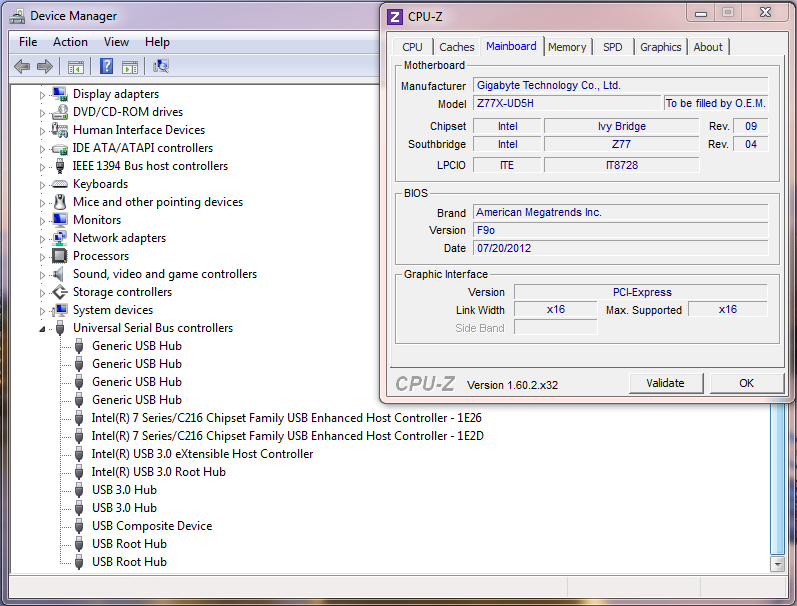
    Note: GA-Z77X-UD5H beta bios F9o: disables (changes to an "unknown device") the VIA USB 3.0 controller in Windows 7 64-bit.
    I gave it a run yesterday & everything is working fine for me

    Edit: sorry ed up the images so removed them....

    Edit 2...

    Last edited by C-N; 07-29-2012 at 10:56 PM.


    Home / Play Rig Asrock Z87 OC Formula/AC, i7 4770K L310B487, 8GB Corsair Dominator Platinum 2666 CL10, BeQuiet Dark Power Pro P8 1200W PSU, 120GB Corsair Force GT SSD, 2 x 1TB WD Sata Drives Mirrored, Palit 680GTX JetStream, Antec Kuhler 920, Windows 10 Pro, Logitech LX700 Deskset, AOC 27" Monitor.

    Work 24/7 Rig Gigabyte GA-Z97X-SOC Force, i7 4790K L418C133 ,8GB Team Xtreem LV 2600, PC Power & Cooling 850WPSU, 120GB OCZ Vertex 3 SSD, 2 x 500GB Hitachi Sata Drives Mirrored, Antec Kuhler 620, Windows 10 Pro 64 Bit, Logitech LX700 Deskset, Benq 27" Monitor.

    Home NAS DFI P35 T2RL Motherboard, Intel E6850 CPU, 8GB Nanya DDR2 6400, 2X 2TB Toshiba DT01ACA200 SATA Drives, ZFS RAID Mirror On Intel ICH9 AHCI, Artic Blue 850W PSU, Marvell Yukon 88E8053 Gigabit Ethernet, FreeNAS 9.2.1.5 RC, 64-Bit On 4GB USB2 SanDisk Cruizer Blade Thumb Drive.

  15. #315
    Xtreme Member
    Join Date
    Mar 2003
    Location
    AZ, USA
    Posts
    127
    @C-N: isn't that system running 32-bit Windows 7?
    64-bit Windows 7 is the problem area, for me.
    System 1: Intel 3570K, Gigabyte Z77X-UD5H (blue capacitors), dual bioses F15o/F15r, Samsung 2x 4 Gb 30nm ULV DDR3, Sony-Optiarc BD-R, dual-boot: Windows 8 Pro 64-bit, Windows XP SP3 32-bit.
    System 2: Intel E8400; Gigabyte EP45-UD3R, bios F12, 2x 2 Gb G.Skill PC8800, Seagate SATA HD, nVidia 9500GT; Samsung SATA DVD-RW, dual-boot: OSX Lion, Windows 7 64-bit.

  16. #316
    Xtreme Addict
    Join Date
    May 2007
    Location
    Hampshire, UK
    Posts
    1,656
    Quote Originally Posted by vailr View Post
    @C-N: isn't that system running 32-bit Windows 7?
    64-bit Windows 7 is the problem area, for me.
    No the first images I uploaded & removed was XP-32 Bit that one is W7-64 Bit


    Home / Play Rig Asrock Z87 OC Formula/AC, i7 4770K L310B487, 8GB Corsair Dominator Platinum 2666 CL10, BeQuiet Dark Power Pro P8 1200W PSU, 120GB Corsair Force GT SSD, 2 x 1TB WD Sata Drives Mirrored, Palit 680GTX JetStream, Antec Kuhler 920, Windows 10 Pro, Logitech LX700 Deskset, AOC 27" Monitor.

    Work 24/7 Rig Gigabyte GA-Z97X-SOC Force, i7 4790K L418C133 ,8GB Team Xtreem LV 2600, PC Power & Cooling 850WPSU, 120GB OCZ Vertex 3 SSD, 2 x 500GB Hitachi Sata Drives Mirrored, Antec Kuhler 620, Windows 10 Pro 64 Bit, Logitech LX700 Deskset, Benq 27" Monitor.

    Home NAS DFI P35 T2RL Motherboard, Intel E6850 CPU, 8GB Nanya DDR2 6400, 2X 2TB Toshiba DT01ACA200 SATA Drives, ZFS RAID Mirror On Intel ICH9 AHCI, Artic Blue 850W PSU, Marvell Yukon 88E8053 Gigabit Ethernet, FreeNAS 9.2.1.5 RC, 64-Bit On 4GB USB2 SanDisk Cruizer Blade Thumb Drive.

  17. #317
    Xtreme Member
    Join Date
    Mar 2003
    Location
    AZ, USA
    Posts
    127
    Quote Originally Posted by C-N View Post
    No the first images I uploaded & removed was XP-32 Bit that one is W7-64 Bit
    The CPU-Z portion of your image shows as 32-bit.
    System 1: Intel 3570K, Gigabyte Z77X-UD5H (blue capacitors), dual bioses F15o/F15r, Samsung 2x 4 Gb 30nm ULV DDR3, Sony-Optiarc BD-R, dual-boot: Windows 8 Pro 64-bit, Windows XP SP3 32-bit.
    System 2: Intel E8400; Gigabyte EP45-UD3R, bios F12, 2x 2 Gb G.Skill PC8800, Seagate SATA HD, nVidia 9500GT; Samsung SATA DVD-RW, dual-boot: OSX Lion, Windows 7 64-bit.

  18. #318
    I am Xtreme
    Join Date
    Dec 2004
    Location
    France
    Posts
    3,462
    he is prob running cpu-z 32 bit, you can run it on windows 7 lol.

    BTW here is my new review: http://www.xtremesystems.org/forums/...s&goto=newpost

  19. #319
    Xtreme Addict
    Join Date
    May 2007
    Location
    Hampshire, UK
    Posts
    1,656
    Quote Originally Posted by sin0822 View Post
    he is prob running cpu-z 32 bit, you can run it on windows 7 lol.
    Yup its 32 Bit CPU-Z on W7 Ult x64

    Quote Originally Posted by sin0822 View Post
    I checked it out first thing this morning mate, awesome detail as always & real nice to see GB are using some awesome spec components. After being disappointed with my 67/68 UD5's poor voltage control I was blown away with my UD5H... its bang on & by the looks of it GB have improved on perfect already.

    I did notice ET6 had PCH voltage control yet the BIOS screens don’t show it as adjustable or at least F4 don’t. I like the idea of this & it’s something I missed going from UD5 to UD5H.


    Home / Play Rig Asrock Z87 OC Formula/AC, i7 4770K L310B487, 8GB Corsair Dominator Platinum 2666 CL10, BeQuiet Dark Power Pro P8 1200W PSU, 120GB Corsair Force GT SSD, 2 x 1TB WD Sata Drives Mirrored, Palit 680GTX JetStream, Antec Kuhler 920, Windows 10 Pro, Logitech LX700 Deskset, AOC 27" Monitor.

    Work 24/7 Rig Gigabyte GA-Z97X-SOC Force, i7 4790K L418C133 ,8GB Team Xtreem LV 2600, PC Power & Cooling 850WPSU, 120GB OCZ Vertex 3 SSD, 2 x 500GB Hitachi Sata Drives Mirrored, Antec Kuhler 620, Windows 10 Pro 64 Bit, Logitech LX700 Deskset, Benq 27" Monitor.

    Home NAS DFI P35 T2RL Motherboard, Intel E6850 CPU, 8GB Nanya DDR2 6400, 2X 2TB Toshiba DT01ACA200 SATA Drives, ZFS RAID Mirror On Intel ICH9 AHCI, Artic Blue 850W PSU, Marvell Yukon 88E8053 Gigabit Ethernet, FreeNAS 9.2.1.5 RC, 64-Bit On 4GB USB2 SanDisk Cruizer Blade Thumb Drive.

  20. #320
    Xtreme Addict
    Join Date
    Oct 2006
    Location
    new jersey
    Posts
    1,100
    I'm not singing many prasies over the ud5h one went down in a month after launch(sitting here still dead) now the one i went and got from the local mc has its first two ram slots 4.2 dead(51 code) was all of the sudden on air wth?
    i cant boot at all in those slots only in 1-2 for single channel...still waiting for a bios so i cant use ivy on my p67 ud7's they put up with alot more then these 2 boards did.
    not picking up another
    _________________

  21. #321
    I am Xtreme
    Join Date
    Dec 2004
    Location
    France
    Posts
    3,462
    Quote Originally Posted by cowie View Post
    I'm not singing many prasies over the ud5h one went down in a month after launch(sitting here still dead) now the one i went and got from the local mc has its first two ram slots 4.2 dead(51 code) was all of the sudden on air wth?
    i cant boot at all in those slots only in 1-2 for single channel...still waiting for a bios so i cant use ivy on my p67 ud7's they put up with alot more then these 2 boards did.
    not picking up another
    why don't you RMA?

    Quote Originally Posted by C-N View Post
    Yup its 32 Bit CPU-Z on W7 Ult x64


    I checked it out first thing this morning mate, awesome detail as always & real nice to see GB are using some awesome spec components. After being disappointed with my 67/68 UD5's poor voltage control I was blown away with my UD5H... its bang on & by the looks of it GB have improved on perfect already.

    I did notice ET6 had PCH voltage control yet the BIOS screens don’t show it as adjustable or at least F4 don’t. I like the idea of this & it’s something I missed going from UD5 to UD5H.
    yea i noticed the PCh voltage control as well, i will see if it works.

  22. #322
    Xtreme Addict
    Join Date
    Oct 2006
    Location
    new jersey
    Posts
    1,100
    Quote Originally Posted by sin0822 View Post
    why don't you RMA?
    I guess i should.
    I did not mean to sound like a little batch or nothing but i have not killed a board in a while and two of these in 30 hours of use combined is way off the scale even for me.
    Well one is not dead but single channel only.
    I looked around socket see if it was me cutting the board or something i could not see anything
    _________________

  23. #323
    Xtreme Addict
    Join Date
    May 2007
    Location
    Hampshire, UK
    Posts
    1,656
    Quote Originally Posted by sin0822 View Post
    yea i noticed the PCh voltage control as well, i will see if it works.
    Cool give it a shot.

    Have you seen the 32M 5G Pi thread? GB have put up a UP5 Thunderbolt for a prize for fastest 32M GB board.
    Last edited by C-N; 07-31-2012 at 01:02 PM. Reason: Typo


    Home / Play Rig Asrock Z87 OC Formula/AC, i7 4770K L310B487, 8GB Corsair Dominator Platinum 2666 CL10, BeQuiet Dark Power Pro P8 1200W PSU, 120GB Corsair Force GT SSD, 2 x 1TB WD Sata Drives Mirrored, Palit 680GTX JetStream, Antec Kuhler 920, Windows 10 Pro, Logitech LX700 Deskset, AOC 27" Monitor.

    Work 24/7 Rig Gigabyte GA-Z97X-SOC Force, i7 4790K L418C133 ,8GB Team Xtreem LV 2600, PC Power & Cooling 850WPSU, 120GB OCZ Vertex 3 SSD, 2 x 500GB Hitachi Sata Drives Mirrored, Antec Kuhler 620, Windows 10 Pro 64 Bit, Logitech LX700 Deskset, Benq 27" Monitor.

    Home NAS DFI P35 T2RL Motherboard, Intel E6850 CPU, 8GB Nanya DDR2 6400, 2X 2TB Toshiba DT01ACA200 SATA Drives, ZFS RAID Mirror On Intel ICH9 AHCI, Artic Blue 850W PSU, Marvell Yukon 88E8053 Gigabit Ethernet, FreeNAS 9.2.1.5 RC, 64-Bit On 4GB USB2 SanDisk Cruizer Blade Thumb Drive.

  24. #324
    I am Xtreme
    Join Date
    Dec 2004
    Location
    France
    Posts
    3,462
    oh wow, that is awesome, sounds like a good prize!

    it also looks like your gonna win it!
    Last edited by sin0822; 07-31-2012 at 02:39 PM.

  25. #325
    Xtreme Addict
    Join Date
    May 2007
    Location
    Hampshire, UK
    Posts
    1,656
    Quote Originally Posted by sin0822 View Post
    oh wow, that is awesome, sounds like a good prize!

    it also looks like your gonna win it!
    He he todays run of 32M Top Trumps will cast the vote but fingers crossed ay.

    Serious good prize though.


    Home / Play Rig Asrock Z87 OC Formula/AC, i7 4770K L310B487, 8GB Corsair Dominator Platinum 2666 CL10, BeQuiet Dark Power Pro P8 1200W PSU, 120GB Corsair Force GT SSD, 2 x 1TB WD Sata Drives Mirrored, Palit 680GTX JetStream, Antec Kuhler 920, Windows 10 Pro, Logitech LX700 Deskset, AOC 27" Monitor.

    Work 24/7 Rig Gigabyte GA-Z97X-SOC Force, i7 4790K L418C133 ,8GB Team Xtreem LV 2600, PC Power & Cooling 850WPSU, 120GB OCZ Vertex 3 SSD, 2 x 500GB Hitachi Sata Drives Mirrored, Antec Kuhler 620, Windows 10 Pro 64 Bit, Logitech LX700 Deskset, Benq 27" Monitor.

    Home NAS DFI P35 T2RL Motherboard, Intel E6850 CPU, 8GB Nanya DDR2 6400, 2X 2TB Toshiba DT01ACA200 SATA Drives, ZFS RAID Mirror On Intel ICH9 AHCI, Artic Blue 850W PSU, Marvell Yukon 88E8053 Gigabit Ethernet, FreeNAS 9.2.1.5 RC, 64-Bit On 4GB USB2 SanDisk Cruizer Blade Thumb Drive.

Page 13 of 23 FirstFirst ... 310111213141516 ... LastLast

Bookmarks

Bookmarks

Posting Permissions

  • You may not post new threads
  • You may not post replies
  • You may not post attachments
  • You may not edit your posts
  •