

Hooray! Great nows.
More pictures soon?


Hooray! Great nows.
More pictures soon?

In a bit. Let me get my jaw off the floor.
IT POSTS!
I'm staring at the BIOS screen now....
*edit* OK it isn't detecting the sata devices. I've plugged the DVD and the hard drive in several random ports and am getting nothing. What gives?
*edit2* never mind, had it in the "wrong" ports or something, BIOS is detecting the drives only on the two ports that are separate, not on any of the other ports. Odd.
*edit3* booting off Windows server 2008 R2 DVD. Starts to, but then it BSODs with an ACPI error. So the issue seems to not be EFI, but these boards don't have complete ACPI support (though they apparently have partial support). Hm. Wonder if there is any way around that or if we're stuck using linux - that I suck at
Anyway enough for tonight. I'm going to bed for real this time.
Last edited by Sparky; 08-27-2010 at 08:48 PM.
The Cardboard Master Crunch with us, the XS WCG team
Intel Core i7 2600k @ 4.5GHz, 16GB DDR3-1600, Radeon 7950 @ 1000/1250, Win 10 Pro x64
I was hoping to get Server 2008 on this sucker. Well, it looks like it's time to brush up on Linux...again!
Try turning off all the acpi options.
If you're board is only crunching then Linux is a fine choice and not that difficult to setup. There's a good guide somewhere on here. You can even get temp monitoring setup too
Cruncher #1: EVGA Z68 FTW | i7-2600k @ 4.5 | 6GB Ram
Cruncher #2: Supermicro Dual-Socket | 2 x 6-core Opterons | 4GB Ram
Cruncher #3: 8-core Xserve 1,1
T400 for non-crunching
"But don't think you'll run me over - It's, ah, planting season here in Texas... and the farm is growing..." -Otis11 on crunching WCG
glad you are back JOriginally Posted by jcool

wow, thats pr0n!!
Last edited by Duh; 08-28-2010 at 07:01 AM.
"Study hard my young friend"[/B].
---------------------------------------
Woody: It's not a laser! It's a... [sighs in frustration]
Installing server 2008 on an EFI based computer
Have a read through that, it may help getting server 2008 to work with the boards.
That came to mind the other day that I may need to try it through the EFI shell and not direct boot to the DVD. I'm planning on giving it a try today.
The Cardboard Master Crunch with us, the XS WCG team
Intel Core i7 2600k @ 4.5GHz, 16GB DDR3-1600, Radeon 7950 @ 1000/1250, Win 10 Pro x64
i hope you get it working, i wouldn't mind getting server 2008 running as well. let us know
Cruncher #1: EVGA Z68 FTW | i7-2600k @ 4.5 | 6GB Ram
Cruncher #2: Supermicro Dual-Socket | 2 x 6-core Opterons | 4GB Ram
Cruncher #3: 8-core Xserve 1,1
T400 for non-crunching
"But don't think you'll run me over - It's, ah, planting season here in Texas... and the farm is growing..." -Otis11 on crunching WCG
Anyone know how this EFI shell is supposed to work? It starts to this point then just seems to freeze at "detected 2 disks"
*edit* interesting, it only hangs there when I have the SATA DVD ROM plugged in to sata20. More experimenting to be done... I see that in the IDE config in the BIOS is shows parallel ATA - but I see no PATA ports on this board!
*edit2* The EFI shell hates the SATA DVD ROM drive. If I swap the ports, then right before it hangs under the detected 2 disks it will show the hard drive, then hang. Hm. This is getting a little frustrating.
Last edited by Sparky; 08-28-2010 at 09:18 AM.
The Cardboard Master Crunch with us, the XS WCG team
Intel Core i7 2600k @ 4.5GHz, 16GB DDR3-1600, Radeon 7950 @ 1000/1250, Win 10 Pro x64
Keep at it Sparky
Nymph - Xeon 5675 @ 4.1 w/ x2 680
Ikaros - i7 920 w/ 275 - Build In Progress
Long live LGA1366
I think if I can just get DVD support I'll be good. I figured out how to mount the hard drive and make it accessible in the EFI shell. Uses the mount command, mount blk0 fs0 gets me access to it (though it has no partition table so it isn't readable). From what I can tell, the EFI shell only supports the FAT file system natively, but that should not affect the file system used in the OS.
I'm still scratching my head why the BIOS lists 6 SATA ports and 2 PATA, while the board physically has 10 SATA ports, no PATA, but nothing seems to get detected on anything but the 2 SATA ports separate from the other 8
The Cardboard Master Crunch with us, the XS WCG team
Intel Core i7 2600k @ 4.5GHz, 16GB DDR3-1600, Radeon 7950 @ 1000/1250, Win 10 Pro x64
Do you have a USB flash drive you could try installing it from?
i installed with the dvd drive in sata20 and the hdd in any other sata port. then when the installation was done, unplugged the dvd drive and plugged hdd in it's place (sata20)
Cruncher #1: EVGA Z68 FTW | i7-2600k @ 4.5 | 6GB Ram
Cruncher #2: Supermicro Dual-Socket | 2 x 6-core Opterons | 4GB Ram
Cruncher #3: 8-core Xserve 1,1
T400 for non-crunching
"But don't think you'll run me over - It's, ah, planting season here in Texas... and the farm is growing..." -Otis11 on crunching WCG
Did the drive show up in the BIOS on one of the group of 8 ports, or just in the OS installer? You used linux didn't you?
I'm going to try copying the DVD contents to a hard drive. I don't have a USB drive big enough to hold the data. Well, I do, just it is full of other stuff right now. I see on the DVD there is a bootmgr.EFI file
Last edited by Sparky; 08-28-2010 at 09:40 AM.
The Cardboard Master Crunch with us, the XS WCG team
Intel Core i7 2600k @ 4.5GHz, 16GB DDR3-1600, Radeon 7950 @ 1000/1250, Win 10 Pro x64
i don't remember exactly but it very well could have been the OS installer
Cruncher #1: EVGA Z68 FTW | i7-2600k @ 4.5 | 6GB Ram
Cruncher #2: Supermicro Dual-Socket | 2 x 6-core Opterons | 4GB Ram
Cruncher #3: 8-core Xserve 1,1
T400 for non-crunching
"But don't think you'll run me over - It's, ah, planting season here in Texas... and the farm is growing..." -Otis11 on crunching WCG
Well that idea didn't work. Went to start the EFI bootloader but it just hangs.
*edit* I give up. I'm giving Ubuntu a shot.
Last edited by Sparky; 08-28-2010 at 12:43 PM.
The Cardboard Master Crunch with us, the XS WCG team
Intel Core i7 2600k @ 4.5GHz, 16GB DDR3-1600, Radeon 7950 @ 1000/1250, Win 10 Pro x64
Lol good luck it took me two days to get Ubuntu to install the way I wanted
Cruncher #1: EVGA Z68 FTW | i7-2600k @ 4.5 | 6GB Ram
Cruncher #2: Supermicro Dual-Socket | 2 x 6-core Opterons | 4GB Ram
Cruncher #3: 8-core Xserve 1,1
T400 for non-crunching
"But don't think you'll run me over - It's, ah, planting season here in Texas... and the farm is growing..." -Otis11 on crunching WCG
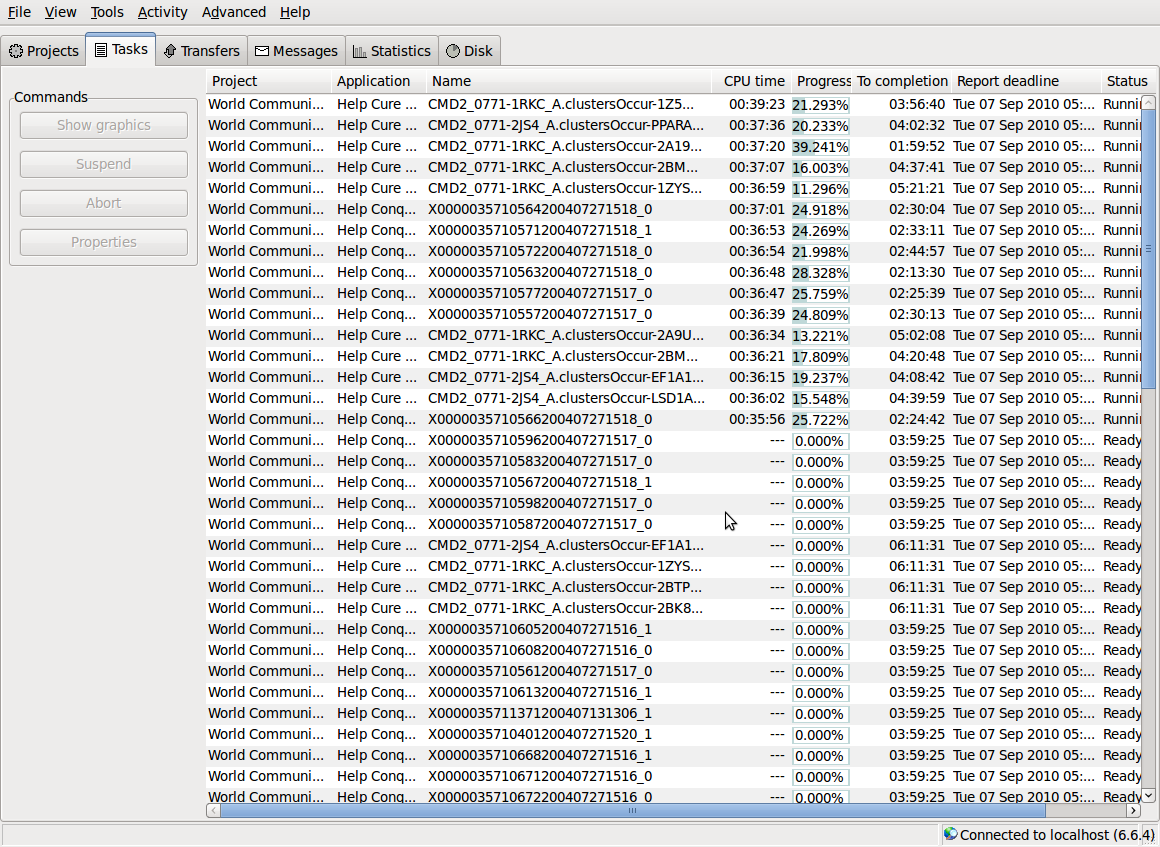
Well it is installed, I used a guide I found here for the BOINC install. It's an old "pre-release" version though so maybe I need to update it
And... I think I have enough cooling. Temps are upper 30's, not even hitting 40C
This is just epic, though...
Last edited by Sparky; 08-28-2010 at 02:20 PM.
The Cardboard Master Crunch with us, the XS WCG team
Intel Core i7 2600k @ 4.5GHz, 16GB DDR3-1600, Radeon 7950 @ 1000/1250, Win 10 Pro x64
let me ask you something. when you're viewing that page does it refresh itself or do you have to move the mouse within the window to "update" it?
Cruncher #1: EVGA Z68 FTW | i7-2600k @ 4.5 | 6GB Ram
Cruncher #2: Supermicro Dual-Socket | 2 x 6-core Opterons | 4GB Ram
Cruncher #3: 8-core Xserve 1,1
T400 for non-crunching
"But don't think you'll run me over - It's, ah, planting season here in Texas... and the farm is growing..." -Otis11 on crunching WCG
I have to move around in it for it to update. I thought it was frozen at first. Guess it has something to do with a linux thing because I noticed that when my mouse was outside of the console window I couldn't type in it.
The Cardboard Master Crunch with us, the XS WCG team
Intel Core i7 2600k @ 4.5GHz, 16GB DDR3-1600, Radeon 7950 @ 1000/1250, Win 10 Pro x64
yeah mine does that too. it looks frozen but it's not. pull up system monitor and look at the beautiful graph of sixteen cores working at the same time
Cruncher #1: EVGA Z68 FTW | i7-2600k @ 4.5 | 6GB Ram
Cruncher #2: Supermicro Dual-Socket | 2 x 6-core Opterons | 4GB Ram
Cruncher #3: 8-core Xserve 1,1
T400 for non-crunching
"But don't think you'll run me over - It's, ah, planting season here in Texas... and the farm is growing..." -Otis11 on crunching WCG
Hi guys, just had an email from Amit (rakicomputers) he has informed me he has quite a few of the arima quad socket boards up for grabs.
I'm waiting to find out how many and at what price - watch this space
I'm watching
i'm running lol
Cruncher #1: EVGA Z68 FTW | i7-2600k @ 4.5 | 6GB Ram
Cruncher #2: Supermicro Dual-Socket | 2 x 6-core Opterons | 4GB Ram
Cruncher #3: 8-core Xserve 1,1
T400 for non-crunching
"But don't think you'll run me over - It's, ah, planting season here in Texas... and the farm is growing..." -Otis11 on crunching WCG
Be nice to the crunching noob
OCM
Last edited by OC Maximus; 08-31-2010 at 08:12 PM.
 Posting Permissions


 Reply With Quote




Bookmarks