MMM
Page 41 of 54 FirstFirst ... 313839404142434451 ... LastLast
Results 1,001 to 1,025 of 1327

Thread: Q9450 OC / Temps / Settings

  1. #1001
    Xtreme Enthusiast
    Join Date
    Mar 2008
    Posts
    750
    Well, thanks to the HD 4870, again. The thing sits idle at 60C, and of course it's going to spread a bit out in the back of the card, where the NB and CPU are.
    And I have always had the impression that the latest BIOS does something weird... I'm at 0703 on my P5Q. So in the end, nothing was wrong, was it?
    Motherboard: ASUS P5Q
    CPU: Intel Core 2 Quad Q9450 @ 3.20GHz (1.07v vCore! )
    RAM: 2GB Kingston HyperX 800MHz
    GPU: MSI Radeon HD 4870 @ 780/1000 (default)

  2. #1002
    Xtreme Addict
    Join Date
    Feb 2008
    Posts
    1,118
    Quote Originally Posted by RunawayPrisoner View Post
    Well, thanks to the HD 4870, again. The thing sits idle at 60C, and of course it's going to spread a bit out in the back of the card, where the NB and CPU are.
    And I have always had the impression that the latest BIOS does something weird... I'm at 0703 on my P5Q. So in the end, nothing was wrong, was it?
    Now everything is fixed. The MB had a bad BIOS to begin with which I took out the first day I got it so, that means that bad chip when it was in here I flashed this chip I'm running on it must have some how contributed to the bad flash of this chip so it was a bad flash I was running on causing the issue.. Big run on there.. The bad chip is in my drawer and is unbootable completely. Asus said they would send me two new ones so.. Besides the chip sitting in my drawer everything is golden yes. I just swapped everything around in both cases and ran all my wires and fans all pretty again and man are my fingers sore from swapping her stock cooler around so much. so
    _____________________________________________


    Rig = GA-P67A-UD3P Rev 1.0 - 2600K @ 5.2~GHz 1.5v~, 1.489~v Under Load - Swiftech Water Cooling - 2 X 4GB Corsair DDR3 2000Mhz @ 1868MHz~ 9,10,9,27 @ 1.65v~ - Asus 6970 @ 950MHz / 1450MHz - 3x Western Digital RE3 320Gb 16Mb Cache SataII Drives in Raid0 - Corsair HX 850w Power Supply - Antec 1200 Case - 3DMark 11 Score = P6234 - 3DVantage Score = P26237

  3. #1003
    Registered User
    Join Date
    May 2008
    Location
    Philippines
    Posts
    18
    Name: JeffLO
    CPU: Intel Core 2 Quad Q9450
    Motherboard: MSI P45 Platinum
    Memory: 8GB Team Dark 1066
    Heatsink Fan: Thermalright IFX-14
    Stock Speed: 2660Mhz
    OCed Speed: 4038Mhz
    CPU Overclock: 51.46%
    BUS Overclock: 51.58%
    CPUZ Validation: http://valid.x86-secret.com/show_oc.php?id=399450
    3Dmark06: http://i6.photobucket.com/albums/y21...70790-1050.jpg
    Screenshot with OCCT Report :
    http://i6.photobucket.com/albums/y21...able/occt2.jpg
    http://i6.photobucket.com/albums/y21...able/occt3.jpg
    http://i6.photobucket.com/albums/y21...table/occt.jpg
    http://i6.photobucket.com/albums/y21...e/occtocct.jpg


    im running my q9450 with 1.48 vcore and vtt: 1.40 im gonna test this out and see if it will die on me so far so good been running 24/7 for atleast 3weeks, will update here if it die's hope not and everything is on air no watercooling
    and i dont know why occt is reporting 1.54 ive set 1.48 on mobo , max temp reading in real temp is 74c (o.c.c.t 2hours mix test)
    Last edited by JeffLo; 08-09-2008 at 01:40 PM.
    Processor: Intel Core2Quad Q9450 @ 3.839GHz
    Motherboard: MSI P45 Platinum
    Memory: 8GB Team Extreme Dark 1066
    Video Card: Palit 4870HD CF
    Hard Drives: 2 x SAMSUNG Spinpoint F1 HD103UJ 1TB
    PSU: Silverstone DA750
    Monitor: Samsung 2693HM
    Optical Drive: LG GH20
    CPU Cooler: Thermalright IFX-14 w/ IFX-10
    Mem Cooler: OCZ XTC
    Fans: 13 x coolermaster 120mm Led Fans
    Case: Stacker 830SE
    Fan Controller: Scythe Kama Meter
    others: Silverstone Aeroslot
    Mice: Logitech G9
    Keyboard: MS Sidewinder X6
    Pad: Razer Destructor


  4. #1004
    Xtreme Addict
    Join Date
    Jul 2007
    Location
    California
    Posts
    1,461
    1.4VTT could mean a dead chip in a month. I'd be careful with that, especially as some boards overvolt VTT on top of that... Not trying to scare you though.
    1.7%

  5. #1005
    Xtreme Enthusiast
    Join Date
    Mar 2008
    Posts
    750
    Gehh... just as I thought, 3.6GHz requires 1.2125v to be OCCT stable for me. Just the same as with 3.2GHz requiring 1.1225v. Ironically enough, Prime95 seems to require up to 0.03v less than that to stay stable(!).
    And you can guess that to run most games, encode most apps stable enough, you just need as much as Prime95.
    Hmm... will test Prime95 out tomorrow.
    Motherboard: ASUS P5Q
    CPU: Intel Core 2 Quad Q9450 @ 3.20GHz (1.07v vCore! )
    RAM: 2GB Kingston HyperX 800MHz
    GPU: MSI Radeon HD 4870 @ 780/1000 (default)

  6. #1006
    Xtreme Member
    Join Date
    Feb 2006
    Posts
    404
    [QUOTE=JeffLo;3203858]Name: JeffLO
    CPU: Intel Core 2 Quad Q9450
    Motherboard: MSI P45 Platinum
    Memory: 8GB Team Dark 1066
    Heatsink Fan: Thermalright IFX-14
    Stock Speed: 2660Mhz
    OCed Speed: 4038Mhz
    CPU Overclock: 51.46%
    BUS Overclock: 51.58%
    CPUZ Validation: http://valid.x86-secret.com/show_oc.php?id=399450
    3Dmark06: http://i6.photobucket.com/albums/y21...70790-1050.jpg
    Screenshot with OCCT Report :
    http://i6.photobucket.com/albums/y21...able/occt2.jpg
    http://i6.photobucket.com/albums/y21...able/occt3.jpg
    http://i6.photobucket.com/albums/y21...table/occt.jpg
    http://i6.photobucket.com/albums/y21...e/occtocct.jpg


    im running my q9450 with 1.48 vcore and vtt: 1.40 im gonna test this out and see if it will die on me so far so good been running 24/7 for atleast 3weeks, will update here if it die's hope not and everything is on air no watercooling
    and i dont know why occt is reporting 1.54 ive set 1.48 on mobo , max temp reading in real temp is 74c (o.c.c.t 2hours mix test)[/QUOTE

    Nix that, need more coffee Nice Job!

    Larry
    Q9650
    Asus P5Q-D Bios 1406
    280 GTX FC Block
    2x2gb OCZ Flex II PC2 9200
    Water Cooled/ Iwaki MD20/ D-Tek Fuzion
    XFX 850 Watt
    OWC SSD

  7. #1007
    Registered User
    Join Date
    May 2008
    Posts
    23
    Quote Originally Posted by RunawayPrisoner View Post

    Gehh... just as I thought, 3.6GHz requires 1.2125v to be OCCT stable for me. Just the same as with 3.2GHz requiring 1.1225v. Ironically enough, Prime95 seems to require up to 0.03v less than that to stay stable(!).
    And you can guess that to run most games, encode most apps stable enough, you just need as much as Prime95.
    Hmm... will test Prime95 out tomorrow.
    Have you noticed any major temp differences going so low on vcore? (@3.2Ghz)
    I tried a bit myself after reading your posts, and my 3.2Ghz OC ran stable on 1.16v while I tested it for a few hours in prime95 and used the PC for normal stuff/gaming for 6+ hours after that, but there was no temp difference from the 1.184v vcore I had before that.
    Didnt dare to go much lower yet though, when i started up at 1.15v it seemed like Windows hang for a short moment before finishing the start up, although it worked fine after that, so it might just have been random (didnt stress test it more than 10min or so to check load temps), went straight back to the old vcore again :P), just wondering if you saw any difference.
    Last edited by Shadout; 08-10-2008 at 08:18 PM.

  8. #1008
    Xtreme Enthusiast
    Join Date
    Mar 2008
    Posts
    750
    You wouldn't see any difference if it was from 1.18v to 1.16v. You would see something if it was from 1.16v to 1.09v, though. Mine boot up at 1.16v. I wasn't too happy with temps, so I went as low as I could. Now the system is either rock solid at 3.2GHz with 1.09v, or 3.6GHz with 1.19v. I bet 3.8GHz is going to require something like 1.28v or 1.32v to stay stable, but I won't go as high just yet.
    Motherboard: ASUS P5Q
    CPU: Intel Core 2 Quad Q9450 @ 3.20GHz (1.07v vCore! )
    RAM: 2GB Kingston HyperX 800MHz
    GPU: MSI Radeon HD 4870 @ 780/1000 (default)

  9. #1009
    Xtreme Addict
    Join Date
    Jul 2008
    Location
    SF, CA
    Posts
    1,294
    @Runaway
    I removed my motherboard for RMA last night and discovered I don't have that batch! I've got L815... Which i actually think might be better, as my temps seem to have been a lot lower.
    I'm still getting sick clocks for my volts, my latest being 3.8 at 1.28v rock stable, but my load temps on that were hovering at and just below 60C.
    I'm confident I could push it to the magical 4ghz everyone wants, but I'm not sure whether I want to wait for water before I try. In any event, I hope BlackOps will be more stable. I ended up liking that gigabyte board afterall, but the vdroop was killing me when trying to push fsb 480+
    [SIGPIC][/SIGPIC]
    [PURE] AWESOME

  10. #1010
    Xtreme Addict
    Join Date
    Jan 2005
    Posts
    1,386
    Quote Originally Posted by Slovnaft View Post
    @Runaway
    I removed my motherboard for RMA last night and discovered I don't have that batch! I've got L815... Which i actually think might be better, as my temps seem to have been a lot lower.
    I'm still getting sick clocks for my volts, my latest being 3.8 at 1.28v rock stable, but my load temps on that were hovering at and just below 60C.
    I'm confident I could push it to the magical 4ghz everyone wants, but I'm not sure whether I want to wait for water before I try. In any event, I hope BlackOps will be more stable. I ended up liking that gigabyte board afterall, but the vdroop was killing me when trying to push fsb 480+
    Hey Slov (trem from EOCF)!!

    My volts are quite similar, I still cant seem to get 4ghz stable and I, in theory, have a better board.

  11. #1011
    Xtreme Addict
    Join Date
    Jul 2008
    Location
    SF, CA
    Posts
    1,294
    whatup whatup treme. what happend over there?

    i've seen people push huge fsb with your board, so i dont think that's your limiting factor. how's the droop with that board? i mean, i dunno, but i've seen enough in this thread alone to make me confident that a good portion of these chips can make 4ghz with enough volts, making the dependent variable the reliability of board power.
    [SIGPIC][/SIGPIC]
    [PURE] AWESOME

  12. #1012
    Xtreme Addict
    Join Date
    Jan 2005
    Posts
    1,386
    I got banned for a week b/c I mentioned how I manipulated my "bought" mp3 files for easy naming. Apparently putting "bought" in quotes was enough for him to think I steal MP3 music and that is illegal.

    I went with this board b/c is 16 phase digital power and was hoping that was the issue. I seem to have 3.8 stable, but 4Ghz is a bear. In fact, its tough to even get it to boot at 4Ghz.

  13. #1013
    Xtreme Addict
    Join Date
    Jul 2008
    Location
    SF, CA
    Posts
    1,294
    heh, well good on you for even getting it to POST at 4ghz thats a step in the right direction. I could POST at 490 fsb, but no boot. I know very little about PWM besides the bigger is better rule, which leads me to believe its more nuanced than that. like my gigabyte board, which had 12 phase power, but turned out it was 'virtual' 12 phase power (whatever the hell that means). but that's neither here nor there.
    I don't know if i can get 4ghz with an X48 board, but I guess I'll find out.
    [SIGPIC][/SIGPIC]
    [PURE] AWESOME

  14. #1014
    Xtreme Addict
    Join Date
    Feb 2008
    Posts
    1,118
    Quote Originally Posted by Slovnaft View Post
    heh, well good on you for even getting it to POST at 4ghz thats a step in the right direction. I could POST at 490 fsb, but no boot. I know very little about PWM besides the bigger is better rule, which leads me to believe its more nuanced than that. like my gigabyte board, which had 12 phase power, but turned out it was 'virtual' 12 phase power (whatever the hell that means). but that's neither here nor there.
    I don't know if i can get 4ghz with an X48 board, but I guess I'll find out.

    I can't get my 9450 to boot past 495 and I think it is a fsb wall of the chip. I dropped my multiplier and still no go past 495.
    _____________________________________________


    Rig = GA-P67A-UD3P Rev 1.0 - 2600K @ 5.2~GHz 1.5v~, 1.489~v Under Load - Swiftech Water Cooling - 2 X 4GB Corsair DDR3 2000Mhz @ 1868MHz~ 9,10,9,27 @ 1.65v~ - Asus 6970 @ 950MHz / 1450MHz - 3x Western Digital RE3 320Gb 16Mb Cache SataII Drives in Raid0 - Corsair HX 850w Power Supply - Antec 1200 Case - 3DMark 11 Score = P6234 - 3DVantage Score = P26237

  15. #1015
    Xtreme Addict
    Join Date
    Jul 2008
    Location
    SF, CA
    Posts
    1,294
    Quote Originally Posted by truehighroller View Post
    I can't get my 9450 to boot past 495 and I think it is a fsb wall of the chip. I dropped my multiplier and still no go past 495.
    uh oh.
    what batch? and whatsyer volt settings?
    [SIGPIC][/SIGPIC]
    [PURE] AWESOME

  16. #1016
    Xtreme Addict
    Join Date
    Feb 2008
    Posts
    1,118
    Quote Originally Posted by Slovnaft View Post
    uh oh.
    what batch? and whatsyer volt settings?
    I will check it when I get home. Then again.. I lapped it so, was that info on the top of the chip? It doesn't matter what voltage I pump through anything.. I just can't get past 495. I tried upping the chips voltage to 1.35v and my nb voltage and fsb term and all that but, no go.. You would think that if I can run @ 475 x 8 all day every day and have no issues. I should be able to go to 7 x 500 with no issues at all right?
    _____________________________________________


    Rig = GA-P67A-UD3P Rev 1.0 - 2600K @ 5.2~GHz 1.5v~, 1.489~v Under Load - Swiftech Water Cooling - 2 X 4GB Corsair DDR3 2000Mhz @ 1868MHz~ 9,10,9,27 @ 1.65v~ - Asus 6970 @ 950MHz / 1450MHz - 3x Western Digital RE3 320Gb 16Mb Cache SataII Drives in Raid0 - Corsair HX 850w Power Supply - Antec 1200 Case - 3DMark 11 Score = P6234 - 3DVantage Score = P26237

  17. #1017
    Xtreme Addict
    Join Date
    Jul 2008
    Location
    SF, CA
    Posts
    1,294
    1.35? thats it? man you need to be more committed than that! i'd guess youd need closer to 1.4 to go 4ghz, and nb voltage really helps. I mean, i wasn't so ballsy with my cpu, but i pushed my nb voltage to the brink of frying ( i think i did cause it to fail once) to get 490 to POST. I'm guessing to make 4ghz work you're going to have to be willing to push your chip near frying territory. at least, that's what some of the results here leads me to believe.
    [SIGPIC][/SIGPIC]
    [PURE] AWESOME

  18. #1018
    Xtreme Addict
    Join Date
    Feb 2008
    Posts
    1,118
    Probably right there and no if it needs that much more voltage to go a couple more hundred Mhz then I don't need to go that far IMO.
    _____________________________________________


    Rig = GA-P67A-UD3P Rev 1.0 - 2600K @ 5.2~GHz 1.5v~, 1.489~v Under Load - Swiftech Water Cooling - 2 X 4GB Corsair DDR3 2000Mhz @ 1868MHz~ 9,10,9,27 @ 1.65v~ - Asus 6970 @ 950MHz / 1450MHz - 3x Western Digital RE3 320Gb 16Mb Cache SataII Drives in Raid0 - Corsair HX 850w Power Supply - Antec 1200 Case - 3DMark 11 Score = P6234 - 3DVantage Score = P26237

  19. #1019
    Registered User
    Join Date
    Aug 2008
    Location
    Canada
    Posts
    61

    Wink Thanks for the OC information

    EDIT:

    Link to my current Q9450 settings in the Asus P5Q Deluxe thread

    http://www.xtremesystems.org/forums/...postcount=2459

    Thanks all for the great posts, appreciate it
    Last edited by mac_69; 08-14-2008 at 10:11 PM. Reason: NEW settings Aug 14th
    P5QDeluxe Q9450 @3.6 8GB Corsair Dominator 8500
    Current AI settings: http://www.xtremesystems.org/forums/...postcount=2459

  20. #1020
    Xtreme Addict
    Join Date
    Jul 2008
    Location
    SF, CA
    Posts
    1,294
    Does anyone in this thread have BlackOps mobo with their Q9450?
    Seems like everyone on BlackOps has a QX or Q9650.
    I'm struggling to get past 3.2, which is not good, as I was on 3.8 and climbing on my gigabyte.
    [SIGPIC][/SIGPIC]
    [PURE] AWESOME

  21. #1021
    Registered User
    Join Date
    Jul 2008
    Posts
    2
    Hi,

    I have just built a new PC for the first time and used the supplied OClock utilities to get 3.6ghz on Air..

    Mobo: Asus Striker II Extreme
    CPU: Q9450 Batch L815 (i think its L815, but its deffo 815)
    CPU Cooling: Artic Freezer Pro 7
    Thermal Paste: Arctic Silver 5
    Memory :Corsair TWIN3X2048-1066C7 - Corsair Memory DDR3 2GB (2 x 1024MB)
    Case: Antec 1200 (Fans on full blow.nice blue leds!)
    Power: Corsair 1000W
    Graphics : BFG GTX 260 OC
    Vista 64

    The Mobo is on Auto everthing apart from :-
    Memory voltage set at 1.5.
    FSB set to 1600, Unlinked
    Memory Speed 1066

    The Pic below shows my Orthos testing for 7 hrs, but i am worried about the high temp on CPU0 at 67c , and wonder if i am at the limit of cpu temps..

    Coudl i drop the Cpu voltage and keep the FSB speed, and see how low i go till it all barffs? Any suggestions from the elightened ones..

    Anyhow... this was stable even when i ran 3DMark06 which gave me a score of 16081

    Next thing is to overclock the memory...

    ciao for now..
    Pete
    Attached Thumbnails Attached Thumbnails Click image for larger version. 

Name:	3600GhzAirDefault.jpg 
Views:	1038 
Size:	187.0 KB 
ID:	83527  
    Last edited by pprovart; 08-13-2008 at 02:34 AM.

  22. #1022
    Xtreme Addict
    Join Date
    Jul 2008
    Location
    SF, CA
    Posts
    1,294
    if you're worried about cpu0 you should be worried about all of them...
    idkno, i have the same batch and temps barely broke 50 at load at 3.8ghz(8x475). you may want to look at airflow, maybe reseat your hsf. 60s isn't really that bad, but i know I'd start worrying as it got close to 70, just as far as a 24/7 clock goes.
    [SIGPIC][/SIGPIC]
    [PURE] AWESOME

  23. #1023
    Registered User
    Join Date
    Jul 2008
    Posts
    2
    The Airflow in my Antec 12000 case shoudl go from Front to Back..

    The fans in the front suck in air, the fans at the back blow it out.

    In the middle is the Mobo with teh Arctic Freezer 7 Pro connected to the Asus Stiekr II Extreme Mobo..

    Hwoeve,r i couldnt get the hsf to fit properly to the cpu due to the Asus Fusion copper cooling fins supplied..

    so i turned the hsf through 90 degrees to blwo air to teh bottom of the case...

    So its not as efficient...

    I'll try remounting again... and see how i go..

    The temps you have are fab, and with a similar setup so i guess i know it can be done..just need to frig things around..

    Maye the force be with me..

  24. #1024
    Xtreme Addict
    Join Date
    Jul 2008
    Location
    SF, CA
    Posts
    1,294
    as i get off blackops and onto p5q3 i'm coming back to this thread with some real results.

    @pprovart -- make sure Tjmax is set to 95. I'm still on 2.6 so i'm not sure whether it already is, but if tjmax is at 105 it is reporting skewed temps.
    and make sure you're really skimping on TIM
    i mean, i guess also try undervolting as much as possible while maintaining the clock...try taking the voltage with a DMM to find out what your board is actually putting through...
    the chip shouldnt need quite that much voltage to be at 3.6
    if none of the above work, try lapping.
    [SIGPIC][/SIGPIC]
    [PURE] AWESOME

  25. #1025
    Banned
    Join Date
    Nov 2007
    Posts
    1,941
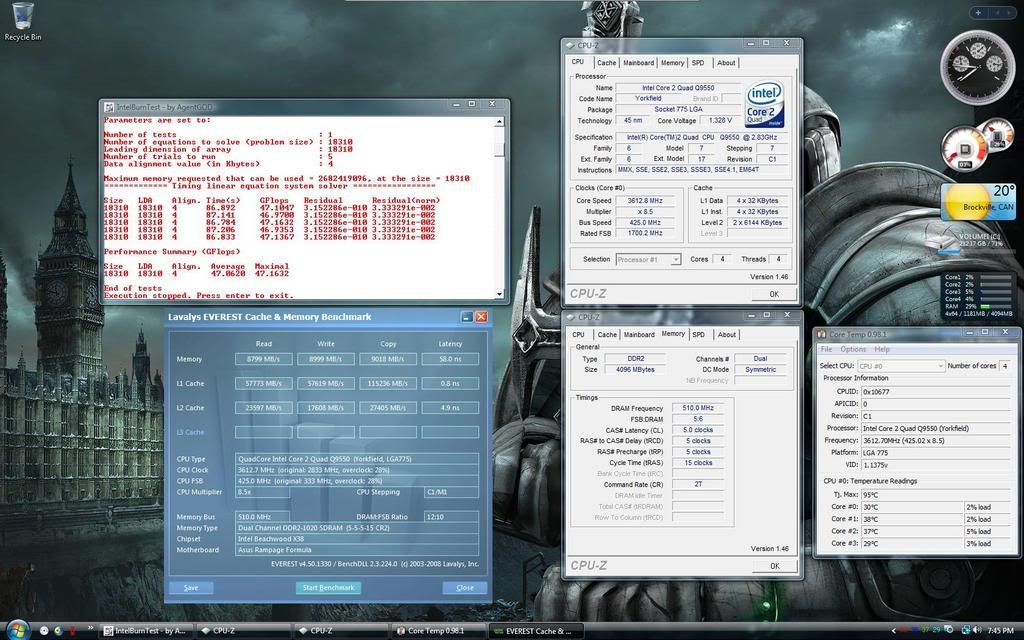
    I ran a quick test and have this so far.
    Could anyone comment on settings please.


    Extreme Tweaker
    Ai Overclock Tuner : Manual
    OC From CPU Level Up : AUTO
    CPU Ratio Control : Manual
    - Ratio CMOS Setting : 8.5
    FSB Frequency : 425
    FSB Strap to North Bridge : 333
    PCI-E Frequency: 110
    DRAM Frequency: DDR2-1021

    CLOCK SKEW advanced Normal both channels

    DRAM Command Rate : 2T
    DRAM Timing Control: Manual
    CAS# Latency : 5
    RAS# to CAS# Delay : 5
    RAS# Precharge : 5
    RAS# ActivateTime : 15
    RAS# to RAS# Delay : 3
    Row Refresh Cycle Time : 55
    Write Recovery Time : 6
    Read to Precharge Time : 3

    Read to Write Delay (S/D) : 8
    Write to Read Delay (S) : 3
    Write to Read Delay (D) : 5
    Read to Read Delay (S) : 4
    Read to Read Delay (D) : 6
    Write to Write Delay (S) : 4
    Write to Write Delay (D) : 6

    Write to PRE Delay : 14
    Read to PRE Delay : 5
    PRE to PRE Delay : 1
    ALL PRE to ACT Delay : 5
    ALL PRE to REF Delay : 5

    DRAM Static Read Control: Enabled
    Ai Clock Twister : Stronger
    Transaction Booster : Manual

    Common Performance Level [7]

    Pull-In of CHA PH1 Disabled
    Pull-In of CHA PH2 Disabled
    Pull-In of CHA PH3 Disabled
    Pull-In of CHA PH4 Disabled
    Pull-In of CHA PH5 Disabled
    Pull-In of CHB PH1 Disabled
    Pull-In of CHB PH2 Disabled
    Pull-In of CHB PH3 Disabled
    Pull-In of CHB PH4 Disabled
    Pull-In of CHB PH5 Disabled

    CPU Voltage : 1.35 (1.32 actual)
    CPU PLL Voltage : 1.60
    North Bridge Voltage : 1.51
    DRAM Voltage : 2.12
    FSB Termination Voltage : 1.22
    South Bridge Voltage : 1.050
    Loadline Calibration : Enabled
    CPU GTL Reference : 0.67X
    North Bridge GTL Reference : 0.67X
    DDR2 Channel A REF Voltage : DDR2-REFF
    DDR2 Channel B REF Voltage : DDR2-REFF
    DDR2 Controller REF Voltage : DDR2-REFF
    SB 1.5V Voltage : 1.5

Page 41 of 54 FirstFirst ... 313839404142434451 ... LastLast

Tags for this Thread

Bookmarks

Bookmarks

Posting Permissions

  • You may not post new threads
  • You may not post replies
  • You may not post attachments
  • You may not edit your posts
  •