MMM
Page 12 of 22 FirstFirst ... 29101112131415 ... LastLast
Results 276 to 300 of 535

Thread: Good design, good overclock, good pipe-The MSI P35 Neo2-FR overview

  1. #276
    Xtreme Member
    Join Date
    Jul 2006
    Location
    Do
    Posts
    267
    Hey guys, did you know this?

    A microcode reliability update is available that improves the reliability of systems that use Intel processors
    Link: http://support.microsoft.com/?kbid=936357

    I saw this on the OCZ Forums. If any of you are having system stability issues or strange system behaviour, get this update (for those using earlier BIOS).
    Excuse me for my English

  2. #277
    Xtreme Member
    Join Date
    Oct 2007
    Location
    Japan
    Posts
    253
    Quote Originally Posted by [LCN]Knowledge View Post
    Hey guys, did you know this?


    Link: http://support.microsoft.com/?kbid=936357

    I saw this on the OCZ Forums. If any of you are having system stability issues or strange system behaviour, get this update (for those using earlier BIOS).
    It's included in XP SP3 RC1.

    Anyone tried beta BIOS 1.81? I'm using it now but it seems not as good as 1.77.
    Core i7 920
    Scythe Mugen 2
    Silicon Power DDR3-1333 2GBx3
    Gigabyte EX58-UD4
    Palit GTX 260 Sonic 896MB
    Samsung Spinpoint F1 640GBx2 Matrix RAID
    Samsung Spinpoint F2 1TB
    Creative Audigy 2 ZS
    Winfast TV2000 XP Expert
    Antec Earthwatts 650W
    Coolermaster CM 690
    LG W2442PA
    Win 7 RC x64

  3. #278
    Xtreme Member
    Join Date
    Jul 2006
    Location
    Do
    Posts
    267
    Quote Originally Posted by wyemarn View Post
    It's included in XP SP3 RC1.

    Anyone tried beta BIOS 1.81? I'm using it now but it seems not as good as 1.77.
    I just flashed to 1.81, it is still beta, but i can't notice any difference, just that it shows real vdroop (comparing against v1.1).

    I wanted a BIOS that help me push my memory a bit farther, running it at DDR-2 900 5-5-5-15. No matter what i do, they wont pass memtest any higher.

    Is BIOS 1.77 better than 1.1? regarding overclocking and stability.
    Excuse me for my English

  4. #279
    Xtreme Member
    Join Date
    Oct 2007
    Location
    Japan
    Posts
    253
    Quote Originally Posted by [LCN]Knowledge View Post
    I just flashed to 1.81, it is still beta, but i can't notice any difference, just that it shows real vdroop (comparing against v1.1).

    I wanted a BIOS that help me push my memory a bit farther, running it at DDR-2 900 5-5-5-15. No matter what i do, they wont pass memtest any higher.

    Is BIOS 1.77 better than 1.1? regarding overclocking and stability.
    Try upping the tRFC. Actually no difference between 1.1 or 1.77 if you set the correct voltage. Vdrroop is normal. Setting 1.3V in 1.1 = 1.35V in 1.77.
    Core i7 920
    Scythe Mugen 2
    Silicon Power DDR3-1333 2GBx3
    Gigabyte EX58-UD4
    Palit GTX 260 Sonic 896MB
    Samsung Spinpoint F1 640GBx2 Matrix RAID
    Samsung Spinpoint F2 1TB
    Creative Audigy 2 ZS
    Winfast TV2000 XP Expert
    Antec Earthwatts 650W
    Coolermaster CM 690
    LG W2442PA
    Win 7 RC x64

  5. #280
    Xtreme Member
    Join Date
    Jul 2006
    Location
    Do
    Posts
    267
    Yeah i did an extensive research about memory subtiming and I guess my memory is already maxed out. I tried tRFT at 62 but not luck.
    Excuse me for my English

  6. #281
    Registered User
    Join Date
    Sep 2006
    Location
    Singapore
    Posts
    321
    Quote Originally Posted by wyemarn View Post
    Try upping the tRFC. Actually no difference between 1.1 or 1.77 if you set the correct voltage. Vdrroop is normal. Setting 1.3V in 1.1 = 1.35V in 1.77.
    Yup, noticed the voltages too.

  7. #282
    Xtreme Member
    Join Date
    Oct 2007
    Location
    Japan
    Posts
    253
    Core i7 920
    Scythe Mugen 2
    Silicon Power DDR3-1333 2GBx3
    Gigabyte EX58-UD4
    Palit GTX 260 Sonic 896MB
    Samsung Spinpoint F1 640GBx2 Matrix RAID
    Samsung Spinpoint F2 1TB
    Creative Audigy 2 ZS
    Winfast TV2000 XP Expert
    Antec Earthwatts 650W
    Coolermaster CM 690
    LG W2442PA
    Win 7 RC x64

  8. #283
    Registered User
    Join Date
    Dec 2007
    Posts
    2
    Guys i like that board. It looks very good and its cheap. I have question. Can i chase extreme overclocks with E8400 and that board (Neo2-FR)?

  9. #284
    Xtreme Member
    Join Date
    Jul 2006
    Location
    Do
    Posts
    267
    Quote Originally Posted by s0bieski View Post
    Guys i like that board. It looks very good and its cheap. I have question. Can i chase extreme overclocks with E8400 and that board (Neo2-FR)?
    Sure you can, i don't see why not. I'm very happy with mine. Lot of options in BIOS (Cell menu) for overclocking. Also my CPU and RAM go very well along with this board.

    The only thing holding me back is my memory, but i'm still pushing, i guess i can do 3.4 but the memory will top out at that speed.

    Excuse me for my English

  10. #285
    Xtreme Member
    Join Date
    Jul 2006
    Location
    Do
    Posts
    267
    Ppl have pushed this board to 570 FSB, and i see more and more ppl having good OC with it. Look a this: http://forums.hardwarezone.com.sg/sh....php?t=1754798

    And this is the official MSI guide for Maxing out Core2 with P35 Neo2FR/P35 Platinum: http://www.msicomputer.com/msiforms2/maxP35.asp


    Last edited by [LCN]Knowledge; 01-24-2008 at 01:01 PM.
    Excuse me for my English

  11. #286
    Registered User
    Join Date
    Jan 2008
    Location
    Long Beach, CA
    Posts
    39
    Yo~

    1. Anyone have any OC information on 8400 with this mobo?

    2. Will this mobo boot up with the 8400 so I can flash it to the updated bios? I don't have a 775 CPU to flash this mobo with.

    Thanks in Advanced.

    E8400 @ 4006ghz Q746 1/4/08
    Scythe SCKTN-2000 100mm Sleeve "Katana 2"
    MSI Neo2-FR bios 1.8
    (2x1gb)Crucial Ballistix 6400
    Western Digital Caviar 250GB
    ZOTAC GeForce 8800GT
    COOLER MASTER Elite 330
    Corsair vx550w PSU

  12. #287
    Registered User
    Join Date
    Jan 2008
    Location
    Long Beach, CA
    Posts
    39
    Quote Originally Posted by turtleonviagra View Post
    I just checked again on the MSI website, and it states support for 45nm chips has been since BIOS v1.4.
    So, now I just hope I get a Rev 1.2 board.
    What is the main difference between rev 1.2 and other revisions? Does it overclock as good?
    WSX, how is your Neo2 FR rev 1.2?
    The site says since BIOS 1.6.

    http://global.msi.com.tw/index.php?f...1&maincat_no=1

    E8400 @ 4006ghz Q746 1/4/08
    Scythe SCKTN-2000 100mm Sleeve "Katana 2"
    MSI Neo2-FR bios 1.8
    (2x1gb)Crucial Ballistix 6400
    Western Digital Caviar 250GB
    ZOTAC GeForce 8800GT
    COOLER MASTER Elite 330
    Corsair vx550w PSU

  13. #288
    Xtreme Member
    Join Date
    Jul 2006
    Location
    Do
    Posts
    267
    The board will boot E8200 with BIOS 1.1. I guess it should boot with E8400/E8500 too. Of course you should flash to a newer BIOS for better performance

    Test Setup :
    E8200 w/Intel default cooler.
    Msi P35 Neo2-Fr Bios v1.1/1.81b
    Corsair 6400C4DHX 2GB
    Msi 8800GT 512Mb -OC Edition(Red Juliet)
    Hitachi 160Gb sata
    Acbel iGold 550w

    Neo2/platinum Users take note:
    If you are on any bios earlier than v1.6.
    Do not worry, it will still boot and run fine.
    You can always flash the bios later.
    Here is the link: http://forums.hardwarezone.com.sg/sh....php?t=1840396
    Excuse me for my English

  14. #289
    Xtreme Member
    Join Date
    Jul 2006
    Location
    Do
    Posts
    267
    I guess this is the limit for these memories, they would need more voltage or loosening the timings a bit more, but i don't like those voltages. 3.2/3.3 with 4-4-4-15 timings and lower voltages is better for my taste

    Excuse me for my English

  15. #290
    Registered User
    Join Date
    Aug 2005
    Location
    Sweden
    Posts
    86
    I have ~5 degrees celsius hotter temps on this board than my old Asus P5N-E SLI board with same CPU and settings. Does anybody experience the same?
    I7 2600K
    Asrock P67 Extreme4
    8Gb Team Xtreem
    Sapphire HD6950
    Cooltek 600W

  16. #291
    Xtreme Cruncher
    Join Date
    Mar 2005
    Location
    Lancaster, PA
    Posts
    3,814
    Just so everyone with this board knows, the onboard voltage sensors are crap, and vDroop is awesome.

    With 1.48v selected in BIOS, I get 1.495 measured on my DMM and 1.485 running OCCT.

    Speedfan reads 1.46 idle and 1.43 running OCCT.
    A wolf in wolves clothing.

  17. #292
    Xtreme Member
    Join Date
    Oct 2007
    Location
    Japan
    Posts
    253
    Quote Originally Posted by [XC] DragonOrta View Post
    Just so everyone with this board knows, the onboard voltage sensors are crap, and vDroop is awesome.

    With 1.48v selected in BIOS, I get 1.495 measured on my DMM and 1.485 running OCCT.

    Speedfan reads 1.46 idle and 1.43 running OCCT.
    Does that mean no Vdroop when measured with your DMM? Your speedfan readings are quite good. Same with mine. 0.02V lower when idle and 0.04~0.05V lower when under olad
    Core i7 920
    Scythe Mugen 2
    Silicon Power DDR3-1333 2GBx3
    Gigabyte EX58-UD4
    Palit GTX 260 Sonic 896MB
    Samsung Spinpoint F1 640GBx2 Matrix RAID
    Samsung Spinpoint F2 1TB
    Creative Audigy 2 ZS
    Winfast TV2000 XP Expert
    Antec Earthwatts 650W
    Coolermaster CM 690
    LG W2442PA
    Win 7 RC x64

  18. #293
    Registered User
    Join Date
    Sep 2006
    Location
    Singapore
    Posts
    321
    Thanks for the info. DragonOrta.

  19. #294
    Xtreme Cruncher
    Join Date
    Mar 2005
    Location
    Lancaster, PA
    Posts
    3,814
    Quote Originally Posted by wyemarn View Post
    Does that mean no Vdroop when measured with your DMM? Your speedfan readings are quite good. Same with mine. 0.02V lower when idle and 0.04~0.05V lower when under load
    I get .005-.01v vDroop on mine, which is even lower than my P5K-E has with CPU Damper enabled.

    I started poking around with my DMM because Speedfan was reporting 2.58 vDimm when I selected 2.15v in BIOS, which scared the hell out of me. DMM reported the 2.15v that I selected in BIOS, so I decided to figure out what else wasn't being reported right.
    A wolf in wolves clothing.

  20. #295
    Xtreme Enthusiast
    Join Date
    Jan 2008
    Posts
    614
    Hello all. I'm on the Platinum, but they're the same.
    First I'd like to say I really like this board given the first impressions I've had with it. It took my old E6600 which topped out @3.5Ghz on Asus P5W DH to 3.8GHz. I am now using this board with my new 8400 and as most of us are aware, booting @4.5Ghz is not a big deal with this combination. Mine is currently Orthos stable 11hrs@4.1 and 4.3G, for whatever that's worth, albeit with a little of a high idle temp.
    Having said that, I'd like to iron out a few things in order to be on the same page with every one about this board.
    Here are my questions:
    1. Still works with E8400 on Bios v.1.1, would upgrading Bios help with further performance and/or lowering temp?
    2. This is sort of a comment: In terms of PCIE Frequency, when I set it to 101...the Sound card doesn't work. Resetting to 100 works. Just in case any one has this problem.
    3. 5xSATA is a little bit lacking.
    4. Setting a lower multi does not work. After setting a multi of 8, or 8.5, the board boots into Windows with a multi of 9 using the same FSB. Is this observed elsewhere?
    5. Here are the voltages for my OC, please feel free to suggest any adjustments that might allow better results:
    FSB@456x9=4.10Ghz
    Vcore=1.3875
    Memv=2.2
    VTT FSB Vcore=1.25
    NB voltage=1.5
    SB I/O Pwr = 1.5
    SV Core Pwr=1.15
    Auto Disable DIMM/PCI Frequency=enabled


    Adv. DRAM Conf:: 5-5-5-15

    Idle Temp ~ 49C
    Load Temp ~70C
    Ambient ~30C
    The system ran Orthos Small for 11 hrs, Memtest passed @ this setting.

    6. There is agonizingly slow boot time particularly @ the "Initializing..." stage. Is this due to something and what can I do to correct it?
    Thanks every one.
    Modded Cosmos. | Maximus II Formula. Bios 1307| 2x2 Mushkin XP ASCENT 8500 | Q9550-E0- 4.10 + TRUE | Visiontek HD4870X2 | LN32A550 1920x1080 | X-FI Extreme Gamer | Z5300E | G15v.1 | G7 | MX518 | Corsair HX1000 | X25-MG2 80G | 5xHDD
    ____________________________________
    Quote Originally Posted by saaya View Post
    most people dont care about opencl, physix, folding at home and direct compute... they want cool explosions and things blowing up and boobs jumping around realistically... .

  21. #296
    Xtreme Member
    Join Date
    Oct 2007
    Location
    Japan
    Posts
    253
    Quote Originally Posted by [XC] DragonOrta View Post
    I get .005-.01v vDroop on mine, which is even lower than my P5K-E has with CPU Damper enabled.

    I started poking around with my DMM because Speedfan was reporting 2.58 vDimm when I selected 2.15v in BIOS, which scared the hell out of me. DMM reported the 2.15v that I selected in BIOS, so I decided to figure out what else wasn't being reported right.
    Speefan also reported higher vDimm with mine. I set 1.85V in BIOS but speedfan reporting 2.18V. So what is the real voltage with DMM? I agree the Fintek controller is crap. Nowhere near ASUS and uGuru's sensor.

    Quote Originally Posted by ragzarok View Post
    Hello all. I'm on the Platinum, but they're the same.
    First I'd like to say I really like this board given the first impressions I've had with it. It took my old E6600 which topped out @3.5Ghz on Asus P5W DH to 3.8GHz. I am now using this board with my new 8400 and as most of us are aware, booting @4.5Ghz is not a big deal with this combination. Mine is currently Orthos stable 11hrs@4.1 and 4.3G, for whatever that's worth, albeit with a little of a high idle temp.
    Having said that, I'd like to iron out a few things in order to be on the same page with every one about this board.
    Here are my questions:
    1. Still works with E8400 on Bios v.1.1, would upgrading Bios help with further performance and/or lowering temp?
    2. This is sort of a comment: In terms of PCIE Frequency, when I set it to 101...the Sound card doesn't work. Resetting to 100 works. Just in case any one has this problem.
    3. 5xSATA is a little bit lacking.
    4. Setting a lower multi does not work. After setting a multi of 8, or 8.5, the board boots into Windows with a multi of 9 using the same FSB. Is this observed elsewhere?
    5. Here are the voltages for my OC, please feel free to suggest any adjustments that might allow better results:
    FSB@456x9=4.10Ghz
    Vcore=1.3875
    Memv=2.2
    VTT FSB Vcore=1.25
    NB voltage=1.5
    SB I/O Pwr = 1.5
    SV Core Pwr=1.15
    Auto Disable DIMM/PCI Frequency=enabled


    Adv. DRAM Conf:: 5-5-5-15

    Idle Temp ~ 49C
    Load Temp ~70C
    Ambient ~30C
    The system ran Orthos Small for 11 hrs, Memtest passed @ this setting.

    6. There is agonizingly slow boot time particularly @ the "Initializing..." stage. Is this due to something and what can I do to correct it?
    Thanks every one.
    1. Newer BIOS means more bug fix and newer firmware for your built in controllers. I suggest that you try the new ones and flash back to 1.1 if you are not satisfied. Pls bear in mind that if you flash to BIOS 1.4 and above, the lowest Vcore would be the CPU's VID. That means you have to set the Vcore 0.05V higher than your current settings to get the same voltage.

    2. I have no problems with 105 or even more. Actually there is little or no performance benefit by upping PCI-E speed. Maybe new BIOS could solve the problem. Try the latest BIOS or stick with 100mhz

    3. Actually the total no of SATA is 7. Two ports from ICH9-R are used as external sata. Ideal for external RAID setup. Do you actually need 5x500GB?

    4. Did you turn of C1E and Speedstep? If not, mobo will automatically change the ratio. I have no problems running at 6, the lowest ratio.

    5. I running on a different CPU but on that FSB speed(456) my system and RAM is stable with these voltages.
    RAM : 1.85V (5-5-5-12)
    VTT : 1.2V
    NB : 1.275
    SB I/O : 1.6
    SB Core : 1.05V

    IMHO, chipset doesn't need extreme voltages below FSB 500.

    6. Did you enable Fast Boot? Maybe you have a lot of device. Try unplugging your USB devices and check the boot time.

    Your temps are pretty high for 24/7 usage. I suggest you lower the Vcore and speed. Maybe 4Ghz would be ideal because no much difference in games after C2D passes 3Ghz. If you are doing encoding, should have got a quad.
    Last edited by wyemarn; 01-25-2008 at 11:26 PM.
    Core i7 920
    Scythe Mugen 2
    Silicon Power DDR3-1333 2GBx3
    Gigabyte EX58-UD4
    Palit GTX 260 Sonic 896MB
    Samsung Spinpoint F1 640GBx2 Matrix RAID
    Samsung Spinpoint F2 1TB
    Creative Audigy 2 ZS
    Winfast TV2000 XP Expert
    Antec Earthwatts 650W
    Coolermaster CM 690
    LG W2442PA
    Win 7 RC x64

  22. #297
    Registered User
    Join Date
    Sep 2006
    Location
    Singapore
    Posts
    321
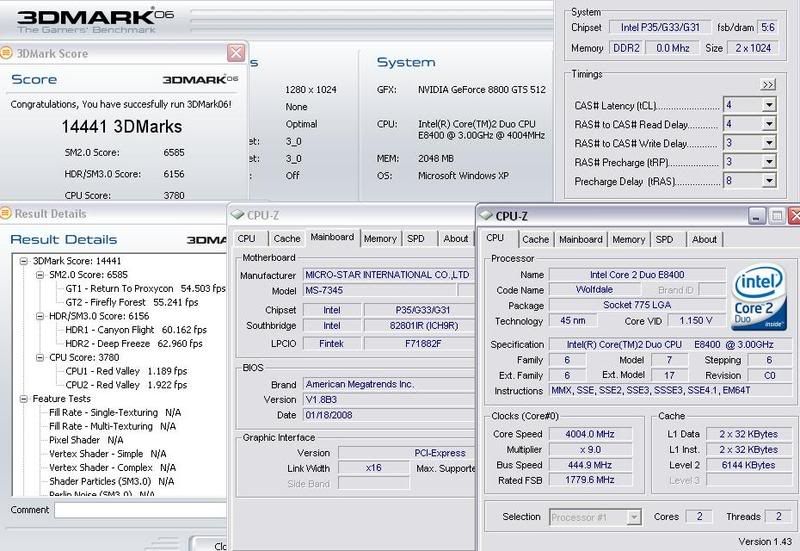
    Juz did a quick run on my E8400...
    i didn't get a good chip thou...
    Will try out more tomorrow..
    Booted @ 1.1 then I flashed the bios over.
    Using bios 1.83 now.


  23. #298
    Xtreme Member
    Join Date
    Jan 2008
    Posts
    117
    Awesome review
    PENGUIN BOX

    CPU------X2 3800+ Toledo @2.6Ghz (260x10 1.35v)
    MOBO----Asus A8N-SLI Deluxe
    RAM------OCZ Gold 2x1GB @ 2.5-3-3-6-1T DDR434
    Video-----EVGA 7900GTO


    HEAT

  24. #299
    Registered User
    Join Date
    Jan 2008
    Location
    Long Beach, CA
    Posts
    39
    Quote Originally Posted by clon22 View Post
    Juz did a quick run on my E8400...
    i didn't get a good chip thou...
    Will try out more tomorrow..
    Booted @ 1.1 then I flashed the bios over.
    Using bios 1.83 now.


    Sorry I am new to all this overclocking stuff. But how is that not a good chip? Your're getting 4ghz with only 1.150v. Is'nt that really GOOD?

    E8400 @ 4006ghz Q746 1/4/08
    Scythe SCKTN-2000 100mm Sleeve "Katana 2"
    MSI Neo2-FR bios 1.8
    (2x1gb)Crucial Ballistix 6400
    Western Digital Caviar 250GB
    ZOTAC GeForce 8800GT
    COOLER MASTER Elite 330
    Corsair vx550w PSU

  25. #300
    Registered User
    Join Date
    Dec 2007
    Posts
    27
    I changed my 4x1GB Team Elite 800 with some Adata 2x2GB 800+ kit.
    Runs at 1000MHz 5-5-5-18 2.0v for now and I managed up to 1060MHz, using only 2.0-2.1v .
    This is the memory:
    http://shop3.outpost.com/product/5475029
    Actually thats not the memory I have, I couldn't find the one in US stores.
    This is what I have:
    http://www.memoryc.com/products/desc...kit/index.html
    Last edited by tty; 01-26-2008 at 03:43 AM.

Page 12 of 22 FirstFirst ... 29101112131415 ... LastLast

Bookmarks

Bookmarks

Posting Permissions

  • You may not post new threads
  • You may not post replies
  • You may not post attachments
  • You may not edit your posts
  •