MMM
Page 1 of 2 12 LastLast
Results 1 to 25 of 43

Thread: Fooling the 1333 strap over 400fsb

  1. #1
    Xtreme Member
    Join Date
    Jul 2006
    Location
    Norway
    Posts
    225

    Fooling the 1333 strap over 400fsb

    Like it says,on my Asus P5B E Plus and other 965 mobos the 1333 strap kick in over 400fsb if you set in bios . Even when you are on 1066 strap.
    Whoever if you set 400 in bios and use clockgen from 400fsb,you will fool the 1333 strap and still use 1066 via clockgen.
    I tried this and found out a few things.

    First off,you need some hardcore memory that can handle low latency,because soon you are into 50ns and lower.
    I tested this with superpi 4m and found that if you use clockgen and fool the strap,you will gain 5 sec in spi4M....thats alot. Will post that pic later too profe it

    I also tried to find out who high can i go on 1066 strap over 400fsb. It was HARD i must say,up to 450 it was pretty easy with my Crucial 10th Anniversary,but then i really needed to tweak the mem.
    I did not use the lowest possible cas,but im happy with what i manage.
    This is no maxtest just a test to see the differ in 1066 over 1333 strap.

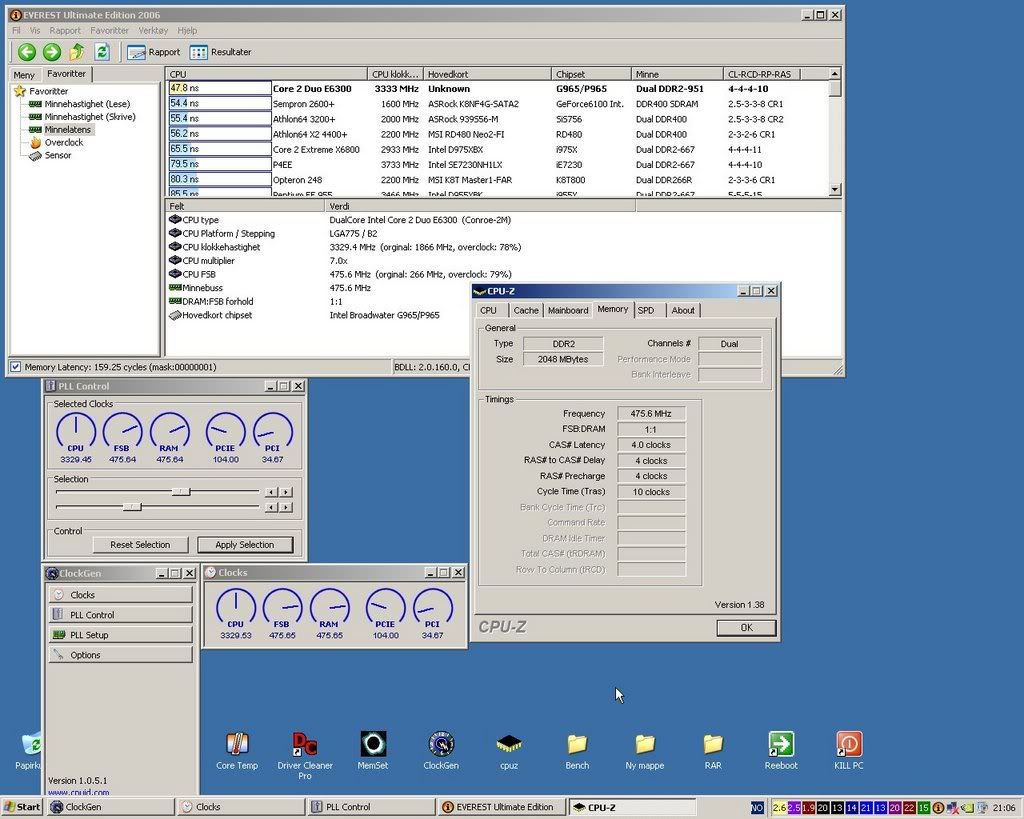
    Heres a pic of 1066 forced strap on 475fsb,this was not done the first time i tried...lol... 47,8ns!!
    with 1333 strap on 475 it was 62,4ns!! interessting i must say...

    Take a look


    Will find some other pics...

    ----cheers----
    Last edited by Norz; 01-17-2007 at 03:56 AM.
    Sub Zero Lives

  2. #2
    Xtreme Member
    Join Date
    Jul 2006
    Location
    Norway
    Posts
    225
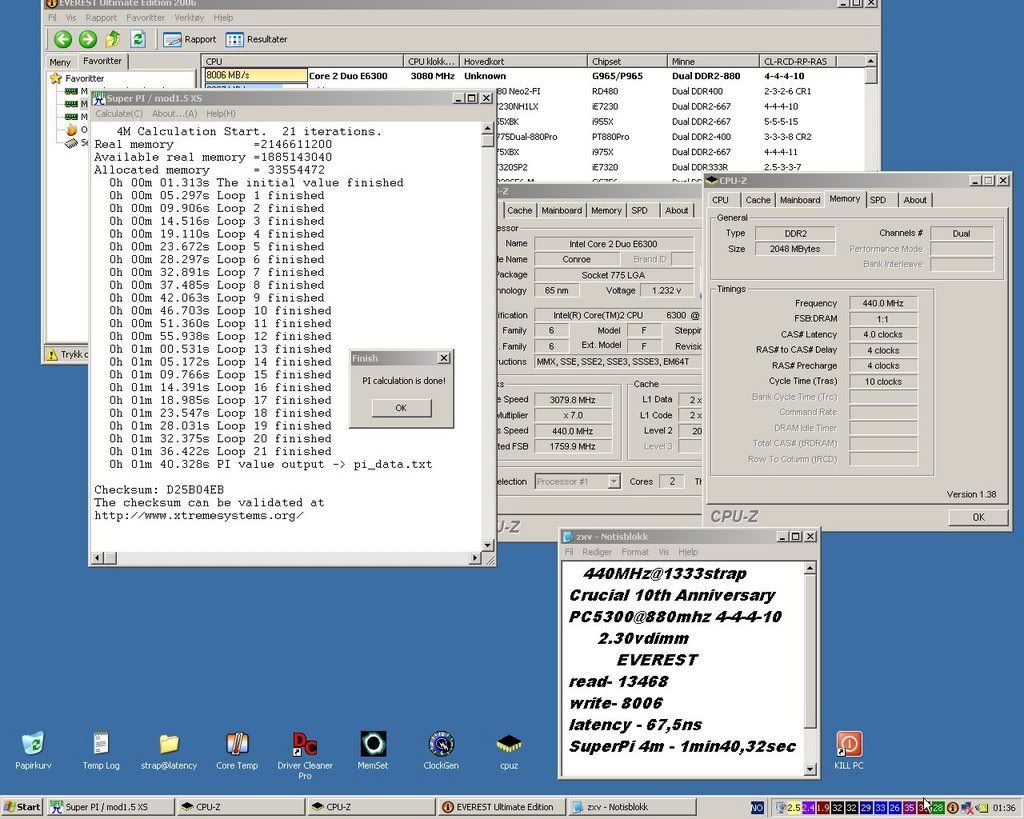
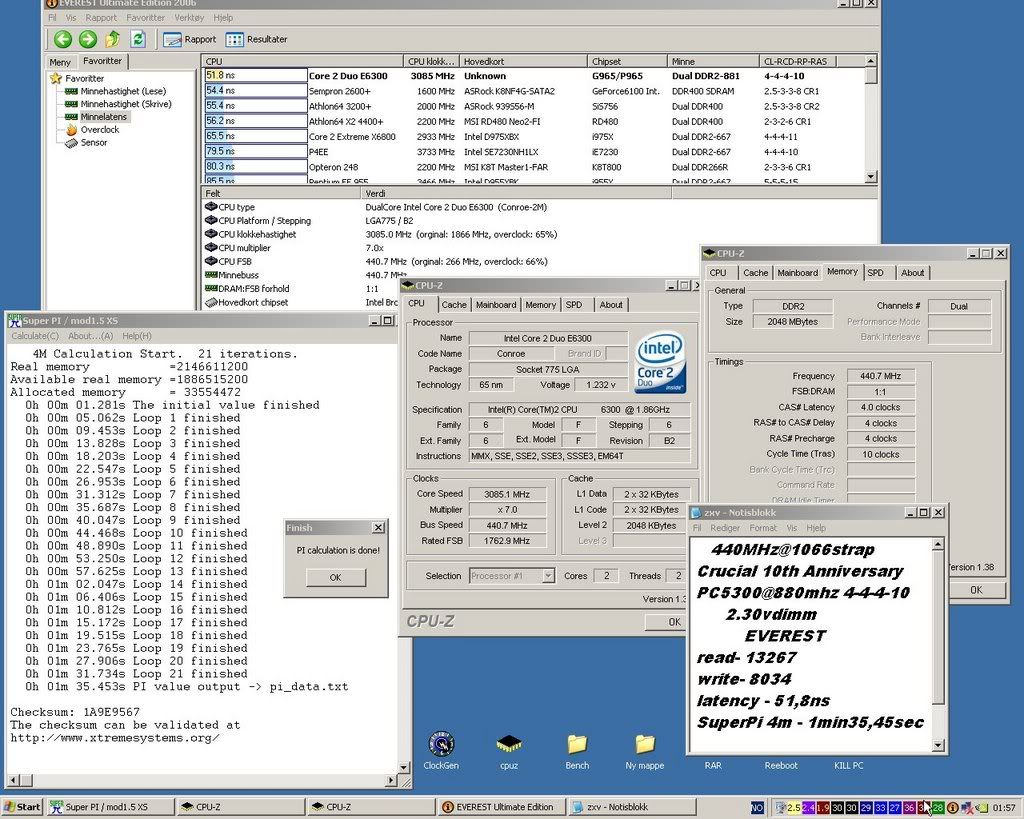
    And heres a live benchmark,spi4M...
    1066 strap@440fsb and 1333 strap@440fsb

    5 sec differ ....thats alot...


    Sub Zero Lives

  3. #3
    Wanna look under my kilt?
    Join Date
    Jun 2005
    Location
    Glasgow-ish U.K.
    Posts
    4,396
    well this info is well known but I was under the assumption the internal chipset latencies stayed at those set for 1066 and couldnt handle much over 410-420FSB, depending on the silicon, the memory wasnt the issue?
    Quote Originally Posted by T_M View Post
    Not sure i totally follow anything you said, but regardless of that you helped me come up with a very good idea....
    Quote Originally Posted by soundood View Post
    you sigged that?

    why?
    ______

    Sometimes, it's not your time. Sometimes, you have to make it your time. Sometimes, it can ONLY be your time.

  4. #4
    Xtreme Member
    Join Date
    Jul 2006
    Location
    Norway
    Posts
    225
    Quote Originally Posted by K404
    well this info is well known but I was under the assumption the internal chipset latencies stayed at those set for 1066 and couldnt handle much over 410-420FSB, depending on the silicon, the memory wasnt the issue?

    Well,i used this sticks

    Micron D9GMH (B6-3)

    I have some moore numbers,will find them and post it. I have pics for all my numbers you just ask if you wanna see
    Sub Zero Lives

  5. #5
    Wanna look under my kilt?
    Join Date
    Jun 2005
    Location
    Glasgow-ish U.K.
    Posts
    4,396
    heh heh the "memory wasnt the issue" was more of a statement..obviously the memory is involved, but its the chipset that falls over UNLESS theres also hidden RAM timings that are or arent changed for a forced strap, but my money is on it being a chipset thing.
    Quote Originally Posted by T_M View Post
    Not sure i totally follow anything you said, but regardless of that you helped me come up with a very good idea....
    Quote Originally Posted by soundood View Post
    you sigged that?

    why?
    ______

    Sometimes, it's not your time. Sometimes, you have to make it your time. Sometimes, it can ONLY be your time.

  6. #6
    Xtreme Member
    Join Date
    Jul 2006
    Location
    Norway
    Posts
    225
    Heres some numbers,on all settings:
    Asus P5B E Plus 533/1066 in bios all the time.
    Crucial 10th@4-4-4-10

    First ill do all the oc from bios,hit F10 and windows
    FSB LAT STRAP
    380 59,9ns 1066
    390 58,6 "
    400 56,7 "
    410 72,4 1333 kicks inn automatic
    425 69,7 "
    450 66,0 "
    475 62,4 "
    500 59,3 "

    So,i set 400fsb in bios and use clockgen up from here

    400 56,7ns 1066
    410 55,5 "
    425 53,5 "
    450 50,6 "
    475 47,8 "
    500....refuse to be set,freeze screen


    There you go.... interesting for me anyway,i think a E6600 running around 430-460fsb will gain alot on this..... i did not know,you guys are ahead ofcourse. Still interesting seeing it live for me.
    Sub Zero Lives

  7. #7
    Wanna look under my kilt?
    Join Date
    Jun 2005
    Location
    Glasgow-ish U.K.
    Posts
    4,396
    I couldnt get a clockgenned OC stable past 410...I`ll try again today, tho i`m only using a P5B Deluxe...maybe the "plus" model has been revised slighty...makes me wonder how the Commando will do
    Quote Originally Posted by T_M View Post
    Not sure i totally follow anything you said, but regardless of that you helped me come up with a very good idea....
    Quote Originally Posted by soundood View Post
    you sigged that?

    why?
    ______

    Sometimes, it's not your time. Sometimes, you have to make it your time. Sometimes, it can ONLY be your time.

  8. #8
    Xtreme Member
    Join Date
    Feb 2005
    Location
    Ankara, Turkey
    Posts
    233
    Last edited by ooztuncer; 01-17-2007 at 07:00 AM.

  9. #9
    Xtreme 3DTeam Member
    Join Date
    Aug 2003
    Location
    Germany
    Posts
    1,875
    Timings on the ram are really important to reach high FSB on 1066-strap. Need some hours to find out, which timings i can set stronger etc.

    Edit: Lol, ooztuncer..

    Look for results from me at the post above.
    Last edited by funkflix; 01-17-2007 at 06:29 AM.
    PC : Asrock Z68 Extreme3 Gen3 + Intel Core i5 i2500k + 2 x Asus HD6870 DirectCU + 2x2GB PC12800 G.Skill Eco 7-8-7-24 + Creative X-Fi Titanium PCIe + Scythe Mugen 3.
    Digicam : Pentax *istDL2 + Pentax smc DA 18-55mm F3.5-5.6 AL + Cosina F3.5/100mm Makro.
    Heimkino : Samsung LE-46B450 FullHD + Arion AF-4000HDCI + Onkyo TX-SR505E + Quadral Quintas 5.0 + Heco Victa 25A.


  10. #10
    version 2.0
    Join Date
    Feb 2005
    Location
    Flanders
    Posts
    3,862
    I never understood why those chipset timings are 'hidden' on 965.
    The motherboard manufacturers could release a bios which allows you to tweak those timings yourself , no? Pretty lame imho.

  11. #11
    KiSUS
    Join Date
    Nov 2006
    Location
    Russia / Moscow
    Posts
    571
    Is only Asus Mobos sets 1333 strap when you set over 400 in the bios ?
    Lights, Music, Camera, Action !


  12. #12
    Xtreme 3DTeam Member
    Join Date
    Aug 2003
    Location
    Germany
    Posts
    1,875
    Only know that the Gigabytes are always on 1333 imho?!
    PC : Asrock Z68 Extreme3 Gen3 + Intel Core i5 i2500k + 2 x Asus HD6870 DirectCU + 2x2GB PC12800 G.Skill Eco 7-8-7-24 + Creative X-Fi Titanium PCIe + Scythe Mugen 3.
    Digicam : Pentax *istDL2 + Pentax smc DA 18-55mm F3.5-5.6 AL + Cosina F3.5/100mm Makro.
    Heimkino : Samsung LE-46B450 FullHD + Arion AF-4000HDCI + Onkyo TX-SR505E + Quadral Quintas 5.0 + Heco Victa 25A.


  13. #13
    IT Engineer in the making
    Join Date
    Jun 2003
    Location
    Former Kingdom of Bavaria
    Posts
    2,094
    A hardware mod should be able to solve that issue. If I'm not mistaking, you could override any bios strap setting this way. You just have to find the fid-pins of the clock generator and set them manually, i.e. soldering some connections or using conductive silver lacquer. That would mean that you wouldn't have to use clockgen any longer, but it would also mean that you should know what you are doing.
    Quote from one of our professors:
    "Reality is hiding in the imaginary part."

  14. #14
    Xtreme Member
    Join Date
    Jul 2006
    Location
    Norway
    Posts
    225
    Quote Originally Posted by celemine1Gig
    A hardware mod should be able to solve that issue. If I'm not mistaking, you could override any bios strap setting this way. You just have to find the fid-pins of the clock generator and set them manually, i.e. soldering some connections or using conductive silver lacquer. That would mean that you wouldn't have to use clockgen any longer, but it would also mean that you should know what you are doing.

    Anyone tried this mod?....Perfect for E6600,but ill keep the strap for my E6300,1066strap on 550fsb .....dont think so....lol...

    Nice links also,bit i have to say,i did not do this for pushing max,i only found this out,tested it.......and you guys had done a long time ago...lol...

    -----cheers---
    Sub Zero Lives

  15. #15
    Xtreme Member
    Join Date
    Jul 2006
    Location
    Norway
    Posts
    225
    Quote Originally Posted by K404
    I couldnt get a clockgenned OC stable past 410...I`ll try again today, tho i`m only using a P5B Deluxe...maybe the "plus" model has been revised slighty...makes me wonder how the Commando will do
    This Asus P5B E Plus is only a rev.2C.no mods....
    And this is what i got from a cold late night session today (Nite)

    Only watercooled,cpu and chipset,also did a few spi run at 3841mhz,i really like my new Asus

    Sub Zero Lives

  16. #16
    Tyler Durden
    Join Date
    Oct 2003
    Location
    Massachusetts, USA
    Posts
    5,623
    My p5B seems to handle 450+ in 1066 strap with ease. What voltages are you running?
    Formerly XIP, now just P.

  17. #17
    Xtreme Member
    Join Date
    Jul 2006
    Location
    Norway
    Posts
    225
    ...on forcing the 1066 strap i need at least 2,3v for easy (up to 410fsb) 2,35-2,45v for the hard stuff. you are soon hitting 50ns and lower,its tuff. I tried for 5min on my 475fsb force 1066strap and 47,8ns...... you need kick ass ram,just ask

    I have a E6600 also,will try soon,think that will be interesting.

    I also run 4-4-4-10 on my Crucial,maybe try other settings.

    ...If you ment the mobovoltage i cant really remember 100%,but the vmch was max or the second highest. Ich also second highest 1,7v. Fsb second highest. Now i talk but im not sure. This was for 475fsb 1066 strap it was damn hard before i figure that out.... sorry
    Last edited by Norz; 01-17-2007 at 10:17 AM.
    Sub Zero Lives

  18. #18
    Tyler Durden
    Join Date
    Oct 2003
    Location
    Massachusetts, USA
    Posts
    5,623
    Quote Originally Posted by Norz
    ...on forcing the 1066 strap i need at least 2,3v for easy (up to 410fsb) 2,35-2,45v for the hard stuff. you are soon hitting 50ns and lower,its tuff. I tried for 5min on my 475fsb force 1066strap and 47,8ns...... you need kick ass ram,just ask

    I have a E6600 also,will try soon,think that will be interesting.

    I also run 4-4-4-10 on my Crucial,maybe try other settings.

    ...If you ment the mobovoltage i cant really remember 100%,but the vmch was max or the second highest. Ich also second highest 1,7v. Fsb second highest. Now i talk but im not sure. This was for 475fsb 1066 strap it was damn hard before i figure that out.... sorry

    I did the 450fsb with max mch and vfsb volts, but I don't think I needed them. The ram used were my 2GB fatbodies, so latencies didn't even bother them.
    Formerly XIP, now just P.

  19. #19
    Xtreme 3DTeam Member
    Join Date
    Aug 2003
    Location
    Germany
    Posts
    1,875
    But u know, that 1066 works only with x-4-x-x timings?

    I like ur rams and I really hope i will find some 2x1GB fatbodies too... 4:5 is working with ur Microns?
    PC : Asrock Z68 Extreme3 Gen3 + Intel Core i5 i2500k + 2 x Asus HD6870 DirectCU + 2x2GB PC12800 G.Skill Eco 7-8-7-24 + Creative X-Fi Titanium PCIe + Scythe Mugen 3.
    Digicam : Pentax *istDL2 + Pentax smc DA 18-55mm F3.5-5.6 AL + Cosina F3.5/100mm Makro.
    Heimkino : Samsung LE-46B450 FullHD + Arion AF-4000HDCI + Onkyo TX-SR505E + Quadral Quintas 5.0 + Heco Victa 25A.


  20. #20
    Xtreme Legend
    Join Date
    Nov 2003
    Location
    Helsinki, Finland
    Posts
    1,692
    All Asus 965 boards that I have tried have done atleast 530FSB with the tighter MCH latencies (400FSB boot and so).

    The MCH needs really high voltage and good cooling to do that, but the memory performance is at completely new level compared to looser chipset timings.

    According to Intel there actually isnīt any straps, but a set of internal MCH latencies that some of the manufacturers are adjusting for higher FSB overclockability.

  21. #21
    Xtreme 3DTeam Member
    Join Date
    Aug 2003
    Location
    Germany
    Posts
    1,875
    If u used normal watercooling for NB, what was ur max. voltage u gave to it? I'm already on the safe maximum with my 1,86V and around 17°C water?
    PC : Asrock Z68 Extreme3 Gen3 + Intel Core i5 i2500k + 2 x Asus HD6870 DirectCU + 2x2GB PC12800 G.Skill Eco 7-8-7-24 + Creative X-Fi Titanium PCIe + Scythe Mugen 3.
    Digicam : Pentax *istDL2 + Pentax smc DA 18-55mm F3.5-5.6 AL + Cosina F3.5/100mm Makro.
    Heimkino : Samsung LE-46B450 FullHD + Arion AF-4000HDCI + Onkyo TX-SR505E + Quadral Quintas 5.0 + Heco Victa 25A.


  22. #22
    Tyler Durden
    Join Date
    Oct 2003
    Location
    Massachusetts, USA
    Posts
    5,623
    Quote Originally Posted by funkflix
    I like ur rams and I really hope i will find some 2x1GB fatbodies too... 4:5 is working with ur Microns?
    4:5 works just as well as it does on every other P5B, not too well... But I can still get almost the same clock on it as I do at 1:1 or 2:3, surprisingly...much better than with the other 'slimbody' D9's I've tried.


    Quote Originally Posted by funkflix
    But u know, that 1066 works only with x-4-x-x timings?
    What do you mean?
    Formerly XIP, now just P.

  23. #23
    Xtreme 3DTeam Member
    Join Date
    Aug 2003
    Location
    Germany
    Posts
    1,875
    Quote Originally Posted by EnJoY
    4:5 works just as well as it does on every other P5B, not too well... But I can still get almost the same clock on it as I do at 1:1 or 2:3, surprisingly...much better than with the other 'slimbody' D9's I've tried.
    Hmm ok, then it seems really to be board dependent.

    I mean if u set timings to 4-3-3-x for example and use clockgen etc. to do > 400MHz u will have the same performance as with straight boot up from bios with that clock. It only works with a Ras to Cas Delay of 4 or greater. Don't know why.
    PC : Asrock Z68 Extreme3 Gen3 + Intel Core i5 i2500k + 2 x Asus HD6870 DirectCU + 2x2GB PC12800 G.Skill Eco 7-8-7-24 + Creative X-Fi Titanium PCIe + Scythe Mugen 3.
    Digicam : Pentax *istDL2 + Pentax smc DA 18-55mm F3.5-5.6 AL + Cosina F3.5/100mm Makro.
    Heimkino : Samsung LE-46B450 FullHD + Arion AF-4000HDCI + Onkyo TX-SR505E + Quadral Quintas 5.0 + Heco Victa 25A.


  24. #24
    Xtreme Member
    Join Date
    Jan 2005
    Location
    USA
    Posts
    171
    Quote Originally Posted by funkflix
    Only know that the Gigabytes are always on 1333 imho?!
    Is this true? I've tried booting @ <401FSB and raising my FSB in Windows with Clockgen and, after raising it to 450 or so, doing something like SuperPi, rebooting at 450, and retrying Superpi, there was no difference. My motherboard is a DS3. Does Gigabyte have the strap always on 1333?

    I wish there was an accurate way to detect the strap on mobos that don't show it/let you change it in BIOS... I saw there was strap detection in Systool, but I don't think it's very accurate...
    Last edited by TSFroggy; 01-17-2007 at 07:32 PM.

  25. #25
    Xtreme Addict
    Join Date
    May 2006
    Location
    Philippines ^_^
    Posts
    1,618
    very nice discussion over here.. very interesting read for people who are experimenting over with the strap.. more info please..

    thanks for sharing
    Asus P5W64 WS Professional , DFI Infinity 965P-S (testing)
    X6800 , E6750 es
    Micron Fatbodies , Micron D9gkx oem, Crucial 8000, Crucial Tracer 8500 (incomming)
    Ati FireGL V5100, Elsa FireGL V3100
    water cooling setup (EK 775 cpu block, swiftech NB Block, Swiftech pump, BI dual pass dual 120mm)
    Silverstone OP650
    raptors, baracuda

Page 1 of 2 12 LastLast

Bookmarks

Bookmarks

Posting Permissions

  • You may not post new threads
  • You may not post replies
  • You may not post attachments
  • You may not edit your posts
  •