
MMM
Page 1 of 3 123 LastLast
Results 1 to 25 of 56

Thread: Software Tweaking Guide

  1. #1
    I am Xtreme
    Join Date
    Aug 2003
    Posts
    7,825

    Software Tweaking Guide

    I think it would be a good idea to compile all the OS/software tweaking info into one thread to make stuff easy to find. I don't know everything so if you have anything to contribute please send it to me and I'll edit it in and give you full credit.


    GENERAL TWEAKING

    Start > run > msconfig > disable ALL un-needed start up processes and applications. For a dedicated benching partition you really only need the ones that have "yes" under required but I leave USB PnP because I use a USB key to save my screenies and scores and I also use a USB mouse.

    Another way of doing this is (the easier way) is to boot into diagnostics mode which can be selected from on the first screen when you run msconfig. This works just as well pretty much but I don't like it. Seems to take a while longer to load on my opteron.

    disable all screen savers, power saving, and windows themes. Also set a blank background. Set screen color depth to 16 bit and not 32 bit. Resolution to 1024x768 is best from what I've heard but I use 1280x1024 so I can fit everything for pictures.

    control panel > system > advanced > performance settings > adjust for best performance

    As for which OS version to use for what:
    win xp + DX9 for pi 8m, 32m (I think) 3d03 and 3d05
    win server 2k3 /w max mem tweak for pi 1m
    win 2k SP4 + DX 8.1 and ricky tweak for 3d01

    Running in real time:
    An easy way to gain some 3dmarks or miliseconds in pi is running the benchmark in "real time" priority. To do this just hit control + alt + delete, go to processes, find the benchmark, right click it, and set the priority to "Real Time". While you're at it you should close any processes and programs that are running and not needed. After all that don't forget to close explorer! You can open it again by clicking "New Task..." on the Applications tab and typing "explorer" without quotations.

    Quote Originally Posted by TinTin
    Because, for XP SP2, A64 will start to run "noexecute" once boot in windows, it will mark up some memory address that cann't be executed, e.g. preventing buffer overflowing by default, it will give some loads to the CPU, so by disabling it, the CPU can be o/c a bit higher for extreme overclocking.

    edit the boot.ini

    noexecute=AlwaysOff

    reboot after edit

    It helps to o/c the CPU a bit higher before it gives you error, especially you are running superpi.
    Thanks to TinTin for posting and OPB for the tweak.

    3D MARK BENCHMARKS

    Run order for 3d01:
    dragothic low
    lobby low
    car high
    dragothic high
    lobby high
    nature
    car low

    From everything I've seen, this is commonly agreed on as the best run order for 3dmark01 tests. Car low is run last because it can vary by a lot, usually 30-40 fps from what I've seen. After your first car low, save your score incase the next run crashes or the first run was your best. Keep running car low until you get a good score. You'll know it when you see it

    The "Ricky Tweak" AKA multi CPU ACPI
    Control panel > system > hardware > device manager > expand computer > right click "ACPI uniprocessor PC" > update driver > don't go to MS update, chose to install from list, select "ACPI multiprocessor PC" > install > reboot

    This tweak will make your CPU slightly more efficient for 3dmark (3d01 mainly) but will increase heat output slightly. DO NOT use this tweak for super pi/pi fast (Thanks to Stephen and Jason for confirming this)

    There is also the MPS Uni processor tweak which is supposedly better than the ricky tweak without heating the CPU up. Thanks to SIOUX for this tip, I hope to try it shortly!

    Quote Originally Posted by SIOUX
    When istalling win2k, press F5 at the blue screen saying "press F6 to install RAID bla bla..." choose MPS Uni Prossecor from the list and install like normal. its only like 100-150 avarage faster, but get you maybe 30-40mhz more, course it does not heat up the CPU

    this tweak does not work so good in win XP, and is basicly for 3d01.

    and it does not work on SATA drives.

    but i can also say that with the tweak on win2k benching 3d03 and 3d05, gives a good boost. i went from 11774 in XP in 05 to 11953 by using the tweak.

    with my old x850xtpe and x800 cards, ther was a huge lost of marks in 3d03 and 05. BUT...with these new x1800 cards it actely gives a boost. dont no why it was bad on the older series. i tested it by acident realy...i could only use ati tool in win2k for some reason, so i installed 03 and 05 on my 3d01 bench disc...and it turned out realy good
    driver tweaking:
    both nvidia and ATI drivers have sliders for image quality settings. Set these to "best performance" under D3D.

    DRIVERS:

    ATI 3d01: catalyst 4.12's
    ATI 3d03/3d05: catalyst 5.10's. The latest drivers are usually best. I've tested a few today and 5.10's came out on top with my x800pro card.

    NVIDIA 3d01: 6800 series = 76.44 drivers 7800 = ???
    NVIDIA 3d03/3d05: 77.72 for FM approved or the latest drivers.

    Overclocking tools:

    ATI TOOL: ATI tool is the most commonly used ATI OCing tool. Other than changing clock speeds it will let you change memory timings. A fellow overclocker found what seems to be the optimal timings for 3dmark on x800 series cards. They work well for me and others and gain ~5 FPS in 3d01's nature test for most people.

    Quote Originally Posted by Eshbach
    TRCDRD: 7
    TRCDWR: 3
    TRP: 5
    TRAS: 13
    TRRD: 4
    TWR: 6
    TR2W: CL+2
    TW2R: 4
    TR2R: USE TWR RULE
    TR2R: 2
    WR_LATENCY: 1.5
    CAS_LATENCY: 7
    CMD_LATENCY: 0
    STR_LATENCY: WR LATENCY
    REFRESH_RATE: 0x75
    TRFC: 23
    Credit goes to Eshbach over at xtremesystems and OCxtreme for testing many different settings of timings to find these :thumbsup:

    RIVA TUNER: Rivatuner is the most comonly used Nvidia overclocking tool. It has a nice "power user" tab for advanced settings and can be used to unlock locked pipes and vertex shaders on cards like the vanilla 6800 AGP cards.
    Under the "power user" tab there's some things we can change.
    First we want to disable thermal throttling.
    Go to nvidia \ overclocking and put a 1 next to "EnablePerfLevelForcing" then go to the clockspeed screen and set force constant performance level to "Performance 3D"
    While you're there put a 1 next to "DisableInternalClockTest" and do the same with "DisableClockTest" under overclocking \ global.

    These tweaks will disable thermalthrottling on 6800 cards. I'm not sure if 7800 cards have throttling as well. The latter 2 you modded will disable the need to test clocks before applying them if the name didn't give it away.

    You can also set LoD under driver settings > directdraw and D3D settings. LoD is usually considered cheating though, especially on 7800 series cards where it can gain 1000+ points in 3d01, so be warned. It's a bit more accepted on the 6800 series where it is very difficult to get a good 3d01 score compared to an ATI x800 card.

    There is also a program out there called NVtimings or something of the like that will allow you to change nvidia card memory timings but I have seen very little of it so if you toy around with it just be careful and I am not responsible if you damage your card.


    PI TWEAKING

    A trick for pi 1m is ms config > boot.ini > advanced > check max mem and set 104 > reboot
    This ONLY works for 1m and must be unchecked before running any pi higher than 1m or 3d. Also, if pi crashes you will have to reboot. It can get .5s or so on a good 1m run though

    As with everything else, set real time, close explorer and other processes, and hope you get a good time. Times can vary a bit especially in 1m where every milisecond counts so give it a few trys and keep the best!

    RAM DRIVES:
    I know Team Japan uses these but that's about it. Again, if anyone knows how well these work and how they work, PLEASE shoot me a PM/IM/email and I'll add it in. I'm quite curious my self as to how these work.


    DOWNLOAD LINKS:
    http://www.cpuid.com/ <- CPUZ and clockgen downloads

    http://www.guru3d.com/ <- The number one source for ATI and Nvidia tools, programs, and drivers. They often have leaked beta drivers you can't get anywhere else.

    http://www.futuremark.com/ <- Home of the 3dmark and PCmark series benchmarks as well as the ORB. Download links to all of their benchmarks can be found on their site.

    http://superpi.radeonx.com/ <- SuperPi mod 1.4 /w anti-cheat and validation

    http://valid.x86-secret.com/ <- CPUZ validation website

    http://www.sisoftware.co.uk/ <- sisoft sandra website. Commonly used memory benchmark program

    http://www.lavalys.com/ < - everests homepage. Another common memory benchmark.

    http://www.traumatic.de/pphlogger/dl...r_V0.6beta.zip <- latest version of A64 Tweaker (.60) a commonly used app to tweak A64 memory settings


    That's all I have for now, I'll add more if I can think of it but that's about all I do. I said it about 10 times already but if you have anything to add please send it to me. I hope this helps some people out


    I was posting this up at another site again and I saw our 3dmark tweaking guide here is old as hell so I decided to post it here.
    Last edited by afireinside; 12-03-2005 at 09:32 PM.
    Phenom II 940 BE / ASUS M4A79 / HD5770 Crossfire
    3770mhz CPU 2600mhz NB | DDR1040 5-5-5-15 | 900/1250

  2. #2
    Xtreme X.I.P.
    Join Date
    Aug 2004
    Location
    Chile
    Posts
    4,151
    in w2k is better with sp1,2,3 or 4??

    also in w2k you have to download the msconfig archive.

    Its a really nice guide.

    also you might use memory to system cache

  3. #3
    I am Xtreme
    Join Date
    Aug 2003
    Posts
    7,825
    I think SP4? I have no idea what I use Like I said, if you know PM me and I'll add it.
    Phenom II 940 BE / ASUS M4A79 / HD5770 Crossfire
    3770mhz CPU 2600mhz NB | DDR1040 5-5-5-15 | 900/1250

  4. #4
    I am Xtreme
    Join Date
    Aug 2003
    Posts
    7,825
    How do you select tests in 03 though?

    I've never seen that order before.

    adding those drivers now. What are the register keys?
    Phenom II 940 BE / ASUS M4A79 / HD5770 Crossfire
    3770mhz CPU 2600mhz NB | DDR1040 5-5-5-15 | 900/1250

  5. #5
    Xtreme X.I.P.
    Join Date
    May 2004
    Location
    Hammel/Denmark
    Posts
    2,060
    MPS UNi tweak is faster than Ricky tweak. and it does not heat up the cpu, witch can give you some extra mhz. but in case of coldbug, ricky is sometimes nesesary
    The whole world's hip and thats not cool !

    Rip Van Hippy

    Doesn't expecting the unexpected make the unexpected the expected ?

    Light travels faster than sound. This is why some people appear bright until you hear them speak


    -------------------------

  6. #6
    I am Xtreme
    Join Date
    Aug 2003
    Posts
    7,825
    MPS UNI? Never heard of that being used. How much faster is it?
    Phenom II 940 BE / ASUS M4A79 / HD5770 Crossfire
    3770mhz CPU 2600mhz NB | DDR1040 5-5-5-15 | 900/1250

  7. #7
    Xtreme Member
    Join Date
    May 2005
    Location
    Somerset/Cardiff (UK)
    Posts
    219
    nice guide, and looks like its going to get better with additions from more ppl.

    cheers
    targ
    University funded Phase unit in production... Done

    Time to start working on more interesting Phase ideas

  8. #8
    Xtreme X.I.P.
    Join Date
    May 2004
    Location
    Hammel/Denmark
    Posts
    2,060
    Quote Originally Posted by afireinside
    MPS UNI? Never heard of that being used. How much faster is it?


    When istalling win2k, press F5 at the blue screen saying "press F6 to install RAID bla bla..." choose MPS Uni Prossecor from the list and install like normal. its only like 100-150 avarage faster, but get you maybe 30-40mhz more, course it does not heat up the CPU

    I used it myself for a long time. i tested in a thread by "Hardcoreclocker", but cant find it. but try yourself and you will see. the benefit also scales with your overclock

    i think a lot of people in here use it
    The whole world's hip and thats not cool !

    Rip Van Hippy

    Doesn't expecting the unexpected make the unexpected the expected ?

    Light travels faster than sound. This is why some people appear bright until you hear them speak


    -------------------------

  9. #9
    I am Xtreme
    Join Date
    Aug 2003
    Posts
    7,825
    Wow I never knew that, I'll have to give it a try! Although with coldbug on my opteron ricky tweak prevents me from having to load with SP2004 which hurts scores. Thanks SIOUX! Adding now.
    Phenom II 940 BE / ASUS M4A79 / HD5770 Crossfire
    3770mhz CPU 2600mhz NB | DDR1040 5-5-5-15 | 900/1250

  10. #10
    Xtreme X.I.P.
    Join Date
    May 2004
    Location
    Hammel/Denmark
    Posts
    2,060
    Quote Originally Posted by afireinside
    Wow I never knew that, I'll have to give it a try! Although with coldbug on my opteron ricky tweak prevents me from having to load with SP2004 which hurts scores. Thanks SIOUX! Adding now.

    No problem but i forgott too say that this tweak does not work so good in win XP, and is basicly for 3d01.

    and it does not work on SATA drives.

    but i can also say that with the tweak on win2k benching 3d03 and 3d05, gives a good boost. i went from 11774 in XP in 05 to 11953 by using the tweak.

    with my old x850xtpe and x800 cards, ther was a huge lost of marks in 3d03 and 05. BUT...with these new x1800 cards it actely gives a boost. dont no why it was bad on the older series. i tested it by acident realy...i could only use ati tool in win2k for some reason, so i installed 03 and 05 on my 3d01 bench disc...and it turned out realy good
    The whole world's hip and thats not cool !

    Rip Van Hippy

    Doesn't expecting the unexpected make the unexpected the expected ?

    Light travels faster than sound. This is why some people appear bright until you hear them speak


    -------------------------

  11. #11
    Phenom™
    Join Date
    Sep 2002
    Posts
    5,163
    FWIW, I've never had much luck with the maxmem tweak and SuperPi. I always seem to get weird problems using it + Server2k3. Also, in my experiences, closing explorer gains nothing in terms of final output time. In fact, Spi becomes unstable most of the time. Running the "realtime" option doens't gain a thing either. I can also confirm that the Ricky tweak WILL NOT benefit you in SuperPi. Sorry this post sounds as if it's full of negatives - just speaking from experience. Great guide BTW - you should post it in Xtreme OC as well....

  12. #12
    I am Xtreme
    Join Date
    Aug 2003
    Posts
    7,825
    Stephen>
    explorer/real time doesn't seem to do much for pi but it never hurts in 3dmark and I've gained from it a few times. When you load a CPU with sp2004 or the like to get around cold bug running real time is the only way to save your self from crap scores.

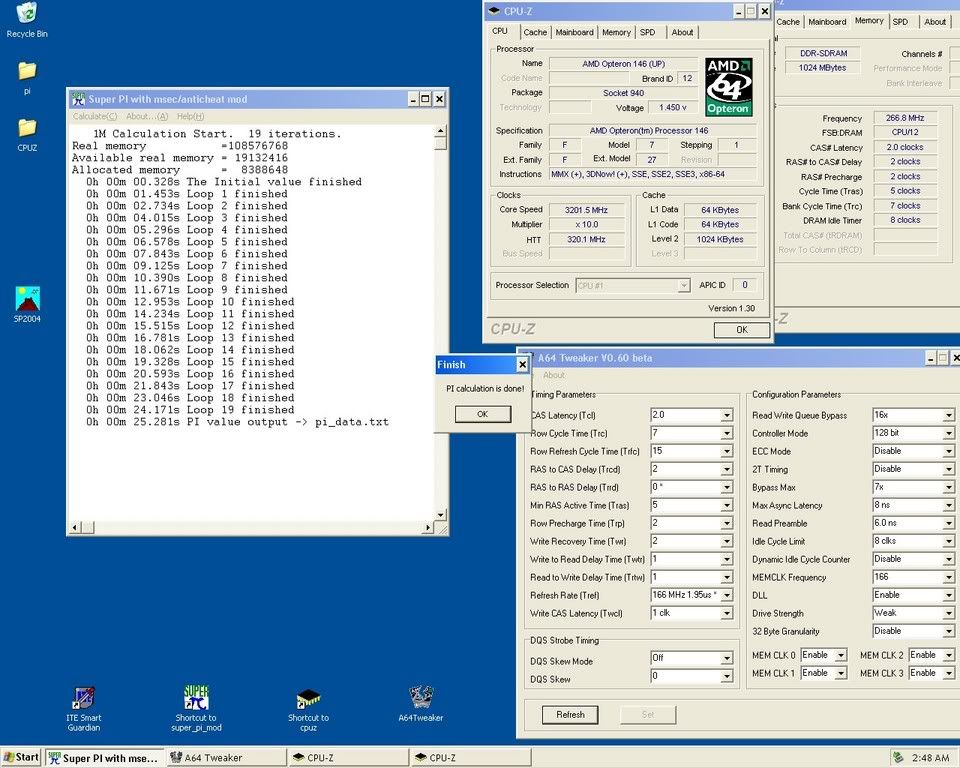
    I've used max mem a few times and it helps me A LOT. I've gotten up to .5s from it before. Took me down to 25.2s on water

    You can be negative all you want, I want whatever input I can get on how to make the guide better!

    SIOUX>
    so is that tweak worse than ricky tweak in win 2k with x800 cards? I'm benching an x800pro now and wondering if I should switch...
    Phenom II 940 BE / ASUS M4A79 / HD5770 Crossfire
    3770mhz CPU 2600mhz NB | DDR1040 5-5-5-15 | 900/1250

  13. #13
    Xtreme X.I.P.
    Join Date
    May 2004
    Location
    Hammel/Denmark
    Posts
    2,060
    Quote Originally Posted by afireinside
    Stephen>
    explorer/real time doesn't seem to do much for pi but it never hurts in 3dmark and I've gained from it a few times. When you load a CPU with sp2004 or the like to get around cold bug running real time is the only way to save your self from crap scores.

    I've used max mem a few times and it helps me A LOT. I've gotten up to .5s from it before. Took me down to 25.2s on water

    You can be negative all you want, I want whatever input I can get on how to make the guide better!

    SIOUX>
    so is that tweak worse than ricky tweak in win 2k with x800 cards? I'm benching an x800pro now and wondering if I should switch...
    ONLY in 3d03 and 05. with 01 it kicks ass with any card
    The whole world's hip and thats not cool !

    Rip Van Hippy

    Doesn't expecting the unexpected make the unexpected the expected ?

    Light travels faster than sound. This is why some people appear bright until you hear them speak


    -------------------------

  14. #14
    Xtreme Addict
    Join Date
    Jan 2005
    Location
    Northern VA
    Posts
    1,556
    Quote Originally Posted by afireinside
    Stephen>

    SIOUX>
    so is that tweak worse than ricky tweak in win 2k with x800 cards? I'm benching an x800pro now and wondering if I should switch...
    DO IT! You'll finally be able to pull 40k

  15. #15
    Phenom™
    Join Date
    Sep 2002
    Posts
    5,163
    Quote Originally Posted by afireinside
    ....When you load a CPU with sp2004 or the like to get around cold bug running real time is the only way to save your self from crap scores.

    I've used max mem a few times and it helps me A LOT. I've gotten up to .5s from it before. Took me down to 25.2s on water ....
    Got it ...forgot some people have to run sp2004 w/bugged cpu's....btw, may I ask to see a screenie of your 25.2 run on water? I ask this because I want to maybe compare a screenshot I have probably stored somewhere to see just how beneficial the tweak is....
  16. #16
    I am Xtreme
    Join Date
    Aug 2003
    Posts
    7,825
    Here you go


    vapb> I had bad contact and lost almost 100mhz CPU last time and STILL had a 40k lined up bit cl crashed re running GPU was only at 1.83v as well. I'll have 40k next run. Setting up for it now actually, probably not getting ice till tomorrow though.
    Phenom II 940 BE / ASUS M4A79 / HD5770 Crossfire
    3770mhz CPU 2600mhz NB | DDR1040 5-5-5-15 | 900/1250

  17. #17
    Phenom™
    Join Date
    Sep 2002
    Posts
    5,163
    Quote Originally Posted by afireinside
    Here you go


    vapb> I had bad contact and lost almost 100mhz CPU last time and STILL had a 40k lined up bit cl crashed re running GPU was only at 1.83v as well. I'll have 40k next run. Setting up for it now actually, probably not getting ice till tomorrow though.
    K....don't have any runs @ x10 mult, but I'll boot up the 57 on the Expert and match those timings for comparison in a bit....
    BTW, with your ICL @ 8, there's no need to go TRRD0. Try with TRRD2 and your results should be almost identical if not faster
    EDIT2: Also, ENABLE DICC! I'm sure your ram is capable of running @ that speed with it on......
    Last edited by s7e9h3n; 12-03-2005 at 04:21 PM.

  18. #18
    Admin
    Join Date
    Dec 2003
    Location
    Hillsboro, OR
    Posts
    5,225
    Quote Originally Posted by SIOUX
    No problem but i forgott too say that this tweak does not work so good in win XP, and is basicly for 3d01.

    and it does not work on SATA drives.
    I use MPS Uni all the time on SATA hard drives. The 03 and 05 I'm not sure about, but its definitely much faster for AM3.

  19. #19
    I am Xtreme
    Join Date
    Aug 2003
    Posts
    7,825
    Thanks stephen I'll try it in a bit after I finish playing some CoD2. I'm pretty noob at OCing ram. What does DICC do?
    Phenom II 940 BE / ASUS M4A79 / HD5770 Crossfire
    3770mhz CPU 2600mhz NB | DDR1040 5-5-5-15 | 900/1250

  20. #20
    Xtreme X.I.P.
    Join Date
    May 2004
    Location
    Hammel/Denmark
    Posts
    2,060
    Quote Originally Posted by Gautam
    I use MPS Uni all the time on SATA hard drives. The 03 and 05 I'm not sure about, but its definitely much faster for AM3.

    but then did you set it from windows??? I tryed, and i know that other did, and never seem to work proberly. but very interresting...thanks

    its faster with x1800 cards in 03 and 05, but it was a lot slower with x850 and x800 for me
    The whole world's hip and thats not cool !

    Rip Van Hippy

    Doesn't expecting the unexpected make the unexpected the expected ?

    Light travels faster than sound. This is why some people appear bright until you hear them speak


    -------------------------

  21. #21
    Admin
    Join Date
    Dec 2003
    Location
    Hillsboro, OR
    Posts
    5,225
    Quote Originally Posted by SIOUX
    but then did you set it from windows??? I tryed, and i know that other did, and never seem to work proberly. but very interresting...thanks

    its faster with x1800 cards in 03 and 05, but it was a lot slower with x850 and x800 for me
    Hmm...I think I set it from Windows once. After that I always used F5 in the BIOS. Either way, once its set it can't be set back to ACPI Uni. What happens exactly when you try it on a SATA drive? It just installs like normal for me.

    Nice work afireinside.

  22. #22
    Xtreme X.I.P.
    Join Date
    May 2004
    Location
    Hammel/Denmark
    Posts
    2,060
    Quote Originally Posted by Gautam
    Hmm...I think I set it from Windows once. After that I always used F5 in the BIOS. Either way, once its set it can't be set back to ACPI Uni. What happens exactly when you try it on a SATA drive? It just installs like normal for me.

    Nice work afireinside.

    no..it installed fine, but i did not see any boost at all. like it did not "eat" the MPS .....i gonna try again soon....could be nice if i could get it to work
    The whole world's hip and thats not cool !

    Rip Van Hippy

    Doesn't expecting the unexpected make the unexpected the expected ?

    Light travels faster than sound. This is why some people appear bright until you hear them speak


    -------------------------

  23. #23
    Xtreme X.I.P.
    Join Date
    Aug 2004
    Location
    Chile
    Posts
    4,151
    that tweak sioux is basically ricky tweak but from bios? and gives you the same boost with out more heat?.

    i'll have to try that when my new cpu arrives

  24. #24
    Xtreme Enthusiast
    Join Date
    Dec 2003
    Location
    Hong Kong
    Posts
    884
    edit the boot.ini file, cancel the "noexecute" for A64 cpu (I didn't try Intel CPU, coz I don't have one), you can o/c a bit more for your CPU.

    PS: thx to OPB, I got this hint from OCXtreme.org
    CPU: XEON W3540 & Gulftown Q3FE
    MB: Asus Rampage III Extreme
    RAM: Corsair GT2000C7 2G X 3 ADATA XPG+ 2200+ 2G X 3
    SSD: Adata S596 120G
    Display Card: Asus EAH 5870
    WaterCooling:
    Laing D5 Pump + Koolance D5 Top
    Radiator: KP 120.3
    CPU Block: HeatKiller 3.0 + EK full MB Block
    PSU: Antec TPQ 1200W OC
    Case: SilverStone TJ-07BW


  25. #25
    I am Xtreme
    Join Date
    Aug 2003
    Posts
    7,825
    TinTin> Can you or OPB explain what it does?
    Phenom II 940 BE / ASUS M4A79 / HD5770 Crossfire
    3770mhz CPU 2600mhz NB | DDR1040 5-5-5-15 | 900/1250

Page 1 of 3 123 LastLast

Bookmarks

Bookmarks

Posting Permissions

  • You may not post new threads
  • You may not post replies
  • You may not post attachments
  • You may not edit your posts
  •