MMM
Results 1 to 23 of 23

Thread: custom cooling solution for gtx295

  1. #1
    Xtreme Member
    Join Date
    Jan 2007
    Location
    Vienna, Austria
    Posts
    330

    custom cooling solution for gtx295

    currently trying to replace the not so quiet stock fan on a gtx295 by a 120mm fan and a custom duct/shroud.

    this involves removing the stock fan to open up the back of the card and let a 120mm fan blow through the back opening of the card directly at the stock cooler to push air from the back of the card through the cooler and out at the front and top exhausts.

    my first attempt miserably failed! you won't imagine how efficient this little stock fan is.

    from looking at the specs of the stock fan its rated at about 25cfm at 3200rpm!

    so my assumption was one of my sflex-e could easy do the job. unfortunately not! even an sflex-f is not able to keep temps in the same range as the stock cooler. as desperate as i was i throw an old delta i had at hand at this, but even this delta was not able to achieve the same result as the stock fan.

    it seems that just a fraction of the airflow is actually pushed towards the stock cooler as supposed. putting my hand at the back of the fan, the side where the fan is actually sucking in air, i could feeel a noticable amout of airflow coming back out!

    may be the fan simply is not delivering enough static pressure?

    redesigning my shroud improved things but still not to the point i expected.

    the delta is now able to outperform the stock fan, but as it is as loud as the stock fan its no valid option here.

    what fan would you recommend for this situation. guess static pressure is the key here? i'm prepared to get a fan which may be a bit loud, but as long as it is quieter than the 3200rpm stock fan i'm fine.

    can there anything be done to get more of the airflow pushed into the cooler and less flow pressed back?

    any recommendations? i personally would give a sflex-g a try. any other fan better suited for this appliation?

    vapor?
    Processor: Intel Core i7 990X
    Motherboard: ASUS Rampage III Extreme
    Memory: Corsair CMT6GX3M3A2000C8
    Video Card: MSI N680GTX Lightning
    Power Supply: Seasonic S12 650W
    Case: Chieftec BH-01B-B-B

  2. #2
    Xtreme Member
    Join Date
    Jan 2009
    Location
    London
    Posts
    128
    Have never really found it that noisy...little noisy at idle, just use rivatuner to lower the idle fan speed.

    Only real way I could see would be WC.

    Hvae you tried adding a 80 mm fan sucking from the exhaust, may help slightly?
    Lian Li V1000 Plus - Core i7 920 2.66 Overclocked to 4.1ghz 1.448v 20x 1.3v QPI Multi 205MHZ BCLK (Still Tweaking) & Watercooled With 2x Feser TFC Xchanger 120mm Rads, EK Supreme Acrylic CPU Block - XSPC Drive Res - Laing DDC-1T Ultra Alphacool Top - Rampage II X58 - XFX GTX 295 680/1380/1100MHZ- 3x2GB (6GB Total) Corsair Dominator Triple Channel DDR3 1600mhz - Tagan Piperock 1100W PSU - 2x WD Velociraptors Raid 0 - Windows 7 64Bit Ultimate Beta

  3. #3
    Registered User
    Join Date
    Oct 2008
    Location
    Arizona
    Posts
    96
    I would think a better quality heatsink would help much more than a new fan setup. I don't have a 295, but I know on the 260s both the 65nm and the 55nm versions they used some sort of Aluminum alloy that is of lower grade. Read it's recycled aluminum, and poorly casted. A solid billet piece, or forged piece at the least would be an improvement. I would fabricate a coopper heatsink if I had the equipment needed, but alas, I do not.

    You have to consider two thing's with this project of your's. The stock heatsink was designed for with a certain pattern of airflow in mind, so simply blowing air on it will not work. That little fan also had to be pretty powerful to make up for the low grade materials they used to make the heatsink. Good fans are cheaper than good metals.

    Do you have any pics of this shroud you fabbed up?

  4. #4
    Xtreme Enthusiast
    Join Date
    Dec 2007
    Location
    North Carolina, USA
    Posts
    965
    You don't have to fabricate anything, the GTX 295 already has an aftermarket cooler. You can turn two Thermalright HR-03 (any derivative) opposite to each other and they will fit, this was done on the 9800GX2 and the size is supposedly almost identical, though I haven't seen anyone with a GTX 295 setup like this yet:


    The weight would be insane, so if you did it you would definitely want to add some type of support for the card and remove it when traveling.

    410g x 2 (w/out fan or including card) = 820g for just heat sinks alone (almost two pounds of metal).
    Last edited by LedHed; 02-10-2009 at 11:22 PM.
    CPU: Intel i5-3570K @ 4.2ghz (1.064V)
    GPU: SLI ASUS GTX 660 Ti DCII 2GB @ 1215/7012
    LCD: BenQ XL2420TE (144Hz)
    Mobo: ASRock Z77 Extreme6
    Sound: SoundBlaster ZXR + Yamaha RX-V863 (LPCM) + Polk Audio Monitor Series II Speakers
    RAM: G.SKILL Sniper Series DDR3 2133 4x4GB
    Storage: Samsung 840 Pro 128GB + 1TB Seagate Barracuda +1TB WD Black Caviar
    PSU: Corsair HX 750W 80+ Silver (62A)
    UPS: Cyberpower CP1200AVR (720W)
    OS: Microsoft Windows 7 Ultimate x64
    Cooling: Corsair 650D + TT Water2.0 Pro + 2x Silverstone FM121

  5. #5
    Xtreme Cruncher
    Join Date
    Oct 2007
    Posts
    332
    ^^That is bad ass

  6. #6
    Banned
    Join Date
    Feb 2008
    Location
    Buffalo, NY
    Posts
    1,609
    I must try this!!

  7. #7
    Xtreme Enthusiast
    Join Date
    Dec 2007
    Location
    North Carolina, USA
    Posts
    965
    be sure to post pictures if anyone does run this setup, I already have one Thermalright HR-03 Rev A so I'd only have to buy one more if I ran it. I'm just concerned about weight/space.
    CPU: Intel i5-3570K @ 4.2ghz (1.064V)
    GPU: SLI ASUS GTX 660 Ti DCII 2GB @ 1215/7012
    LCD: BenQ XL2420TE (144Hz)
    Mobo: ASRock Z77 Extreme6
    Sound: SoundBlaster ZXR + Yamaha RX-V863 (LPCM) + Polk Audio Monitor Series II Speakers
    RAM: G.SKILL Sniper Series DDR3 2133 4x4GB
    Storage: Samsung 840 Pro 128GB + 1TB Seagate Barracuda +1TB WD Black Caviar
    PSU: Corsair HX 750W 80+ Silver (62A)
    UPS: Cyberpower CP1200AVR (720W)
    OS: Microsoft Windows 7 Ultimate x64
    Cooling: Corsair 650D + TT Water2.0 Pro + 2x Silverstone FM121

  8. #8
    Registered User
    Join Date
    Dec 2008
    Posts
    22
    That's seriously badass, nice job.


    Video Card - Sapphire Radeon HD 4870 X2.
    Chip - Intel i7 965 Extreme 3.2 Ghz.
    Chassis - Thermaltake Spedo Advance Package.
    Board - Asus P6T Deluxe OC Palm Edition.
    Memory - 2gb (3 chips) Corsair Dominator PC 12800.
    Optical primary - Blu Ray DVD ROM Lite On IHES206-08.
    Optical secondary - Lite On DVD burner.
    Tv Card - Happauge WinTV HR 2250.
    Main drives (Raid 0)x2 WD Velociraptor 300gb hard drives.
    Secondary storage drive - SEAGATE Barracuda 7200.11 1.5 TB. PSU - Kingwin 1220 watt Mach 1.

    ALL built for under 3k.

  9. #9
    Xtreme Mentor
    Join Date
    May 2008
    Location
    cleveland ohio
    Posts
    2,879
    Quote Originally Posted by LedHed View Post
    You don't have to fabricate anything, the GTX 295 already has an aftermarket cooler. You can turn two Thermalright HR-03 (any derivative) opposite to each other and they will fit, this was done on the 9800GX2 and the size is supposedly almost identical, though I haven't seen anyone with a GTX 295 setup like this yet:


    The weight would be insane, so if you did it you would definitely want to add some type of support for the card and remove it when traveling.

    410g x 2 (w/out fan or including card) = 820g for just heat sinks alone (almost two pounds of metal).
    http://www.newegg.com/Product/Produc...82E16835199010

    add three of those some how and this thing is 4 slot cooler and three fans lol
    HAVE NO FEAR!
    "AMD fallen angel"
    Quote Originally Posted by Gamekiller View Post
    You didn't get the memo? 1 hour 'Fugger time' is equal to 12 hours of regular time.

  10. #10
    Xtreme Cruncher
    Join Date
    Dec 2008
    Location
    Los Angeles/Hong Kong
    Posts
    3,058
    oh wow, but how do you mount it?
    Team XS: xs4s.org


  11. #11
    Xtreme Addict
    Join Date
    Apr 2007
    Location
    arizona
    Posts
    1,189
    Quote Originally Posted by lkiller123 View Post
    oh wow, but how do you mount it?
    well you see, its a PCI-e GPU, so you put it in the PCI-E slot

    just messing with you
    FREEDOM ISN'T FREE
    Cruncher Support:
    Utnorris
    DarthBeavis
    DEFRANCO NATION
    _____________
    E6750@ 3.0ghz- evga 750i FTW- 320gb- Swiftech MCR220 compact- 8800gts 512mb KO- 620hx - 4gb Crucial 1066- CM 690- 6 yate loons

    E6600- Asus striker Extreme-2 x 750gb- Igloo 5710- 8800gt- antec 850w Quatro- 4gb DDR2 800- Antec 1200- 24/7 cruncher

    **Wishes for a dual- quad core cruncher **

  12. #12
    Xtreme Enthusiast
    Join Date
    Dec 2007
    Location
    North Carolina, USA
    Posts
    965
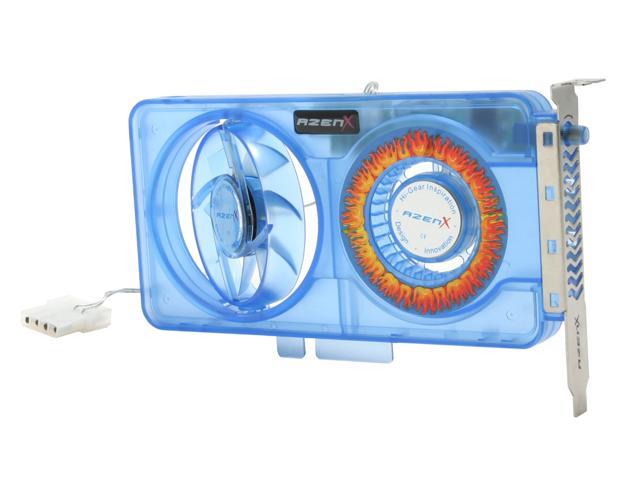
    I like this slot cooler better, I think I'm going to get two of these for my GTX 295, it sucks and blows in one slot cooler:

    http://www.newegg.com/Product/Produc...82E16835114024

    CPU: Intel i5-3570K @ 4.2ghz (1.064V)
    GPU: SLI ASUS GTX 660 Ti DCII 2GB @ 1215/7012
    LCD: BenQ XL2420TE (144Hz)
    Mobo: ASRock Z77 Extreme6
    Sound: SoundBlaster ZXR + Yamaha RX-V863 (LPCM) + Polk Audio Monitor Series II Speakers
    RAM: G.SKILL Sniper Series DDR3 2133 4x4GB
    Storage: Samsung 840 Pro 128GB + 1TB Seagate Barracuda +1TB WD Black Caviar
    PSU: Corsair HX 750W 80+ Silver (62A)
    UPS: Cyberpower CP1200AVR (720W)
    OS: Microsoft Windows 7 Ultimate x64
    Cooling: Corsair 650D + TT Water2.0 Pro + 2x Silverstone FM121

  13. #13
    Xtreme Cruncher
    Join Date
    Jan 2005
    Location
    England
    Posts
    3,554
    the dual thermalright solution looks awesome. some kind ofmetal bracket would need to run along the top edge of each card (from front to back) to support the extra weight.

    My Free-DC Stats
    You use IRC and Crunch in Xs WCG team? Join #xs.wcg @ Quakenet

  14. #14
    Diablo 3! Who's Excited?
    Join Date
    May 2005
    Location
    Boulder, Colorado
    Posts
    9,412
    Or just run it in a horizontal case/on a box on your desk

  15. #15
    Registered User
    Join Date
    Jun 2008
    Posts
    82
    fgw:
    Can you post some pictures of your setup? I was thinking of doing something similar. The 120x38mm fans tend to deliver better static pressure than 120x25mm. I wanted to connect the fan to some sort of duct to create a wind tunnel through the card. If we can set up a duct with a good seal and relatively unobstructed airflow, I think it's possible to have 100+ CFM pushing over the stock heatsink. From the looks of it, the location of the power connectors may make things a little tricky.
    MOBO Biostar TpowerX58 | CPU Intel i7 920 | GPU eVGA GTX 295 SLI | RAM Super Talent 12GB DDR3-1333 CL8 | SSD Super Talent 64GB | PSU Coolmax 1200W

  16. #16
    Xtreme Member
    Join Date
    Apr 2007
    Posts
    390
    unless they redid the dual thermalright on a GTX295, the pic above is of a 9800GX2, it was posted up a while back. I would think that the design of the car is the same though, so it is feasible, but would cost a pretty penny

  17. #17
    Registered User
    Join Date
    Jan 2009
    Location
    Swizterland
    Posts
    17
    Quote Originally Posted by LedHed View Post
    I like this slot cooler better, I think I'm going to get two of these for my GTX 295, it sucks and blows in one slot cooler:

    http://www.newegg.com/Product/Produc...82E16835114024

    Dont' buy it, is cheap and plastic air blower. Works only if you have one or two inch distance between the card and the blower.

    I already try with a normal single cooler slot fan, and didnt work. You need some distance if you dont have it the fan blows nothing, he just rotate ( and make noise ) without blowing any hot air out of the case from the pcb.
    Last edited by AnimalPak; 03-07-2009 at 05:24 PM.

  18. #18
    Registered User
    Join Date
    Jan 2009
    Location
    Swizterland
    Posts
    17
    Like this works fine.
    Attached Thumbnails Attached Thumbnails Click image for larger version. 

Name:	Immagine.jpg 
Views:	3500 
Size:	30.1 KB 
ID:	96015  

  19. #19
    Registered User
    Join Date
    Jan 2009
    Location
    Swizterland
    Posts
    17
    This is my setup and what i did for keep cool my GTX295 with stock fan.

    - i cut the rear of the motherboard tray for extra ventilation ( Original CM Stacker 830 dont have extra ventilation holes ) so i use the Dremel and i make myself.
    - keep two slot free open
    - set the fan at 50 %


    idle temps 47-45 degrees, load ( while im gaming ) 72-75 degrees.
    Attached Thumbnails Attached Thumbnails Click image for larger version. 

Name:	DSC00061.jpg 
Views:	3546 
Size:	172.1 KB 
ID:	96016  

  20. #20
    Xtreme Addict
    Join Date
    Jun 2006
    Posts
    1,394
    I dont understand why the 295 has a lot of its vents exhausting hot air inside the case, can we just tape up the sides ( not on the fins ) to force all the hot air to the rear exhaust instead of the sides??

  21. #21
    Registered User
    Join Date
    Jan 2009
    Location
    Swizterland
    Posts
    17
    Quote Originally Posted by Demo View Post
    I dont understand why the 295 has a lot of its vents exhausting hot air inside the case, can we just tape up the sides ( not on the fins ) to force all the hot air to the rear exhaust instead of the sides??
    Because the faster the air blows across the heatsink the more heat will get disapated to the surounding air.

    Well you must change the directions of the fins and guide them towards the rear.

    I do not think it is a good solution because the warm air has to move away quickly from the heatsink, this is why nivida has make the vents at the sides.

  22. #22
    Xtreme Addict
    Join Date
    Jun 2006
    Posts
    1,394
    I guess you mean if the air has a shorter exposure time to the heatsink more cooler air can be used to cool the already warm heatsink.

  23. #23
    Registered User
    Join Date
    Jan 2009
    Location
    Swizterland
    Posts
    17
    Quote Originally Posted by Demo View Post
    I guess you mean if the air has a shorter exposure time to the heatsink more cooler air can be used to cool the already warm heatsink.
    Exactly and this is what really works

Bookmarks

Bookmarks

Posting Permissions

  • You may not post new threads
  • You may not post replies
  • You may not post attachments
  • You may not edit your posts
  •