MMM
Results 1 to 24 of 24

Thread: Timing Issues with X58 Chipset? Please Help Me Test!

  1. #1
    Registered User
    Join Date
    May 2006
    Posts
    65

    Timing Issues with X58 Chipset? Please Help Me Test!

    I've just built an i7 PC based on the Gigabyte EX58-UD5 motherboard and I'm finding that in my video capture applications, timing is inaccurate compared to my previous QX6850/P45 combination.

    I'm wondering whether this is unique to my motherboard or a problem with i7 and X58 in general?

    There's a simple test that I hope those with X58 boards can help me with.

    1. Download VirtualDub from www.virtualdub.org - it's spyware free, doesn't require installation etc... just unzip into a standalone folder
    2. Run VirtualDub.exe, go to File -> Capture AVI
    3. Under Devices, select Screen Capture, and at the bottom right, next to the frame rate, select 48.00KHz, 16-bit, Stereo
    4. Press F7 to do a test capture
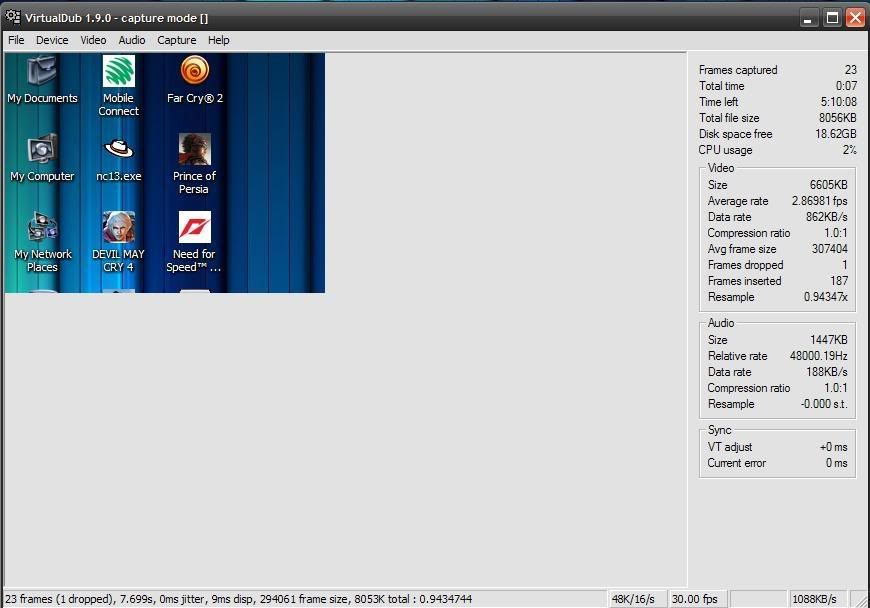
    5. Make a note of the average rate and relative rate under audio on the right and post it here

    Average rate and relative rate should be at 48000Hz, 48050Hz tops. On my Gigabyte board I'm getting 48470Hz. That 1% variance ruins any attempt at precision video capture. Can any one - specifically ASUS users - try the test?

  2. #2
    Xtreme Addict
    Join Date
    May 2008
    Location
    Land of Koalas and Wombats
    Posts
    1,058
    IS your CPU overclocked and BCLK oc'd? If so run everything at default and see if the variance is anywhere near as large. If the nominal value is still similar then you probably want to relax memory timings like Round-Trip Turnaround, Precharge All to Ref/Activate, Activate to Activate. You can play around with PCIE frequency as well and see if small increments by 1 or 2mhz cleans up the noise.
    Last edited by mikeyakame; 01-20-2009 at 02:16 AM.

    DFI LT-X48-T2R UT CDC24 Bios | Q9550 E0 | G.Skill DDR2-1066 PK 2x2GB |
    Geforce GTX 280 729/1566/2698 | Corsair HX1000 | Stacker 832 | Dell 3008WFP


  3. #3
    One-Eyed Killing Machine
    Join Date
    Sep 2006
    Location
    Inside a pot
    Posts
    6,340
    Just did a few tests for you.

    System Specifications:
    Foxconn BloodRage ( X58 Motherboard )
    Intel Core i7 920 @ Stock
    3GB Triple Channel Memory @ Tight timings ( 6-5-5-12 1T )
    GeForce GTX 280 @ Stock
    Creative SoundBlaster X-Fi Fatal1ty FPS ( PCI )
    2* Mtron 3535 16GB SSDs @ RAID 0 @ ICH10R [ OS Drive & Test Drive ]
    Windows 7 Ultimate Beta Build 7000 x64
    Creative SB X-Fi Drivers by Daniel K
    GeForce Beta by nVIDIA through Windows Update

    Test 1:
    VirtualDub latest beta, 1.9.0 x64


    Test 2:
    VirtualDub latest beta, 1.9.0 x86


    Test 3:
    VirtualDub latest stable version, 1.8.8 x64


    In test #3 everything looked like Test 1 & 2, so I decided to give the system an extra stress by running a archiving ( compression ) of a 4GB folder with WinRAR, that's when the Audio Data Rate started varying a bit.
    Coding 24/7... Limited forums/PMs time.

    -Justice isn't blind, Justice is ashamed.

    Many thanks to: Sue Wu, Yiwen Lin, Steven Kuo, Crystal Chen, Vivian Lien, Joe Chan, Sascha Krohn, Joe James, Dan Snyder, Amy Deng, Jack Peterson, Hank Peng, Mafalda Cogliani, Olivia Lee, Marta Piccoli, Mike Clements, Alex Ruedinger, Oliver Baltuch, Korinna Dieck, Steffen Eisentein, Francois Piednoel, Tanja Markovic, Cyril Pelupessy (R.I.P. ), Juan J. Guerrero

  4. #4
    Registered User
    Join Date
    May 2006
    Posts
    65
    That's wonderful, thanks for the tests. It means I don't have to bin my CPU (with the CineForm codec I am seeing 50% gains over my QX6850).

    I am running the system at stock speeds by the way and changing PCIe slot speed probably won't help - this is affecting onboard devices, PCI devices and PCIe devices.

    I fancy swapping in an ASUS P6T (Deluxe). Can any one run the test on their ASUS board?
    Last edited by grandmaster; 01-20-2009 at 06:44 AM.

  5. #5
    Registered User
    Join Date
    Jan 2006
    Posts
    28
    I am on a DFI X58 and have been having problems with mouse skipping, video pauses, sound lag and it loses time.
    I noticed when I was on my way to work and my wife told me the time and it was like 5 minutes off.
    I synced the clock with internet time to correct the variance, but when I got home tonight I noticed it was off by a couple minutes again. The only way I have been able to get get the mouse/video/sound lag to go away is to put the machine into sleep mode and then wake it back up. I did find though that once I woke it back up and opened CPU-Z the CAS settings on my ram always show 4 when it was at like 9. Oh the other thing I almost forgot to mention is that I also have really poor usb performance pre windows. It is really annoying when you have to try a million things to get the damn thing to flash a bios using a pen drive.This thing is getting me really pissed off. I may have to RMA it back to newegg. I have seen reports of other users on the DFI support forum having this same issues, get a new board from RMA to see the same problems on the new board. And now I am beginning to notice the skipping trend is crossing over to other manufacturers too. Sucks I upgraded to the i7 platform to be greeted by all these ugly bugs. I felt my x24400 was a bit long in the tooth though.

    Check out these links:

    http://www.evga.com/forums/tm.asp?m=739506&mpage=1&key=

    http://csd.dficlub.org/forum/showthread.php?t=9090
    Last edited by o0Lo0P0o; 01-20-2009 at 10:54 PM.


    Intel Core i7 920 @4.0Ghz
    DFI LP UT X58-T3EH8
    CORSAIR TR3X6G1866C9DF 6GB PC3-15000
    2x WD 300GB Velociraptor
    EVGA GeForce GTX 295 (017-P3-1293-AR)
    XFX 8800 GTX (Physx)
    Coolermaster Stacker 830
    Enermax Revolution 85+ 1050 watt Modular PSU
    LG GGC-H20L Super Multi Blue
    Creative Labs X-Fi Fatality (Non FPS)
    NEC Multisync 20WMGX2 (20.1 WS TFT)
    Logitech Z-5500 Digital
    Logitech G15 Gaming Keyboard
    Logitech G5 Gaming Mouse
    D-Link DGL 4500 Gamer Lounge router

  6. #6
    Xtreme Addict
    Join Date
    May 2008
    Location
    Land of Koalas and Wombats
    Posts
    1,058
    Well thats more an issue of MOBO vendors not sufficiently shielding the unique reference clock frequencies from each other. This problem isn't new and it existed with FSB too. For 48Khz frequency to be affected as you've shown then there is a good chance that BCLK frequency is creating resonance and interference with HD Audio Bus which lies on the PCI bus. PCI bus is extremely prone to this problem, and it would go a long way if Motherboard Vendors spent a bit more time isolating different frequency domains and shielding them from clock domains which have potential to interfere. Half the problem lies at the Analog clock generator, the other half is to do with insufficient shielding/isolation.

    This is what you need to understand.

    BCLK works off 133mhz Reference. PCI works of 33mhz reference, HD Audio off 48mhz reference, PCIE/SATA/DMI off 100mhz reference. USB off 48mhz reference.

    PCI bus clock resonance will be the worst at 199mhz BCLK -+5-10mhz.
    Hd AUDIO clock resonance will be the worst at 202Mhz BCLK -+ 5-10mhz.
    PCIE resonance will be the worst at 200Mhz BCLK -+10mhz but PCIE can be set safely upto 120mhz or so where the ICH10R Sata ports in this case will drop out. 118Mhz is as far as I'd go.
    USB clock resonance will be the worst at 202Mhz BCLK -+5-10mhz.

    Now BCLK will experience the least external interference at -+ 15-25% of its reference which is 133mhz. So roughly my belief is that beyond 166mhz BCLK and before 233Mhz BCLK there exists a grey area where random things can and will happen unless the vendor design sufficiently takes this into account.

    The cross chatter as it's called is born when you request a frequency which requires the Analog Clock Generator to produce similar oscillation frequencies to obtain the requested frequency that fall too close to clock domains which use a similar oscillation for their reference. To obtain 48mhz you begin with 33mhz from the crystal, and use PLL divider ratios to achieve it. The problem lies thus here, frequencies which require many PLL dividers to obtain a reference will have much more tolerance to cross chatter due to the bigger arrangement of individual reference points.

    If we use 2 dividers to attain 48mhz, and we use 6 to attain a BCLK of say 200mhz where we share PLL dividers with HD Audio or USB for our requested base clock, then there is nearly certain chance that cross chatter from BCLK logical swings will interfere with the weaker fixed USB or HD audio differential clocks. The other matter is because they use such an odd reference frequency of 48MHz vendor's don't bother to put the same amount of shielding and higher grade components in as they would between the IOH, CPU, and ICH.

    Bench,

    Maybe you noticed as I have but Francois team at Intel no matter what CPU frequency they go for always use fairly moderate BCLK frequencies with very big multipliers. It's a minor detail most overlook, and assume because its an Extreme chip multipliers are sparse. My humble opinion is that being the ones who designed the architecture they also understand the above mentioned phenomenon and nearly always avoid it like a plague. I've never seen them mention using a BCLK above 166Mhz, it's always lower and they just raise multiplier on the CPU due to the internal PLL being more than adequate to provide enough shielding to that point.

    Perhaps this was the reason the early engineering samples had stringent limitations in place to restrict BCLK below 160mhz before they made few minor PLL changes to remove restrictions and leave the responsibility of shielding to the vendors.
    Last edited by mikeyakame; 01-21-2009 at 01:15 AM.

    DFI LT-X48-T2R UT CDC24 Bios | Q9550 E0 | G.Skill DDR2-1066 PK 2x2GB |
    Geforce GTX 280 729/1566/2698 | Corsair HX1000 | Stacker 832 | Dell 3008WFP


  7. #7
    One-Eyed Killing Machine
    Join Date
    Sep 2006
    Location
    Inside a pot
    Posts
    6,340
    I have some testing ideas for further investigation on this matter, but I have to finish some review measurements first, and then I'll give them a shot and post the results
    Coding 24/7... Limited forums/PMs time.

    -Justice isn't blind, Justice is ashamed.

    Many thanks to: Sue Wu, Yiwen Lin, Steven Kuo, Crystal Chen, Vivian Lien, Joe Chan, Sascha Krohn, Joe James, Dan Snyder, Amy Deng, Jack Peterson, Hank Peng, Mafalda Cogliani, Olivia Lee, Marta Piccoli, Mike Clements, Alex Ruedinger, Oliver Baltuch, Korinna Dieck, Steffen Eisentein, Francois Piednoel, Tanja Markovic, Cyril Pelupessy (R.I.P. ), Juan J. Guerrero

  8. #8
    Registered User
    Join Date
    Jan 2006
    Posts
    28
    Quote Originally Posted by BenchZowner View Post
    I have some testing ideas for further investigation on this matter, but I have to finish some review measurements first, and then I'll give them a shot and post the results

    I am very interested in seeing the results when you get around to it.


    Intel Core i7 920 @4.0Ghz
    DFI LP UT X58-T3EH8
    CORSAIR TR3X6G1866C9DF 6GB PC3-15000
    2x WD 300GB Velociraptor
    EVGA GeForce GTX 295 (017-P3-1293-AR)
    XFX 8800 GTX (Physx)
    Coolermaster Stacker 830
    Enermax Revolution 85+ 1050 watt Modular PSU
    LG GGC-H20L Super Multi Blue
    Creative Labs X-Fi Fatality (Non FPS)
    NEC Multisync 20WMGX2 (20.1 WS TFT)
    Logitech Z-5500 Digital
    Logitech G15 Gaming Keyboard
    Logitech G5 Gaming Mouse
    D-Link DGL 4500 Gamer Lounge router

  9. #9
    Registered User
    Join Date
    Jan 2006
    Posts
    28
    Quote Originally Posted by mikeyakame View Post
    Well thats more an issue of MOBO vendors not sufficiently shielding the unique reference clock frequencies from each other. This problem isn't new and it existed with FSB too. For 48Khz frequency to be affected as you've shown then there is a good chance that BCLK frequency is creating resonance and interference with HD Audio Bus which lies on the PCI bus. PCI bus is extremely prone to this problem, and it would go a long way if Motherboard Vendors spent a bit more time isolating different frequency domains and shielding them from clock domains which have potential to interfere. Half the problem lies at the Analog clock generator, the other half is to do with insufficient shielding/isolation.

    This is what you need to understand.

    BCLK works off 133mhz Reference. PCI works of 33mhz reference, HD Audio off 48mhz reference, PCIE/SATA/DMI off 100mhz reference. USB off 48mhz reference.

    PCI bus clock resonance will be the worst at 199mhz BCLK -+5-10mhz.
    Hd AUDIO clock resonance will be the worst at 202Mhz BCLK -+ 5-10mhz.
    PCIE resonance will be the worst at 200Mhz BCLK -+10mhz but PCIE can be set safely upto 120mhz or so where the ICH10R Sata ports in this case will drop out. 118Mhz is as far as I'd go.
    USB clock resonance will be the worst at 202Mhz BCLK -+5-10mhz.

    Now BCLK will experience the least external interference at -+ 15-25% of its reference which is 133mhz. So roughly my belief is that beyond 166mhz BCLK and before 233Mhz BCLK there exists a grey area where random things can and will happen unless the vendor design sufficiently takes this into account.

    The cross chatter as it's called is born when you request a frequency which requires the Analog Clock Generator to produce similar oscillation frequencies to obtain the requested frequency that fall too close to clock domains which use a similar oscillation for their reference. To obtain 48mhz you begin with 33mhz from the crystal, and use PLL divider ratios to achieve it. The problem lies thus here, frequencies which require many PLL dividers to obtain a reference will have much more tolerance to cross chatter due to the bigger arrangement of individual reference points.

    If we use 2 dividers to attain 48mhz, and we use 6 to attain a BCLK of say 200mhz where we share PLL dividers with HD Audio or USB for our requested base clock, then there is nearly certain chance that cross chatter from BCLK logical swings will interfere with the weaker fixed USB or HD audio differential clocks. The other matter is because they use such an odd reference frequency of 48MHz vendor's don't bother to put the same amount of shielding and higher grade components in as they would between the IOH, CPU, and ICH.

    Bench,

    Maybe you noticed as I have but Francois team at Intel no matter what CPU frequency they go for always use fairly moderate BCLK frequencies with very big multipliers. It's a minor detail most overlook, and assume because its an Extreme chip multipliers are sparse. My humble opinion is that being the ones who designed the architecture they also understand the above mentioned phenomenon and nearly always avoid it like a plague. I've never seen them mention using a BCLK above 166Mhz, it's always lower and they just raise multiplier on the CPU due to the internal PLL being more than adequate to provide enough shielding to that point.

    Perhaps this was the reason the early engineering samples had stringent limitations in place to restrict BCLK below 160mhz before they made few minor PLL changes to remove restrictions and leave the responsibility of shielding to the vendors.

    Hey Mikeyakame, I was wondering if any of this could affect the system clock? I have been losing minutes over the course of one day. Also I am experiencing this @ stock settings.


    Intel Core i7 920 @4.0Ghz
    DFI LP UT X58-T3EH8
    CORSAIR TR3X6G1866C9DF 6GB PC3-15000
    2x WD 300GB Velociraptor
    EVGA GeForce GTX 295 (017-P3-1293-AR)
    XFX 8800 GTX (Physx)
    Coolermaster Stacker 830
    Enermax Revolution 85+ 1050 watt Modular PSU
    LG GGC-H20L Super Multi Blue
    Creative Labs X-Fi Fatality (Non FPS)
    NEC Multisync 20WMGX2 (20.1 WS TFT)
    Logitech Z-5500 Digital
    Logitech G15 Gaming Keyboard
    Logitech G5 Gaming Mouse
    D-Link DGL 4500 Gamer Lounge router

  10. #10
    IT Engineer in the making
    Join Date
    Jun 2003
    Location
    Former Kingdom of Bavaria
    Posts
    2,094
    I would rather check the BIOS battery first if I were you.
    I know that sometimes boards leave the factory with very old batteries, or the battery contacts are bent down so that they make bad contact, leading to a faster discharge of the battery itself.
    Then if you are sure that it's not the battery, some further investigation on the resonance problem would come in handy.
    But just my .
    Quote from one of our professors:
    "Reality is hiding in the imaginary part."

  11. #11
    Registered User
    Join Date
    Jan 2006
    Posts
    28
    Quote Originally Posted by celemine1Gig View Post
    I would rather check the BIOS battery first if I were you.
    I know that sometimes boards leave the factory with very old batteries, or the battery contacts are bent down so that they make bad contact, leading to a faster discharge of the battery itself.
    Then if you are sure that it's not the battery, some further investigation on the resonance problem would come in handy.
    But just my .

    Yeah, I already tried that a couple times as I have seen this at work from time to time.


    Intel Core i7 920 @4.0Ghz
    DFI LP UT X58-T3EH8
    CORSAIR TR3X6G1866C9DF 6GB PC3-15000
    2x WD 300GB Velociraptor
    EVGA GeForce GTX 295 (017-P3-1293-AR)
    XFX 8800 GTX (Physx)
    Coolermaster Stacker 830
    Enermax Revolution 85+ 1050 watt Modular PSU
    LG GGC-H20L Super Multi Blue
    Creative Labs X-Fi Fatality (Non FPS)
    NEC Multisync 20WMGX2 (20.1 WS TFT)
    Logitech Z-5500 Digital
    Logitech G15 Gaming Keyboard
    Logitech G5 Gaming Mouse
    D-Link DGL 4500 Gamer Lounge router

  12. #12
    Registered User
    Join Date
    May 2006
    Posts
    65
    I'm having issues finding stock of the Foxconn Bloodrage board in the UK. Could any ASUS X58 board owners please try the test in post #1 please?

  13. #13
    Registered User
    Join Date
    May 2006
    Posts
    65
    In fact, anyone with a NON Gigabyte X58 board, please try the test in post #1. It'll literally take a couple of minutes and the information is worth its weight in gold to me.

  14. #14
    Xtremely unstable
    Join Date
    Aug 2004
    Location
    Between Hell and Nowhere
    Posts
    2,800
    This from a 920 on tpower x58, 3.8ghz (21x181) Not certain this is what you're looking for but if it's useful you're more than welcome.

    dx58so
    w3520@4100
    4x1gb corsair ddr3-1333
    gtx 295
    TR ultra-x, 2 scythe ultrakaze push/pull
    xclio stablepower 1000
    vista ultimate

    [SIGPIC][/SIGPIC]
    -------------------------------

    would you crunch if you thought it would save her life?

    maybe it will!

  15. #15
    Registered User
    Join Date
    May 2006
    Posts
    65
    That's exactly what I'm looking for and it shows a near-exact 48000Hz, plus it's a board I can source in the UK. Many thanks. Definitely looks like the Gigabyte board is simply incompatible with my application.

    Can any ASUS users *please* give it a go?

  16. #16
    Registered User
    Join Date
    May 2003
    Location
    Malaysia
    Posts
    46
    Ok here's from me, I'm using Asus P6T non deluxe...WinXP Pro 32Bit


    My Rig : | Intel Core i7 920 @ 4.2Ghz 1.32V (24/7), #3841A383 | Cooler Master CM690 | Asus P6T X58 | TRUE 120 (Push/Pull) | MSI NX8800GTS | Asus 6 x 1GB DDR3-1333 ram @ DDR3-1600| 80GB WD IDE, 120GB Maxtor IDE, 320GB Hitachi SATA II, 500GB Hitachi SATA II | LG Blu Ray Burner 6x | Topower 600W psu | Vista Ultimate x64 SP1 | Dell 2208WFP 22" LCD Monitor | Sony 32" D Series LCD TV 100Hz/24p |
    My Consoles : | PS3 60GB Asia | Wii NTSC-J | 2 x Stupid XBox360, both 3RROD |

  17. #17
    Registered User
    Join Date
    May 2006
    Posts
    65
    Perfect, thank you very much. That's awesome - another kick in the balls for the Gigabyte board but at least now I can buy my favourite brand.

  18. #18
    Registered User
    Join Date
    May 2006
    Posts
    65
    Well I upped my RAM frequency up from 1066MHz to 1600MHz (the rated speed of the RAM) and then turned off the Turbo memory feature, and I appear to be at 48001Hz now, which is interesting. I'm not quite sure what the turbo feature does (it's under the DRAM settings so nothing to do with the CPU) but curious nonetheless.
    Last edited by grandmaster; 01-22-2009 at 05:42 AM.

  19. #19
    One-Eyed Killing Machine
    Join Date
    Sep 2006
    Location
    Inside a pot
    Posts
    6,340
    could be an indication of a unstable system ( before )
    Coding 24/7... Limited forums/PMs time.

    -Justice isn't blind, Justice is ashamed.

    Many thanks to: Sue Wu, Yiwen Lin, Steven Kuo, Crystal Chen, Vivian Lien, Joe Chan, Sascha Krohn, Joe James, Dan Snyder, Amy Deng, Jack Peterson, Hank Peng, Mafalda Cogliani, Olivia Lee, Marta Piccoli, Mike Clements, Alex Ruedinger, Oliver Baltuch, Korinna Dieck, Steffen Eisentein, Francois Piednoel, Tanja Markovic, Cyril Pelupessy (R.I.P. ), Juan J. Guerrero

  20. #20
    I am Xtreme
    Join Date
    Jul 2007
    Location
    Austria
    Posts
    5,485
    the performance mode in dram setting is the subtimings of the ram, standard is the most relaxed one while extreme are the thightest timings.

  21. #21
    Xtreme Addict
    Join Date
    Oct 2005
    Location
    U.K.
    Posts
    1,171
    I've just been playing with this test on my UD5

    It seems to me that on my system, HyperThreading is causing the relative rate to be incorrect (starts to jump after around 10 seconds or so)
    If i disable HT in the BIOS (either at stock speeds or overclocked), then the test runs just fine and the relative rate is correct and remains steady

    HT On:


    HT Off:


    edit:
    just noticed something in the screenshots from loonym and tot31, but not sure of the importance...
    the average rates are shown as 4.6 and 2.8 fps and there are some dropped frames
    Last edited by Pyr0; 01-22-2009 at 12:18 PM.

  22. #22
    I am Xtreme
    Join Date
    Mar 2005
    Location
    Edmonton, Alberta
    Posts
    4,594
    Quote Originally Posted by grandmaster View Post
    I am running the system at stock speeds by the way and changing PCIe slot speed probably won't help - this is affecting onboard devices, PCI devices and PCIe devices.
    Quote Originally Posted by grandmaster View Post
    Well I upped my RAM frequency up from 1066MHz to 1600MHz (the rated speed of the RAM) and then turned off the Turbo memory feature, and I appear to be at 48001Hz now, which is interesting. I'm not quite sure what the turbo feature does (it's under the DRAM settings so nothing to do with the CPU) but curious nonetheless.
    Quote Originally Posted by BenchZowner View Post
    could be an indication of a unstable system ( before )
    immature bios...

  23. #23
    Xtreme Addict
    Join Date
    Oct 2005
    Location
    U.K.
    Posts
    1,171
    Not sure how important it is to the OP, but i've just noticed in the other screenshots that there are some dropped frames. And in the ones from loonym and tot31, the average rates look rather low
    i950 (3035B684)
    Gigabyte EX58A-UD3R
    3x4GB G.Skill PC3-12800 7-8-7-24
    HIS Radeon HD 6970 2GB & Dell 3007WFP-HC
    Asus Xonar DX
    128GB C300, Velociraptor & Sammy F3's
    Corsair AX850W
    Windows 7 Ultimate x64 SP1

  24. #24
    Registered User
    Join Date
    May 2006
    Posts
    65
    In terms of video yes, it looks like there are problems, but relative audio is the key variable for me in these tests. Variances in video could well be down to the GPU being employed but probably won't have much to do with the system timers causing the audio issue.

    I'm wondering whether the RAM issue with my board is the cause of the fact my LAN ports continually and rapidly seem to be active then inactive. I can't use the LAN ports at all and need to use a USB wireless dongle to get online, which is an inordinate pain in the arse.

    Gigabyte sent me a beta F5 bios which isn't available yet but it hasn't solved anything - indeed, upgrading the BIOS actually seemed to corrupt my OS drive, though thankfully my 4TB (2x2TB) RAID array was unaffected.

Bookmarks

Bookmarks

Posting Permissions

  • You may not post new threads
  • You may not post replies
  • You may not post attachments
  • You may not edit your posts
  •