

Wasn't sure where to post this.
The new version is reading all 4 cores on my dual 3870X2s
Though it still can't pick up crossfire.
(vista 64)
http://www.techpowerup.com/downloads/SysInfo/GPU-Z/



Wasn't sure where to post this.
The new version is reading all 4 cores on my dual 3870X2s
Though it still can't pick up crossfire.
(vista 64)
http://www.techpowerup.com/downloads/SysInfo/GPU-Z/
Last edited by TedShred; 05-25-2008 at 01:19 PM.
Time is an illusion. Lunchtime, doubly so. Douglas Adams
QX9650 @ 3825mhz CoolIT FZone
2x HD3870X2 @ 845/946mhz air
Asus Maximus Formula 0907
2x2048mb OCZ Reaper 8500
2x Raptor 150G Raid0; 'Cuda 1000G
1200W Thermaltake
xFi Extreme Gamer/ Z-5500
Vista Ult. 64
Cosmos 1000
30" NEC
Thanks for heads up.
The mini graph feature is very funny.
░░░░░░░░░░░░░░░░░░░░░░░░░░░░░░░░░ Intel i7 3770k
░░░░░░▄▄▄▄▀▀▀▀▀▀▀▀▄▄▄▄▄▄░░░░░░░░░ ASUS GTX680
░░░░░░█░░░░▒▒▒▒▒▒▒▒▒▒▒▒░░▀▀▄░░░░░ ASUS Maximun V Gene
░░░░░█░░░▒▒▒▒▒▒░░░░░░░░▒▒▒░░█░░░░ Mushkin 8GB Blackline
░░░░█░░░░░░▄██▀▄▄░░░░░▄▄▄░░░█░░░░ Crucial M4 256GB
░░░▀▒▄▄▄▒░█▀▀▀▀▄▄█░░░██▄▄█░░░█░░░ Hitachi Deskstar 2TB x2
░░█▒█▒▄░▀▄▄▄▀░░░░░░░░█░░░▒▒▒▒▒█░░ FSP 750W Gold
░░░░░░░░░░░░░░░░░░░░░░░░░░░░░░░░░ Fractal Arc Mini
I'll have to try this to monitor my crossfire. Im currently using XP since Vista is going to need reactivating.
Lol, I didn't notice the graph at first. Geez, whoever makes this thing deserves some applause. Not sure how useful the graph will be, but I love that it shows there's some guy out there payin' attention to the details.
Thanks GPUZ-maker-guy!
Time is an illusion. Lunchtime, doubly so. Douglas Adams
QX9650 @ 3825mhz CoolIT FZone
2x HD3870X2 @ 845/946mhz air
Asus Maximus Formula 0907
2x2048mb OCZ Reaper 8500
2x Raptor 150G Raid0; 'Cuda 1000G
1200W Thermaltake
xFi Extreme Gamer/ Z-5500
Vista Ult. 64
Cosmos 1000
30" NEC


This version FINALLY displays the correct core temperature on my 8800 Ultra, previous versions were off by 10c or so.
Silverstone Temjin TJ-09BW w/ Silverstone DA750
Asus P8P67
2600K w/ Thermalright Venomous X Black w/ Sanyo Denki San Ace 109R1212H1011
8GB G.Skill DDR-1600 7-8-7-24
Gigabyte GTX 460 1G
Modded Creative X-Fi Fatal1ty w/ Klipsch Promedia 2.1
1 X 120GB OCZ Vertex
1 X 300GB WD Velociraptor HLFS
1 X Hitachi 7K1000 1TB
Pioneer DVR-216L DVD-RW
Windows 7 Ultimate 64
Originally Posted by alexio

Thanks GPU-Z pplz!
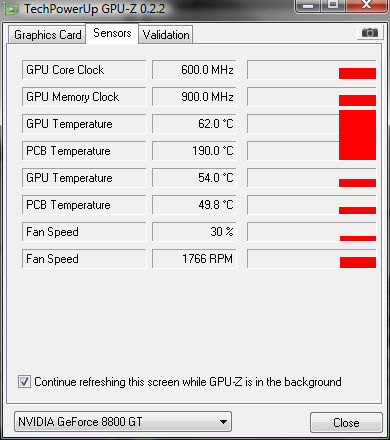
It says that my pcb temp is 190C, something is wrong...
C2Q Q6700 @ 4000Mhz 1.58v 24/7/ PNY 8800 GTS 512 @ 824/1102/2027
Gigabyte P35 DS4 / Corsair XMS2 6400 with Corsair Dominator Airflow fan / Corsair HX 520
900 Gb storage / Cooler Master CM 690 6 Schythe S-flex 1600rpm
Watercooling: D-Tech FuZion+Quad Nozzle, EK FC-88 GT/GTS G92, PA120.2 + PA120.3 with 5 Scythe S-flex 1600rpm, Laining DDC-1 18w
Yes, obviously your cooling
Mine says its 190c as well. It seems stuck their as the temp doesn't alter at all.
Gotta try it right away.
Still not showing shader clocks on any of my 7 seies cards. Temps seem spot on so far.
shader clocks on a 7 serie?? they dont have a seperate shader/core clock
they also dont have any shaders like the 8 series, the architecture of the 7 series uses pixel & vertex pipelines
So why did early versions show shader clocks?
you don't have to believe me, just use google to find out
might be a bug

Looks like temperature info is correct, but clocks are way off.
Member of Overclockers.com Folding @ Home team
"<The_Coolest> you can't unwaste wasted CPU cycles" - Start FOLDing now!
Main rig:
AMD Ryzen 7 2700X / Mobo: Asrock Fatal1ty X470 / EVO 970 500GB + WD Blue 250GB + HDD / GPU: Dell RX 570 4GB / Mem: 2x16GB DDR4-3200 G.Skill 32GTZKW TridentZ - 32GB total / PSU: Seasonic Prime Ultra Gold 650W
Secondary rigs:
Core i7 2600K 3.4GHz @ 4.3GHz (Scythe Mugen2) / Mobo: Biostar TP67XE / 2x Inland Pro 120GB / GPU: HD5450 / Mem: 4x4GB DDR3-1600 G.Skill 8GBXL RipJawsX - 16GB total / PSU: Seasonic S12II 620W.
Core i3 540 3.06GHz @ 4.0GHz (Freezer 7 Pro) / Mobo: MSI H55M-ED55 / GPU: Integrated / Mem: 4x2GB DDR3-1600 G.Skill 4GBRL RipJaws - 8GB total / PSU: Antec 380W.
Core Temp - Accurate temperature monitor for Intel's Core/Core 2 and AMD64 processors
175.12
My pcb is on fire, heeelp
Phenom II x6 1055T | ASRock 880G Ex.3 | 560Ti FrozrII 1GB| Corsair Vengeance 1600 2x4GB | Win7 64 | M4 128GB
VR Box - i5 6600 | MSI Mortar | Gigabyte G1 GTX 1060 | Viper 16GB DDR4 2400 | 256 SSD | Oculus Rift CV1 + Touch
Geometric Delta Clock was used in the 7 Series, that is what the Shader Clock was showing.
Only bugs i've encountered are it's point blank refusal to show the correct bandwidth on a 7800GT (it reads double) & constant crashes with 0.2.1.
0.2.2 still has the BW bug but hasn't crashed yet.
Works great on my HD3870X2 CrossfireX setup. It properly detects clock speed and temps. It only has an issue in detecting fan speed.
(click pic)

Core i7 3770K
EVGA GTX780 + Surround
EVGA GTX670
EVGA Z77 FTW
8GB (2x4GB) G.Skill 1600Mhz DDR3
Ultra X3 1000w PSU PSU
Windows 7 Pro 64bit
Thermaltake Xaser VI
*raises hand*
thanks for all the other bug reports. geforce-7 "shader clock" was indeed the geometric clock and has been removed for a while now
correct gpu temp now reported on my 8800 GT, but PCB temp is also at 190°C lol wtf?
and I don't understand why on this version and others my Twintech card is reported as EVGA?
ASUS P8P67
i7 2600K 3.4GHz @ 4.6GHz
Twintech 8800 GT 512Mo Samsung (vgpu modded)
Crucial Ballistix DDR3 C7 2 * 2Go
2 * WD VelociRaptor 150Go RAID 0
2 * Samsung Spinpoint F3 1To RAID 0
Creative Sound Blaster Audigy 2 ZS
Seasonic S12 600HT
WC :
1A-SL2 CPU // 1A-SL2 GPU (home made fix)
Eheim 1048 + magicool 25
2 * Black Ice Pro 3 serial
Tygon 3603 + glycoshell
because twintech is reselling evga cards
ah W1zzard my friend, much respect for your work
Interesting that EVGA sells its cards to other manufacturers, I've searched a little about it and some cards of other brands are also EVGA cards.
Are they supposed to be EVGA products which didn't pass the tests or something? Otherwise there is a problem with how the price is scaling for their cardsbecause twintech is cheaper.
another question : why is there two GPU temperatures and two pcb temperatures? there is the correct GPU temp and the previous false one, 8°C lower, plus the pcb temp of 190°C and the other one, which I don't know if it's correct or not as nv drivers and riva tuner don't report it.
Last edited by Pacha; 05-27-2008 at 05:59 AM.
ASUS P8P67
i7 2600K 3.4GHz @ 4.6GHz
Twintech 8800 GT 512Mo Samsung (vgpu modded)
Crucial Ballistix DDR3 C7 2 * 2Go
2 * WD VelociRaptor 150Go RAID 0
2 * Samsung Spinpoint F3 1To RAID 0
Creative Sound Blaster Audigy 2 ZS
Seasonic S12 600HT
WC :
1A-SL2 CPU // 1A-SL2 GPU (home made fix)
Eheim 1048 + magicool 25
2 * Black Ice Pro 3 serial
Tygon 3603 + glycoshell
afaik they just buy a ton of cards from evga, get a good price, sell them for more. this means they have to do nothing but print boxes and sell the product.
the two gpu temperatures are 1. reported by the nvidia driver 2. reported by the sensor chip on the pcb
the 190°C one will be gone in future builds .. for some reason the nvidia driver reports two temperatures
Hey, cheers W1zzard, awesome to see ya drop by. And good work on the 2.2.... too. Great to have the good read on temps and clocks.
Time is an illusion. Lunchtime, doubly so. Douglas Adams
QX9650 @ 3825mhz CoolIT FZone
2x HD3870X2 @ 845/946mhz air
Asus Maximus Formula 0907
2x2048mb OCZ Reaper 8500
2x Raptor 150G Raid0; 'Cuda 1000G
1200W Thermaltake
xFi Extreme Gamer/ Z-5500
Vista Ult. 64
Cosmos 1000
30" NEC
why yours have so many sensors, which gfx?
ASUS P5K-E // E8400 Q746A519
G.Skill F2-8000CL5D-4GBPQ
LC 550W GP// XPERTVISION 9600GT
 Posting Permissions


 Reply With Quote














Bookmarks