MMM
Page 131 of 349 FirstFirst ... 3181121128129130131132133134141181231 ... LastLast
Results 3,251 to 3,275 of 8711

Thread: The Maximus Formula Thread - Help/OCing/Guide/Rampage conversion

  1. #3251
    Xtreme Recruit
    Join Date
    Aug 2006
    Posts
    97
    I successfully changed my MF into a RF but I'm starting to have some DET DRAM problems. My old stable settings on the MF won't work and I get the DET DRAM hang when I set the FSB higher than 380 or so. It's either me screwing up mobo conversion process or there's some new thing in the BIOS I don't get yet.
    CPU: E8400
    Mobo: Maximus Formula
    RAM: 4GB G.Skill PC8500
    GPU: HD3870
    PSU: PC&P Silencer 750

  2. #3252
    Registered User
    Join Date
    Mar 2006
    Posts
    35
    God I hate to sound like such a noob but need advice on pushing an E6850 past 460FSB.

    I think that just might be the limit on the E6850's I have as I've tried on a few boards now.
    Currently trying with the Maximus Rampage conversion on a 1.03g board (BIOS 219).

    I'm trying to keep under 3.6Ghz due to cooling at the moment and more interested in trying to push FSB for memory performance.

    I'm testing out some Patriot PC28500 2x2GB sticks and trying to get to 500x7 or 533x6.
    Last edited by Signal64; 03-24-2008 at 11:50 PM.

  3. #3253
    Registered User
    Join Date
    Mar 2008
    Posts
    4
    Quote Originally Posted by Yay for Cheese View Post
    I successfully changed my MF into a RF but I'm starting to have some DET DRAM problems. My old stable settings on the MF won't work and I get the DET DRAM hang when I set the FSB higher than 380 or so. It's either me screwing up mobo conversion process or there's some new thing in the BIOS I don't get yet.
    Same here. I just converted my Maximus Formula to Rampage Formula bios and my old stable settings on the MF won't work as well. I, too, am getting alot of DET DRAM hang-ups. Right now, I'm just running on default till I get a better handle on new settings.

    Any advice on how to tweak the Rampage Formula Bios?

    *edit

    And how do I flash back to Maximus Formula?
    ____________________
    Running on:

    -Quad 6600 GO stepping
    -Kingston HyperX 4 gig DDR2 800 (PC2 6400)
    Last edited by dootiez; 03-25-2008 at 02:01 AM.

  4. #3254
    Xtreme Enthusiast
    Join Date
    May 2007
    Location
    Richmond (GVA), BC, Canada
    Posts
    541
    Quote Originally Posted by dootiez View Post
    Same here. I just converted my Maximus Formula to Rampage Formula bios and my old stable settings on the MF won't work as well. I, too, am getting alot of DET DRAM hang-ups. Right now, I'm just running on default till I get a better handle on new settings.

    Any advice on how to tweak the Rampage Formula Bios?

    *edit

    And how do I flash back to Maximus Formula?
    ____________________
    Running on:

    -Quad 6600 GO stepping
    -Kingston HyperX 4 gig DDR2 800 (PC2 6400)
    You can try the flash method I posted above and replace the RF bios to MF bios of your choice. Type in the same command with the change to the MF bios name. It should work.

    I don't get any DET RAM hang until I've reached ~460+FSB. Overall experience seems a bit more stable than MF bioses I've tried but performance wise, it's roughly the same in term of bandwidth from Everest. Performance level 7 = MF AI booster set to auto or disable 0. However there are more finer tuning options in the RF bios to help users squeeze a bit more bandwidth before the next unstable configuration.

    It will take a lot of your time to find the exact best stable/performance configuation with all the extra fine tuning options that Asus has ever had to put in a bios. Prepare to reboot a lot of times and run countless everest benches to find the answers the usability of each finer options.

    I think RF bios gives me much less DET RAM occassions than MF bios. I'm currently benching at 470FSB * 8 at performance level 7 and NB volt set to 1.67 in bios....yes it does need this high to even use OCCT/Prime95 to bench. Quad 6600 G0 at *8 multi does put a lot more stress on the NB than stock *9. Those of others who has 45nm e8x00 will luckier in OC in this case....I hope the new 45nm Q9x50 with its 8 or 8.5 multi will be more likely to bench stable at 470+fsb.
    Xtreme Air-Cooled OC System:
    Mobo: Asus Rampage Formula (X38 Edition) Rev 1.03G (BIOS: 0803)
    CPU: C2Q Q6600 "G0" L723A765, VID 1.2625, 3720mhz, FSB 465*8, Vcore: 1.464, Idle/load temp: 31c/64c
    CPU Heatsink: Thermalright Ultra120 Xtreme lapped (2* Scythe S-Flex SFF21F S-FDB 120mm Push-Pull configuration)
    RAM: Kingston HyperX T1 2x2GB PC2-8500 (DDR2-1116)(5-5-5-15-3-52-6-3-8-3-5-4-6-4-6-14-5-1-5-5)(2.264 Vdimm)(Rated @ 2.3v default clock)
    HDD: Western Digital Caviar Black 640GB WD6401AALS-00L3B (AHCI)
    Video Card: XFX 8800GTS 320mb Xtreme, Core 612 Shader 1420 Mem 900 (Stock cooling)
    Sound Card: Auzentech Meridian 7.1 (8788 chipset)
    DVD: Pioneer 212D SATA DVD-RW
    PSU: Corsair HX620W Modular
    Xtreme Air Cooled Case: Antec 900 case | 3*120mm intake | 1*120mm & 1*200mm exhuast
    OS: Vista Ultimate x64 SP1 Build 6001

  5. #3255
    Xtreme Enthusiast
    Join Date
    Aug 2006
    Location
    Oxford, UK
    Posts
    747
    What sort of voltages are people needing to run 470fsb on a dual core?

    I'm coming from a P5B and P5K, which both did 470fsb with 1.4V NB...so am I being too conservative on the voltage?
    || 2500K @ 5GHz 1 thread, 4.8 2 threads, 4.7 3, 4.6 4 1.284V ||
    || P8P67-M Pro || 8GB @ 2133MHz ||
    || 5850 @ 1000/1225 || XFX 650W || Silverstone FT03B ||
    || 37" LCD TV || CM Hyper 212+ || Samsung 2.1 Soundbar ||

  6. #3256
    Banned
    Join Date
    Nov 2007
    Posts
    1,941
    enable all pull-ins and set PL8
    you will get better bandwidth and latency

  7. #3257
    Xtreme Enthusiast
    Join Date
    May 2007
    Location
    Richmond (GVA), BC, Canada
    Posts
    541
    Quote Originally Posted by Grnfinger View Post
    enable all pull-ins and set PL8
    you will get better bandwidth and latency
    Good call but that's essentially set PL7 and dissable all pull-ins.
    I realized this cos after I've change first couple pull-ins to enable on channel A and B I see 77888 77888 for PL. It does increase the bandwidth and latency at the cost of system stability depends on which FSB strap you're currently running and the corresponding FSB.
    Xtreme Air-Cooled OC System:
    Mobo: Asus Rampage Formula (X38 Edition) Rev 1.03G (BIOS: 0803)
    CPU: C2Q Q6600 "G0" L723A765, VID 1.2625, 3720mhz, FSB 465*8, Vcore: 1.464, Idle/load temp: 31c/64c
    CPU Heatsink: Thermalright Ultra120 Xtreme lapped (2* Scythe S-Flex SFF21F S-FDB 120mm Push-Pull configuration)
    RAM: Kingston HyperX T1 2x2GB PC2-8500 (DDR2-1116)(5-5-5-15-3-52-6-3-8-3-5-4-6-4-6-14-5-1-5-5)(2.264 Vdimm)(Rated @ 2.3v default clock)
    HDD: Western Digital Caviar Black 640GB WD6401AALS-00L3B (AHCI)
    Video Card: XFX 8800GTS 320mb Xtreme, Core 612 Shader 1420 Mem 900 (Stock cooling)
    Sound Card: Auzentech Meridian 7.1 (8788 chipset)
    DVD: Pioneer 212D SATA DVD-RW
    PSU: Corsair HX620W Modular
    Xtreme Air Cooled Case: Antec 900 case | 3*120mm intake | 1*120mm & 1*200mm exhuast
    OS: Vista Ultimate x64 SP1 Build 6001

  8. #3258
    Banned
    Join Date
    Nov 2007
    Posts
    1,941
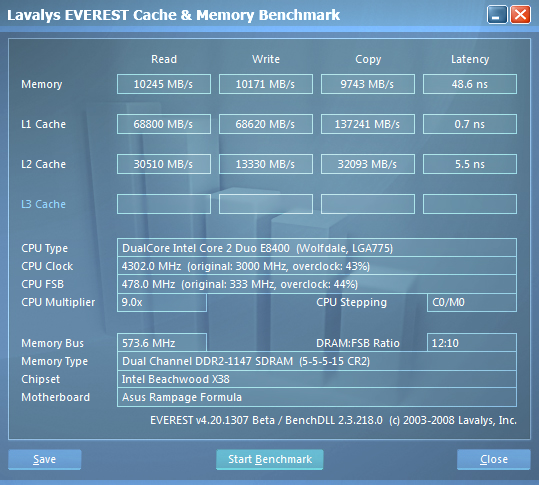
    Compared to PL7 disabled, PL8 enabled is faster

    PL7 disabled


    PL8 enabled


    Notice the huge jump in L2 Cache

    hard to argue

    3.4GHz Prime blend stable

    Extreme Tweaker
    Ai Overclock Tuner : Manual
    OC From CPU Level Up : AUTO
    CPU Ratio Control : Manual
    - Ratio CMOS Setting : 9
    FSB Frequency : 478
    FSB Strap to North Bridge : 333
    PCI-E Frequency: 110
    DRAM Frequency: DDR2-1147
    DRAM Command Rate : 2T
    DRAM Timing Control: Manual
    CAS# Latency : 5
    RAS# to CAS# Delay : 5
    RAS# Precharge : 5
    RAS# ActivateTime : 15
    RAS# to RAS# Delay : 3
    Row Refresh Cycle Time : 35
    Write Recovery Time : 6
    Read to Precharge Time : 3

    Read to Write Delay (S/D) : 8
    Write to Read Delay (S) : 3
    Write to Read Delay (D) : 5
    Read to Read Delay (S) : 4
    Read to Read Delay (D) : 6
    Write to Write Delay (S) : 4
    Write to Write Delay (D) : 6

    Write to PRE Delay : 14
    Read to PRE Delay : 5
    PRE to PRE Delay : 1
    ALL PRE to ACT Delay : 5
    ALL PRE to REF Delay : 5

    DRAM Static Read Control: Enabled
    Ai Clock Twister : Stronger
    Transaction Booster : Manual

    Common Performance Level [8]

    Pull-In of CHA PH1 Enabled
    Pull-In of CHA PH2 Enabled
    Pull-In of CHA PH3 Enabled
    Pull-In of CHA PH4 Enabled
    Pull-In of CHA PH5 Enabled
    Pull-In of CHB PH1 Enabled
    Pull-In of CHB PH2 Enabled
    Pull-In of CHB PH3 Enabled
    Pull-In of CHB PH4 Enabled
    Pull-In of CHB PH5 Enabled

    CPU Voltage : 1.40
    CPU PLL Voltage : AUTO
    North Bridge Voltage : 1.49
    DRAM Voltage : 2.10
    FSB Termination Voltage : 1.40
    South Bridge Voltage : 1.050
    Loadline Calibration : Enabled
    CPU GTL Reference : 0.63X
    North Bridge GTL Reference : 0.67X
    DDR2 Channel A REF Voltage : AUTO
    DDR2 Channel B REF Voltage : AUTO
    DDR2 Controller REF Voltage : DDR2-REFF
    SB 1.5V Voltage : 1.5

    Skew set to AUTO

  9. #3259
    Registered User
    Join Date
    Mar 2006
    Posts
    97
    Can someone give me a complete list of changes for the memories ? Considering that they are not maxed out at 1066MHz ( I wanted 1:1 ratio ) so they are running at 890MHz......
    Ideas ?
    ThermalTake SuperTower XASER III
    Asus Rampage Formula
    Core 2 Duo 8600@4500MHz ( 450x10 ) /Thermalright Ultra 120 Xtreme ( 38degrees Idle - 58degrees OCCT2 Load )
    4GB OCZ REAPER 1066MHz
    GeForce GTX260 ( 702/1458/2376 )
    X-Fi Extreme Music
    Thermaltake ToughPower 850W
    Windows Vista Ultimate x64
    Samsung 21' 215TW
    CL Inspire 5.1 Digital 5700

  10. #3260
    Xtreme Enthusiast
    Join Date
    Aug 2006
    Location
    Oxford, UK
    Posts
    747
    your L2 cache bandwidth is much higher than mine, yet mine has almost twice the latency. Is this because you have a wolfdale chip?

    Last edited by gurusan; 03-25-2008 at 03:35 AM.
    || 2500K @ 5GHz 1 thread, 4.8 2 threads, 4.7 3, 4.6 4 1.284V ||
    || P8P67-M Pro || 8GB @ 2133MHz ||
    || 5850 @ 1000/1225 || XFX 650W || Silverstone FT03B ||
    || 37" LCD TV || CM Hyper 212+ || Samsung 2.1 Soundbar ||

  11. #3261
    Banned
    Join Date
    Nov 2007
    Posts
    1,941
    yeah 8400 are not that great on L2 and you also have a 69% OC

  12. #3262
    Xtreme Enthusiast
    Join Date
    Aug 2006
    Location
    Oxford, UK
    Posts
    747
    I thought it was the bus speed and not the % oc that mattered in terms of cache speeds and latencies.

    Anyway that doesn't seem to slow them down as they are faster clock vs clock
    || 2500K @ 5GHz 1 thread, 4.8 2 threads, 4.7 3, 4.6 4 1.284V ||
    || P8P67-M Pro || 8GB @ 2133MHz ||
    || 5850 @ 1000/1225 || XFX 650W || Silverstone FT03B ||
    || 37" LCD TV || CM Hyper 212+ || Samsung 2.1 Soundbar ||

  13. #3263
    Xtreme Member
    Join Date
    Mar 2008
    Location
    Toronto, Ontario
    Posts
    307
    My account finally got validated. I've been following this thread for a while now.

    The Rampage 219 bios defintely allows for a high FSB OC on my Q6600 G0. Previous best was around 425FSB, now I can pull over 480.

    I'm still working on getting everything as high as possible but stable. Right now 480 x 8 with PL=6 seems to be the sweet spot. I can get the CPU to post at 4.2GHz, but it's not stable.


    Thanks to everyone involved in this awesome mod. Can't wait to see some new BIOS to play around with.

  14. #3264
    Registered User
    Join Date
    Mar 2008
    Location
    Albany
    Posts
    1
    Dear proffessionals,

    Question:

    I am currently running a Maximus 1.3 Rev MB. (1004)
    4 x 1 GB Corsair Dominators Pc2-8500 C5 (1066)
    Q6600 w/go

    Does anyone have BIOS settings for this type of config?
    Should I make it a Rampage board?

    Thanks!

  15. #3265
    Team KOC2.com
    Join Date
    Nov 2005
    Location
    Indonesia
    Posts
    986
    dont even bother flashed P5E3 Deluxe to Premium.. you'll ended up with dead mobo
    my P5E3 Dlx cant boot right now... all fans spinning but no boot

    E8600 Q820A750
    DFI LanParty UT P35-T2R - Abit IX38 QuadGT - Asus P5B Deluxe - Biostar TP45 HP
    Team Xtreem PC-5300 C3 2GB - Crucial 10th Anniversary 2GB - Team Xtreem PC8500 C5 2GB
    Winfast 8600GT
    Silverstone Olympia 1000w
    andre X_X -72c CO2 Cascade

    My R22/CO2 Cascade Project

  16. #3266
    Xtreme Enthusiast
    Join Date
    Aug 2006
    Location
    Oxford, UK
    Posts
    747
    sorry to hear that
    || 2500K @ 5GHz 1 thread, 4.8 2 threads, 4.7 3, 4.6 4 1.284V ||
    || P8P67-M Pro || 8GB @ 2133MHz ||
    || 5850 @ 1000/1225 || XFX 650W || Silverstone FT03B ||
    || 37" LCD TV || CM Hyper 212+ || Samsung 2.1 Soundbar ||

  17. #3267
    Registered User
    Join Date
    Jul 2007
    Posts
    32
    Having problems pushing my OCZ Reaper 4x2GB DDR2 rated @ 4-4-4-15 2.1v.

    -CPU Q6600 @ 3.6GHz 4hours Prime95
    -If I push my RAM past 800MHz 1 of the Prime95 threads will fails within minutes
    -I've tried DDR2-961 @ 5-5-5-15 no go
    -Also I noticed my CPU isn't stable unless I push 1.5v is there a workaround?

    Any ideas how to push my RAM higher?

    Extreme Tweaker
    Ai Overclock Tuner : Manual
    OC From CPU Level Up : AUTO
    CPU Ratio Control : Manual
    - Ratio CMOS Setting :9
    FSB Frequency : 400
    FSB Strap to North Bridge : AUTO
    PCI-E Frequency: 100
    DRAM Frequency: DDR2-800
    DRAM Command Rate : AUTO
    DRAM Timing Control: Manual
    CAS# Latency : 4
    RAS# to CAS# Delay : 4
    RAS# Precharge : 4
    RAS# ActivateTime : 15
    RAS# to RAS# Delay : Auto
    Row Refresh Cycle Time : Auto
    Write Recovery Time : Auto
    Read to Precharge Time : Auto

    Read to Write Delay (S/D) : Auto
    Write to Read Delay (S) : Auto
    Write to Read Delay (D) : Auto
    Read to Read Delay (S) : Auto
    Read to Read Delay (D) : Auto
    Write to Write Delay (S) : Auto
    Write to Write Delay (D) : Auto
    DRAM Static Read Control: AUTO
    Ai Clock Twister : STRONG
    Transaction Booster : Auto

    CPU Voltage : 1.500
    CPU PLL Voltage : 1.52
    North Bridge Voltage : 1.51
    DRAM Voltage : 2.10
    FSB Termination Voltage : 1.40
    South Bridge Voltage : Auto
    Loadline Calibration : Enabled
    CPU GTL Reference : Auto
    North Bridge GTL Reference : Auto
    DDR2 Channel A REF Voltage : DDR_REF
    DDR2 Channel B REF Voltage : DDR_REF
    DDR2 Controller REF Voltage : DDR_REF
    SB 1.5V Voltage : 1.5

    USB Configuration
    USB Functions: Enabled
    Legacy USB Support : Disabled
    Work in progress ...

    Core2 Q6600 @ 3.6GHz | Asus Maximus Formula
    4x 2GB OCZ Reaper | 1x 74GB WD Raptor | 2x 250GB Seagate
    EVGA ACS3 8800 GTX | 1000w Ultra X3 | Thermaltake Armor LCS | Swiftech Apogee GT

  18. #3268
    Xtreme Member
    Join Date
    Mar 2008
    Location
    Toronto, Ontario
    Posts
    307
    Quote Originally Posted by andre X_X View Post
    dont even bother flashed P5E3 Deluxe to Premium.. you'll ended up with dead mobo
    my P5E3 Dlx cant boot right now... all fans spinning but no boot
    Oh man . Dead motherboards are never fun

  19. #3269
    xtreme energy
    Join Date
    Oct 2004
    Location
    Europe, Latvia
    Posts
    4,145
    Quote Originally Posted by andre X_X View Post
    dont even bother flashed P5E3 Deluxe to Premium.. you'll ended up with dead mobo
    my P5E3 Dlx cant boot right now... all fans spinning but no boot
    Can you try asus bios recovery?
    ...

  20. #3270
    Xtreme Member
    Join Date
    Jan 2008
    Location
    United States
    Posts
    147
    HellasVagabond, good to see you here as well as Nvidia forums!

    I have problems when I try to run my 4x1GB at 1:1. This board is finicky with it. I need much more vNB and more vDIMM just to POST. Perhaps your problem is trying to stay at a conservative speed.

    Try the 6:5 in the 333 strap. That seems to work best for me with 4x1 (sigged).

    Oh, and my vNB is 1.49 and vDIMM is 2.18 (2.2 stock).
    Vista Ultimate x64 SP1 3DMark: 2006 18,426 Vantage P13,913
    E8400 4.23GHz (470x9, 1.40v, Tuniq 120, lapped + Silverstone 121)
    EVGA GTX280 (670/2430/1458) EVGA 9600GT (675/1800/1674)
    ASUS Rampage Formula X38 0407 (Hacked Maximus 1.03G)
    4x1GB Ballistix PC2-8500 (1128MHz, 5-4-4-12-2T, 2.20v)
    Tagan 1.1kW, 2xRaptor 150 (RAID-0), Fatal1ty Platinum
    System Gallery

  21. #3271
    Registered User
    Join Date
    Mar 2006
    Posts
    97
    Been here since a long time ago but i rarely ever post...I just watch
    I am getting help over at OCZ Forums as well as here....This mobo is somewhat weird...
    ThermalTake SuperTower XASER III
    Asus Rampage Formula
    Core 2 Duo 8600@4500MHz ( 450x10 ) /Thermalright Ultra 120 Xtreme ( 38degrees Idle - 58degrees OCCT2 Load )
    4GB OCZ REAPER 1066MHz
    GeForce GTX260 ( 702/1458/2376 )
    X-Fi Extreme Music
    Thermaltake ToughPower 850W
    Windows Vista Ultimate x64
    Samsung 21' 215TW
    CL Inspire 5.1 Digital 5700

  22. #3272
    Xtreme Enthusiast
    Join Date
    Nov 2004
    Location
    Sweden
    Posts
    674
    Can someone help maybe with my crucial ballistix pc8500 rams.
    Having hard time to get them stable over 1000mhz. I know these sticks does 600mhz + but when i´m setting it in bios i only get DET DRAM. Any clues what i should try out ??
    [SIGPIC]http://techsweden.org[/SIGPIC]
    Gigabyte Z87X-OC, Haswell 4770K, 8GB Team Group 2666mhz, Asus HD7970

  23. #3273
    I am Xtreme
    Join Date
    Jul 2005
    Posts
    4,811
    DRAM Voltage : 2.00 ??? why not 2.10V for that ram? From what I've seen that ram is rated at 2.15V (depending on circumstance)
    [SIGPIC][/SIGPIC]

  24. #3274
    Team KOC2.com
    Join Date
    Nov 2005
    Location
    Indonesia
    Posts
    986
    how do i use asus bios recovery (asus crash free) when nothing appears in screen? its the black screen of death... if you have other way please help

    E8600 Q820A750
    DFI LanParty UT P35-T2R - Abit IX38 QuadGT - Asus P5B Deluxe - Biostar TP45 HP
    Team Xtreem PC-5300 C3 2GB - Crucial 10th Anniversary 2GB - Team Xtreem PC8500 C5 2GB
    Winfast 8600GT
    Silverstone Olympia 1000w
    andre X_X -72c CO2 Cascade

    My R22/CO2 Cascade Project

  25. #3275
    Team KOC2.com
    Join Date
    Nov 2005
    Location
    Indonesia
    Posts
    986
    * Double Post *

    E8600 Q820A750
    DFI LanParty UT P35-T2R - Abit IX38 QuadGT - Asus P5B Deluxe - Biostar TP45 HP
    Team Xtreem PC-5300 C3 2GB - Crucial 10th Anniversary 2GB - Team Xtreem PC8500 C5 2GB
    Winfast 8600GT
    Silverstone Olympia 1000w
    andre X_X -72c CO2 Cascade

    My R22/CO2 Cascade Project

Page 131 of 349 FirstFirst ... 3181121128129130131132133134141181231 ... LastLast

Bookmarks

Bookmarks

Posting Permissions

  • You may not post new threads
  • You may not post replies
  • You may not post attachments
  • You may not edit your posts
  •