

Retail week 24





Retail week 24
Intel Rig
2500K @ 4.8 Ghz 1.304v | ASRock Z68 Extreme3 Gen3| 2x4Gb Ripjaws DDR3-2133 | Radeon 7970 @ 1250/1800 | Corsair HX850 PSU
Custom Water of course
you have a nice cpu there
OC-Lab.si!!
Can someone confirm if this OC works:
http://www.legionhardware.com/document.php?id=570&p=1The Core 2 Duo E6700 processor clock multiplier is set to x10 by default and the BIOS would not allow this value to be altered as it is locked on the processor. First start by increasing the FSB from 266MHz to 366MHz and then select the DDR2-1100MHz setting; assuming you have memory such as the Corsair PC8500 that can achieve such a high frequency. The memory timings used at DDR2-1100 were CAS5-5-5-15...
The PCI Express frequency was set to the default 100MHz setting and the PCI clock frequency was also set to the default 33.3MHz. Other than this, the only other options that required tweaking were all the voltage settings. The Corsair PC8500 memory requires 2.0v when operating at 1100MHz in order to maintain absolute stability. The processor ran best at 1.3500v, the FSB termination was set to 1.40v with the MCH at 1.55v and the ICH at 1.20v. Once these nine simple alterations were made to the BIOS it was smooth sailing at 3.66GHz. The next step was to compare the standard 2.66GHz configuration to the overclocked 3.66GHz setup!
Besides using higher memory, I am more concerned with the blue highlighted areas then the Ram. Because if you do not have PC8500 you can't clock that high of a dram frequency (at least I don't think you can). What I am most concern with is the use of the:
CPU Frequency 366
MCH only at 1.55V
ICH only at 1.20V instead of Auto
FSB Termination Voltage 1.40V
Vcore only at a whopping 1.3500V (which is the max for this CPU according to Intel Spec).
I would like your help as the Vcore is way lower then what everyone else is using. PCI express frequency at anything other then Auto results in instability for me.
Last edited by Eastcoasthandle; 09-05-2006 at 06:14 PM.
[SIGPIC][/SIGPIC]
Ok I've tried it and notice smoother frame rates but I had to keep MCH @ 1.60V instead of 1.55V and Vcore is at 1.3375V instead of 1.3500V @ 293 FSB
Here is tweaking Bios before
After tweaking bios per previous elog

Last edited by Eastcoasthandle; 09-05-2006 at 06:58 PM.
[SIGPIC][/SIGPIC]
Is there anyone else who was able to tweak their Bios with this type of OC?
[SIGPIC][/SIGPIC]
Could you post your bios configuration for 1333 with P5W DH? For example:
CPU Frequency 333
Dram Frequency
PCI Express Frequency 100
PCI Clock Sync 33.33
Memory Voltage depending on the ram you buy (check with the ram manufacture for OC details)
CPU Voltage
MCH Voltage
ICH Voltage
Performance Mode
FSB Term. Voltage
Dram ECC
Hyperpath 3 Disabled
Dram throttle Disable
Repost Video S3 Resume No
Execute Disable Function Disabled
CPU Intern.Therm.Control Disabled
Virtualization Tech. Disabled
SpeedStep Technology Disabled
[SIGPIC][/SIGPIC]
it seems this thread hasn't been active in a while--I'm a new OC'er and decided to get the 6700 for it's multiplier... I had some questions regarding safe temps.
Currently, I've got this:
e6700 stepping 6 rev.B2
Asus P5W DH deluxe bios 2004
Crucial Ballistix PC-8500
Thermalright Ultra 120
FSB speed: 3.50
Vcore: 1.4250 (in Bios)
vMCH: 1.55
the 2 PCI clock settings: 101/33.33mhz
vDimm: 2.2
FSB/Dram Multiplier: 2:3, running at 1050, 4-4-4-12 timings
I can't run orthos for over 5 min or so because I'm suspecting that vDroop kicks in and reduces the volts going to the core--I'm maxing out at around 55~62 on both cores in SpeedFan.
my question is, what's a safe sustainable temp at 3.5ghz? I know I can probably be OK if I crank the volts up more in the bios, but I am worried about overall temps getting out of control.
Also, I read up on the Temp Guide over at TomzHWForums, and it said that temps shouldn't exceed 55c on the CPU when running orthos/Fprime.
Any thoughts would be appreciated.
Notes: I use my CPU for rendering 3D graphics--while it may not constantly put the same stress on the CPU as orthos/Fprime, it does put some stress on the system and so I'm using orthos as a good benchmark for heat. I am able to run most apps stable in the above mentioned config, just I can't sustain that amount of CPU stress with a higher vCore setting with temps similar to those or a few degrees higher...
E6700 Retail @ 3.7Ghz 10x370
1.58 vcore
DDR3 +0.20v
Had to up the PCI Express volts to +0.20 or my P35T-DQ6 would reset bios... very odd.
Anyway system stable running all my games and Orthos overnight Idle temp 37c, after running orthos all night 65c
Scythe Ninja + 2200 rpm fan
5 120mm fans in case
Have had the system stable at 3.9Ghz 1.6v but the temperatures were too much... Some water cooling and I have no doubt 4Gz would be easy.
Last edited by AbjectBlitz; 07-25-2007 at 05:32 PM.

Fastest E6700
I did validation, but file is corrupt
"We are competing, competing to win. And the main motivation is to compete for victory" - Ayrton Senna
Cheating is not really encouraged here
Where courage, motivation and ignorance meet, a persistent idiot awakens.
I concure....Originally Posted by massman


I never cheating, only bug.
"We are competing, competing to win. And the main motivation is to compete for victory" - Ayrton Senna
 Posting Permissions


 Reply With Quote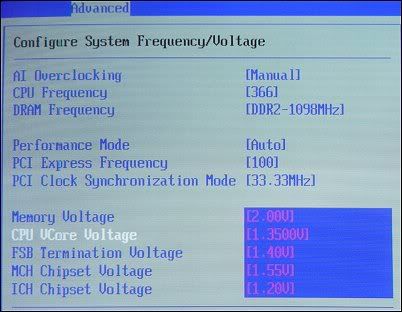


Bookmarks