MMM
Results 1 to 24 of 24

Thread: Strap setting and memory REAL fsb

  1. #1
    Xtreme Member
    Join Date
    Feb 2005
    Location
    Italy
    Posts
    247

    Strap setting and memory REAL fsb

    One member of my Staff (v_parrello) and me were thinkin about some benchmarking scores....

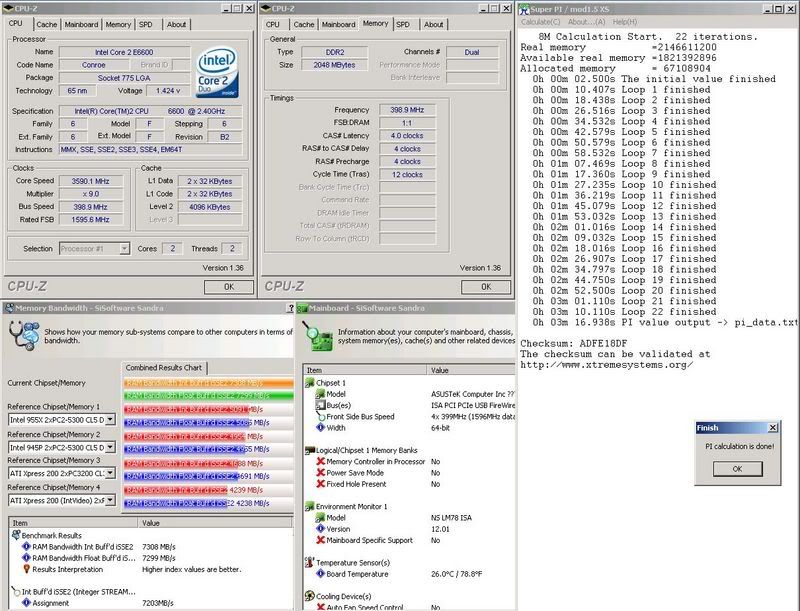
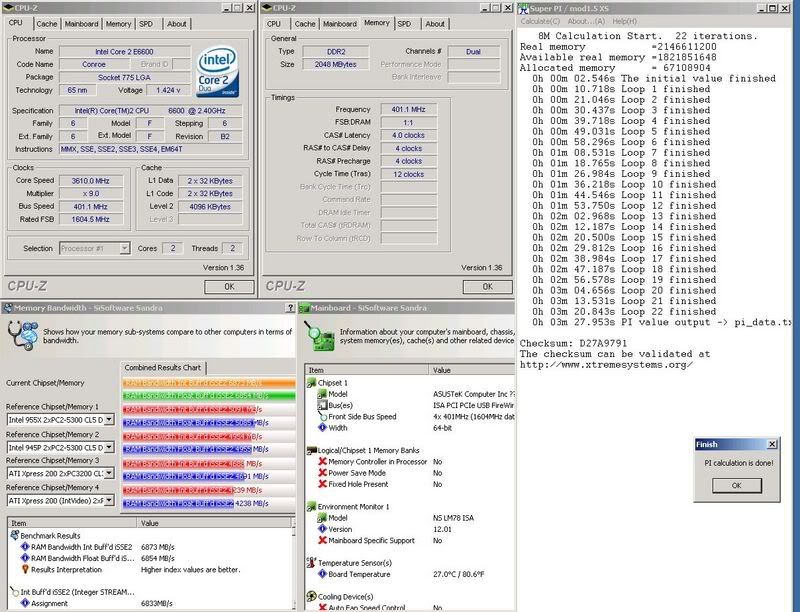
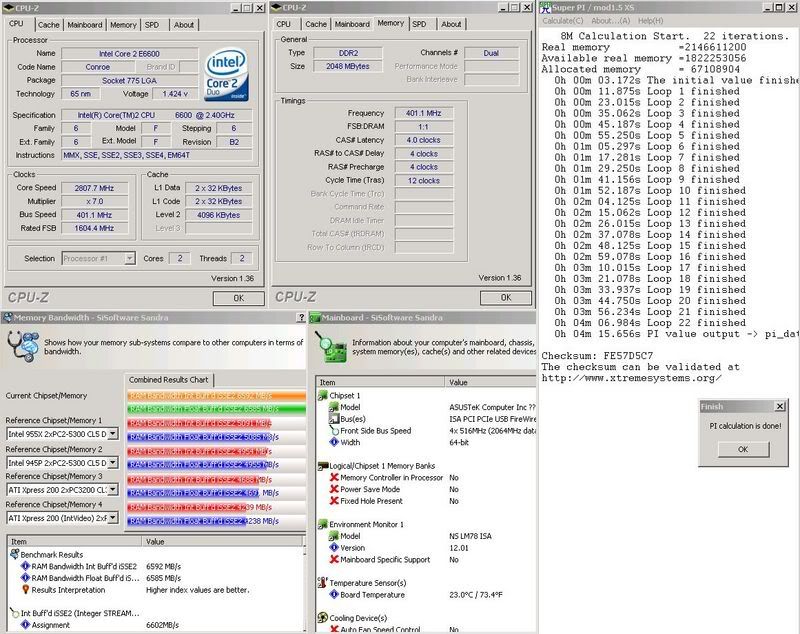
    We all know that with the intel 965 chipset if you boot at more then 401mhz you'll get worse scores at the same memory setting of booting at 399...till now everyone was thinkin that the causes of this problem were the NorthBridge timings... but... I'd like to show you some scores...and remember the intel badaxe 2 bug when you boot with the 1333 strap for the 4:5 dram multiplier:

    Configuration:

    Asus Commando
    E6600 @ 399/410 x 6
    Geil Pc 9280 2x1gb @ 4 4 4 4
    air cooling

    Sandra 2007:


    Everest benchmarking:


    now take your conclusions....

    Right now we are working on other mainboards... but it seems that the dram fsb showed by the bios and by cpuz are not true... but we got no idea on how much are them faked...

    Marco
    XtremeHardware.it
    Asrock Italian Official Support Forum, Enermax and Sapphire Support Forum

  2. #2
    Xtreme Member
    Join Date
    Oct 2006
    Location
    Rome, Italy
    Posts
    157
    We (me and marco) are trying to evaluate the validity of followings formula:

    freq_ram=FSB*(multi_ram)*(strap_base/current_strap)

    In the previous benchmark 965 chipset changes strap frequency at FSB 401 MHz , following the formula:
    - FSB 400 MHz and FSB:RAM 1:1 and 1066 strap => memory frequency DDR2-800 MHz
    - FSB 401 MHz and FSB:RAM 4:5 and 1333 strap frequency => memory frequency DDR2-800 MHz (instead cpu-z, everest and so on report memory frequency DDR2-1000 MHz because they are not considering the strap frequency).

    What do you tink about this?

    Bye

  3. #3
    Xtreme Legend
    Join Date
    Nov 2003
    Location
    Helsinki, Finland
    Posts
    1,692
    The reason why Bad Axe gives 5:4 divider on 1333FSB strap and DDR533 is because the DRAM dividers are different between 1066FSB & 1333FSB (if it is programmed properly).

    For 1066FSB 1:1 means DDR533, but for 1333FSB 1:1 is DDR667.

    As far as I know P965 is not altering the DRAM speed in any case.
    There is no 5:4 divider in P965 () so the chipset is being scaled up by latched MCH latencies not by latched DRAM frequency.

    Also I havenīt noticed any increase in DRAM overclock when the strap is changed to more latched one.

    By the way, these "straps" arenīt a standard features of P965.
    I think it was originally Asus who figured out what to adjust to make the chipset scale higher. It is all about the bios programming.

  4. #4
    Xtreme Member
    Join Date
    Feb 2005
    Location
    Italy
    Posts
    247
    Quote Originally Posted by The Stilt
    The reason why Bad Axe gives 5:4 divider on 1333FSB strap and DDR533 is because the DRAM dividers are different between 1066FSB & 1333FSB (if it is programmed properly).

    For 1066FSB 1:1 means DDR533, but for 1333FSB 1:1 is DDR667.

    As far as I know P965 is not altering the DRAM speed in any case.
    There is no 5:4 divider in P965 () so the chipset is being scaled up by latched MCH latencies not by latched DRAM frequency.

    Also I havenīt noticed any increase in DRAM overclock when the strap is changed to more latched one.

    By the way, these "straps" arenīt a standard features of P965.
    I think it was originally Asus who figured out what to adjust to make the chipset scale higher. It is all about the bios programming.
    Noone talked about the 5:4 divider, but the 4:5 instead...and if you could please watch the screenshot you will see that the scores of sandra @399x6 dram 1:1 is the same as @401 dram 4:5

    why is that?

    Marco
    XtremeHardware.it
    Asrock Italian Official Support Forum, Enermax and Sapphire Support Forum

  5. #5
    Xtremely Addicted
    Join Date
    Dec 2004
    Location
    NL
    Posts
    2,471
    Probably because of the extra 100mhz due to 4/5. If you would compare 6x399 and 6x401 both 1/1 the difference wil be bigger in favour of the 6x399 settings in sandra bw test.

  6. #6
    Xtreme Member
    Join Date
    Jul 2006
    Location
    Haverhill, MA
    Posts
    491
    Quote Originally Posted by v_parrello
    We (me and marco) are trying to evaluate the validity of followings formula:

    freq_ram=FSB*(multi_ram)*(strap_base/current_strap)

    In the previous benchmark 965 chipset changes strap frequency at FSB 401 MHz , following the formula:
    - FSB 400 MHz and FSB:RAM 1:1 and 1066 strap => memory frequency DDR2-800 MHz
    - FSB 401 MHz and FSB:RAM 4:5 and 1333 strap frequency => memory frequency DDR2-800 MHz (instead cpu-z, everest and so on report memory frequency DDR2-1000 MHz because they are not considering the strap frequency).

    What do you tink about this?

    Bye

    At FSB 401, using the 4:5 divider will give you DDR2-1000mhz regardless of the NB strap. The '1333mhz' strap isn't changing anything but the NB latencies I believe.
    E6400 L624A768 @ 3600mhz 1.48V
    Biostar TP35D2-A7
    2x1GB Micron D9JKH, 2x1GB OCZ Gold DDR2-1100
    1x250GB WD SATAII 2x120GB Maxtor IDE 1x200GB
    EVGA 8800GTS 512MB stock 799/1998/2075
    MCW350, Apogee, 120.1 Swiftech Rad
    Antec Smartpower 500W
    BenQ DVDrw
    Logitech z-5300e

  7. #7
    Xtreme Member
    Join Date
    Oct 2006
    Location
    Rome, Italy
    Posts
    157
    Quote Originally Posted by Hutch
    At FSB 401, using the 4:5 divider will give you DDR2-1000mhz regardless of the NB strap. The '1333mhz' strap isn't changing anything but the NB latencies I believe.
    I am shure that sometingh happens about NB performances, but what where is the technical explantion of this fact?
    Until now anybody gives explanation about these NB latencies, what do they mean (these latencies)?

    Quote Originally Posted by The Stilt
    The reason why Bad Axe gives 5:4 divider on 1333FSB strap and DDR533 is because the DRAM dividers are different between 1066FSB & 1333FSB (if it is programmed properly).

    For 1066FSB 1:1 means DDR533, but for 1333FSB 1:1 is DDR667.
    ....
    This means that with strap change there is also a change in ram divider, are you shure that is not the same behavior in 965? The formula reflects the badaxe behavior, we are looking to understand if in other chipset/motherboard the behavior is the same.

    Your support with some test screen will be appreciated.

    Bye
    Last edited by v_parrello; 02-13-2007 at 04:56 AM.

  8. #8
    Xtreme Member
    Join Date
    Oct 2006
    Location
    Rome, Italy
    Posts
    157
    Quote Originally Posted by loc.o
    Probably because of the extra 100mhz due to 4/5. If you would compare 6x399 and 6x401 both 1/1 the difference wil be bigger in favour of the 6x399 settings in sandra bw test.
    This is the real question. Why there is a bigger difference in favour of 6x399 settings versus 6x401 settings with ram multiplier 1/1?

    Until now, everybody say because at 401 MHz FSB there is a strap change from 1066 to 1333 and the NB latencies are higher. What is the tecnical explanation of this fact?

    With badaxe we have a technical explanation of what happens with strap change, are we sure that with 965 chipset is not the same technical explanation?

    We are looking to undestand if we can extend the badaxe technical explanation to 965 chipset, but to do this we need your support to make some test as I explained in my previous post.

    Any support/suggestion in order to better understand will be appreciate.

    Bye

  9. #9
    Xtremely Addicted
    Join Date
    Dec 2004
    Location
    NL
    Posts
    2,471
    What would be your technical explanation of what happens with strap change on BA2? BW results from high to low would most likely be.

    1) 6x399 1/1
    2) 6x401 4/5
    3) 6x401 1/1

    Did a few test some time ago. Maybe its a good idea to use default multi while testing, look at bw and spi 8M... times on lower multi then stock stayed same although sandra did report different bw results. Only with multi 9 spi was considerably faster with 399 compared to 401. Wil run them again soon.

    9x399


    9x401


    8x399


    8x401


    7x399


    7x401

  10. #10
    Xtreme Member
    Join Date
    Oct 2006
    Location
    Rome, Italy
    Posts
    157
    Quote Originally Posted by loc.o
    What would be your technical explanation of what happens with strap change on BA2? BW results from high to low would most likely be.

    1) 6x399 1/1
    2) 6x401 4/5
    3) 6x401 1/1

    Did a few test some time ago. Maybe its a good idea to use default multi while testing, look at bw and spi 8M... times on lower multi then stock stayed same although sandra did report different bw results. Only with multi 9 spi was considerably faster with 399 compared to 401. Wil run them again soon.
    ....
    I agree with you! The effect of strap change from 1066 to 1333 is what is reported in your test. But we can not figure out why.

    Please, I need a test with
    1) 9x399 1/1 in this case the frequency RAM will be DDR2-800 MHz
    2) 9x401 4/5 in this case the RAM would be DDR2-1000 MHz but if the behavior is the same of badaxe the frequency RAM wolud be DDR2-800 MHz

    If the behavior is the same of badaxe I will expect very similar results, because in the 2nd test the frequency memory could be DDR2-1000 MHz (as configured by bios), but in reality the frequency memory will be DDR2-800 MHz.

    I hope that I explain what I mean with my little english.

    Thank you for the attention.

    By

  11. #11
    Xtremely Addicted
    Join Date
    Dec 2004
    Location
    NL
    Posts
    2,471
    In second pic ram has to be at 500mhz otherwise the difference with 399 1/1 should be bigger in bw test. Try 6x401 1/1 it should be at least 300 less compared to 399 1/1
    Last edited by Viss; 02-13-2007 at 08:06 AM.

  12. #12
    Xtreme Cruncher
    Join Date
    Dec 2006
    Location
    Texas
    Posts
    784
    I'll post some screens when I get home, but I've tried creating this on my S3 and I haven't been able to. I think it is locked into the 1333 strap. I will run tests as you ask when I get home.

  13. #13
    Xtreme Member
    Join Date
    Oct 2006
    Location
    Rome, Italy
    Posts
    157
    Quote Originally Posted by loc.o
    In second pic ram has to be at 500mhz otherwise the difference with 399 1/1 should be bigger in bw test. Try 6x401 1/1 it should be at least 300 less compared to 399 1/1
    Sorry but I dont understand what you mean (it is my understanding problem). Could you explain better what you mean?

    If I look to your first two pics (9x399 and 9x401 tests) followings the formula we will have:
    pics 1: 9x399, FSB:RAM=1:1, strap 1066 => 399*(1:1)*(1066/1066)=399 so memory frequency DDR2-798 MHz
    pics 2: 9x401, FSB:RAM=1:1, strap 1333 => 401*(1:1)*(1066/1333)= 320,7 so memory frequency DDR2-640 MHz

    So if the behavior of 965 is the same of badaxe (described by the formula), the difference of memory bandwith is explained with the fact that in pic1 the memory is running DDR2-798, in pic2 the memory is running DDR2-640 MHz.

    We are triyng to understand if this is true and for this matter we asked to make some tests with other 965 motherboard (does not matter about cpu multiplier, in this moment we are not interested to make test with different cpu multiplier).

    Thank you for everything.

    Bye

  14. #14
    I am Xtreme
    Join Date
    Dec 2002
    Posts
    5,931
    for starters make sure you are clear on which chipset you are talking about, 965 and 975 are very different beasts, you can't simply compare then, what we call 1066 strap and 1333 strap on 965 is nothing like what it is on 975.

  15. #15
    Xtreme Cruncher
    Join Date
    Dec 2006
    Location
    Texas
    Posts
    784
    So you think the memory is saying it is at 1000mhz on 1333 strap but it is REALLY running at 800mhz?

    I'll test 399 1:1 and 401 4:5 and post the screens. Same memory timing, different ratio and fsb will be only variables. I will post Everest and Superpi and a cpuz screens to verify. I'll be back shortly.

  16. #16
    Xtreme Cruncher
    Join Date
    Dec 2006
    Location
    Texas
    Posts
    784
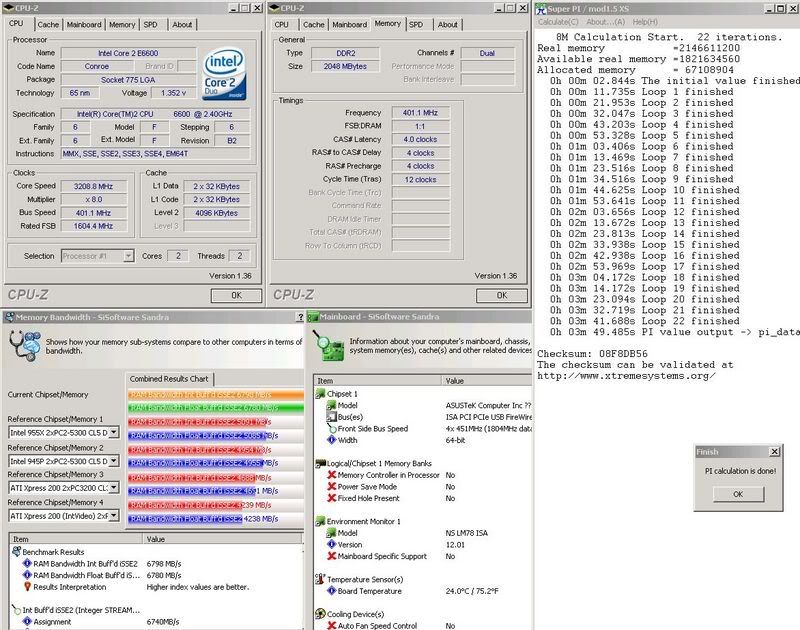
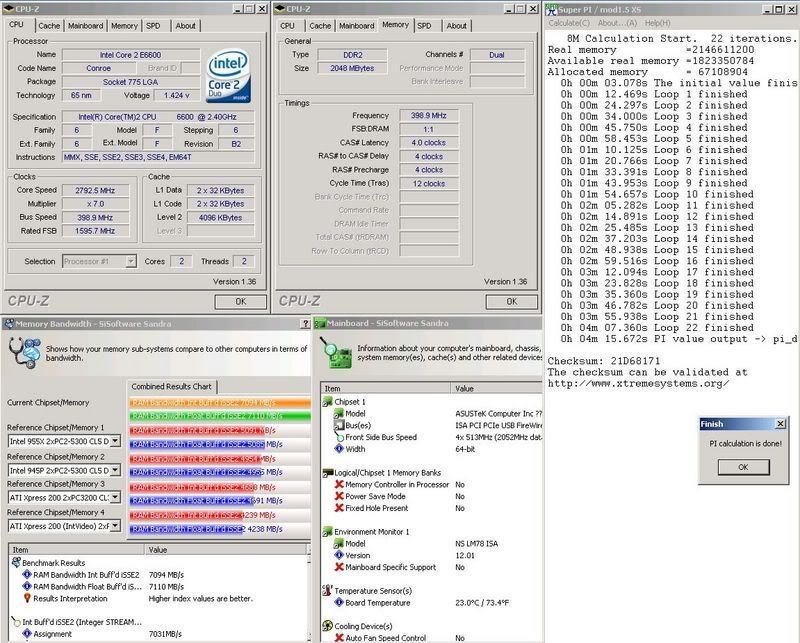
    Here they are. My board doesn't like even fsb's for some reason so here is 398fsb 1:1 ram 796mhz 4-4-4-5, and 402fsb 4:5 ram 1005mhz 4-4-4-5. Just for kicks I threw in a 516fsb 1:1 ram 1032mhz 4-4-4-5.


  17. #17
    Xtreme Member
    Join Date
    Jul 2006
    Location
    Haverhill, MA
    Posts
    491
    Quote Originally Posted by PanteraGSTK
    Here they are. My board doesn't like even fsb's for some reason so here is 398fsb 1:1 ram 796mhz 4-4-4-5, and 402fsb 4:5 ram 1005mhz 4-4-4-5. Just for kicks I threw in a 516fsb 1:1 ram 1032mhz 4-4-4-5.


    You mean your board doesn't like odd fsb's
    E6400 L624A768 @ 3600mhz 1.48V
    Biostar TP35D2-A7
    2x1GB Micron D9JKH, 2x1GB OCZ Gold DDR2-1100
    1x250GB WD SATAII 2x120GB Maxtor IDE 1x200GB
    EVGA 8800GTS 512MB stock 799/1998/2075
    MCW350, Apogee, 120.1 Swiftech Rad
    Antec Smartpower 500W
    BenQ DVDrw
    Logitech z-5300e

  18. #18
    Xtreme Member
    Join Date
    Oct 2006
    Location
    Rome, Italy
    Posts
    157
    Quote Originally Posted by PanteraGSTK
    Here they are. My board doesn't like even fsb's for some reason so here is 398fsb 1:1 ram 796mhz 4-4-4-5, and 402fsb 4:5 ram 1005mhz 4-4-4-5. Just for kicks I threw in a 516fsb 1:1 ram 1032mhz 4-4-4-5.

    .....
    PanteraGSTK, please coul you make the same tests with Sandra Memory Bandwith?

    Tanks a lot.

    Bye

    Edit: P.S.: PanteraGSTK, I was trying to understand why the memory latency decrease with FSB increment. Your motherboard seems that there are not strap change at 400 MHz FSB. It works differently from Asus 965 motherboard. With bandiwidth tests we will have a confirmation of this fact.
    Last edited by v_parrello; 02-14-2007 at 03:13 AM.

  19. #19
    Xtreme Cruncher
    Join Date
    Dec 2006
    Location
    Texas
    Posts
    784
    Quote Originally Posted by v_parrello
    PanteraGSTK, please coul you make the same tests with Sandra Memory Bandwith?

    Tanks a lot.

    Bye

    Edit: P.S.: PanteraGSTK, I was trying to understand why the memory latency decrease with FSB increment. Your motherboard seems that there are not strap change at 400 MHz FSB. It works differently from Asus 965 motherboard. With bandiwidth tests we will have a confirmation of this fact.
    Thats what I was thinking. I think people are correct in saying that the strap change is whatever the motherboard manufacturer wants it to be. Too bad BIOS updates won't let us CHOOSE what strap we want to use.

    I'll do some sandra shots when I get home.

  20. #20
    Xtreme Cruncher
    Join Date
    Dec 2006
    Location
    Texas
    Posts
    784
    Quote Originally Posted by Hutch
    You mean your board doesn't like odd fsb's
    Yes, I am a moron...I think one thing and my brain does the opposite. Makes life interesting...

  21. #21
    Xtreme Member
    Join Date
    Jul 2006
    Location
    Haverhill, MA
    Posts
    491
    Quote Originally Posted by PanteraGSTK
    Yes, I am a moron...I think one thing and my brain does the opposite. Makes life interesting...
    Haha I hear ya, happens to all of us!

    I'm pretty sure there is no strap change on the S3 (c1 chipset atleast.) I have tried and tried again with FSB's between 401-450 and haven't hit a strap...
    E6400 L624A768 @ 3600mhz 1.48V
    Biostar TP35D2-A7
    2x1GB Micron D9JKH, 2x1GB OCZ Gold DDR2-1100
    1x250GB WD SATAII 2x120GB Maxtor IDE 1x200GB
    EVGA 8800GTS 512MB stock 799/1998/2075
    MCW350, Apogee, 120.1 Swiftech Rad
    Antec Smartpower 500W
    BenQ DVDrw
    Logitech z-5300e

  22. #22
    Xtreme Cruncher
    Join Date
    Dec 2006
    Location
    Texas
    Posts
    784
    Quote Originally Posted by Hutch
    Haha I hear ya, happens to all of us!

    I'm pretty sure there is no strap change on the S3 (c1 chipset atleast.) I have tried and tried again with FSB's between 401-450 and haven't hit a strap...
    Yea thats the conclusion I've come to. When I first heard about the change at over 400fsb i tried to recreate other's results and got what you saw above. I'll post my sandra scores when I have time. I did them all last night, but my woman wanted to do something for valentines day so....

  23. #23
    Xtreme Cruncher
    Join Date
    Dec 2006
    Location
    Texas
    Posts
    784
    Here are my Sandra results.


    Did I mention how slow image shack is?

  24. #24
    Xtreme Member
    Join Date
    Oct 2006
    Location
    Rome, Italy
    Posts
    157
    Quote Originally Posted by PanteraGSTK
    Here are my Sandra results.

    .......
    Did I mention how slow image shack is?
    PanteraGSTK thanks a lot for your tests.
    According your results imho there is not strap change in your motherboard from 1066 to 1333 MHz at 400 MHz of FSB. It works differently from 965 Asus motherboard. For sure it is a question about different bios programming.

    At the end we understood what happened with badaxe motherboard and cpu-z memory frequency measurement.

    In chipset 975 and with badaxe we will have the followings possible ram multiplier (multi_ram):
    3:5, 4:5, 1:1, 6:5 that corresponds in badaxe bios to 400,533,667,800 selection with 1333 strap frequency
    3:4, 1:1, 5:4, 3:2 that corresponds in badaxe bios to 400,533,667,800 selection with 1066 strap frequency

    Ther RAm frequency is calulated according to following formula:
    ram_freq=2*fsb_base*multi_ram
    where
    ram_freq is the RAM working frequency
    fsb_base is the configured FSB frequency in bios
    multi_ram is one of the possible values depending from strap and ram frequency settings in bios (400,533,667,800)

    If are taking, as example, the values presents in the thread http://www.xtremesystems.org/forums/...9&postcount=82
    we will have:
    fsb_base=363
    strap=1333
    multi_ram=667 that is 1:1 ram multiplier (according to the previous table)
    and applying the formula
    2*363*(1/1)=726 we will have DDR2-726 MHz memory work frequency.
    Intel Desktop Control Center reports the right vaules cpuz reports FSB:RAM=4:5 and ram working frequency DDR2-908 MHz.

    What happens? Were are the troubles?
    Cpuz does not consider the strap, for cpuz there is only 1066 strap, and we know that ram multiplier (multi_ram) varies according to frequency strap, in particular:
    667 multi_ram means 1:1 with 1333 strap frequency
    667 multi_ram means 5:4 with 1066 strap frequency
    and considering that FSB:RAM=1/multi_ram, cpuz considers multi_ram=5:4 therefore FSB:RAM=4:5 and ram working frequency
    2*363*(5/4)=907,5 or DDR2-908 MHz, because for cpuz as I said before there is only 1066 strap.

    I opened a thread on cpuz official support forum, I explain what happened, and after this they fix that bug in cpuz ver. 1.39.
    I think there are other tools bugged with tha same problem of cpuz.

    Regarding our theory, when I have understood how is working badaxe motherboard, now I am enough sure that I was in trouble for the theory about strap settings and memory real fsb (the question for which it has been opened this thread).

    There are a lot of opened points because 975 Asus motherboards works differently from badaxe, they have not in bios the direct possibility of strap selection, but it makes a strap selection according to the multi_ram choosed. This is the main reason because only some multi_ram works well in 975.

    But the real mistery for me still remains the 965 chipset motherboard because thre are opened point that I can not figure out how could be technically explained (the question about 965 chipset latencies is not enough, and we saw, for example, that in GigaByte is different).

    Any suggestion/correction it will be appreciated.

    Bye
    Last edited by v_parrello; 02-16-2007 at 04:58 AM.

Bookmarks

Bookmarks

Posting Permissions

  • You may not post new threads
  • You may not post replies
  • You may not post attachments
  • You may not edit your posts
  •